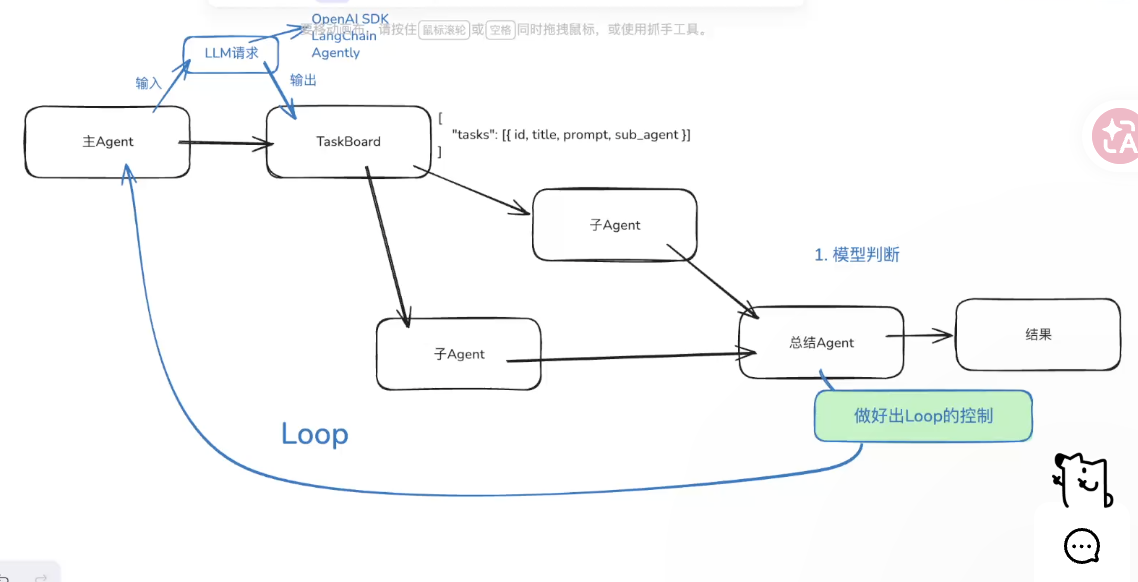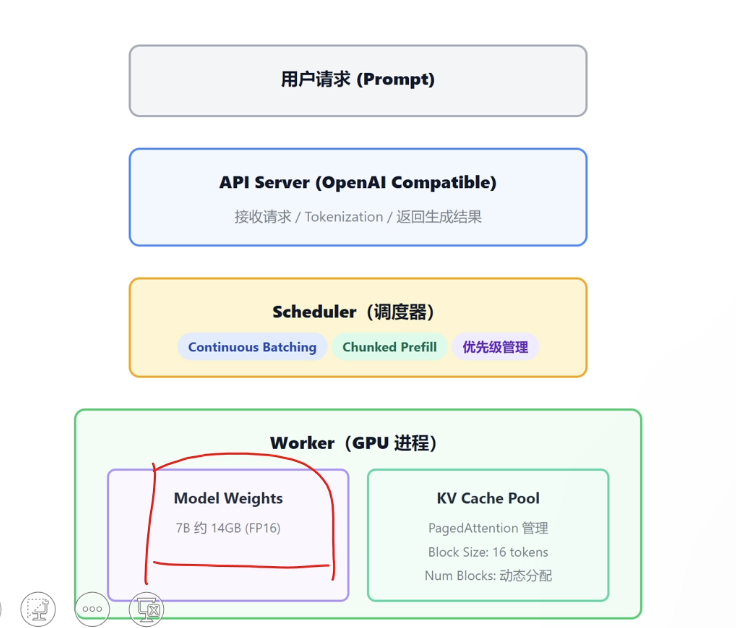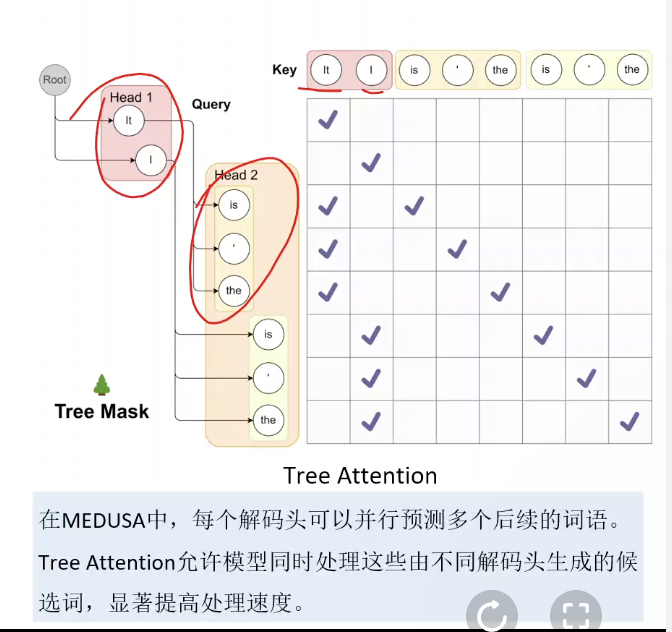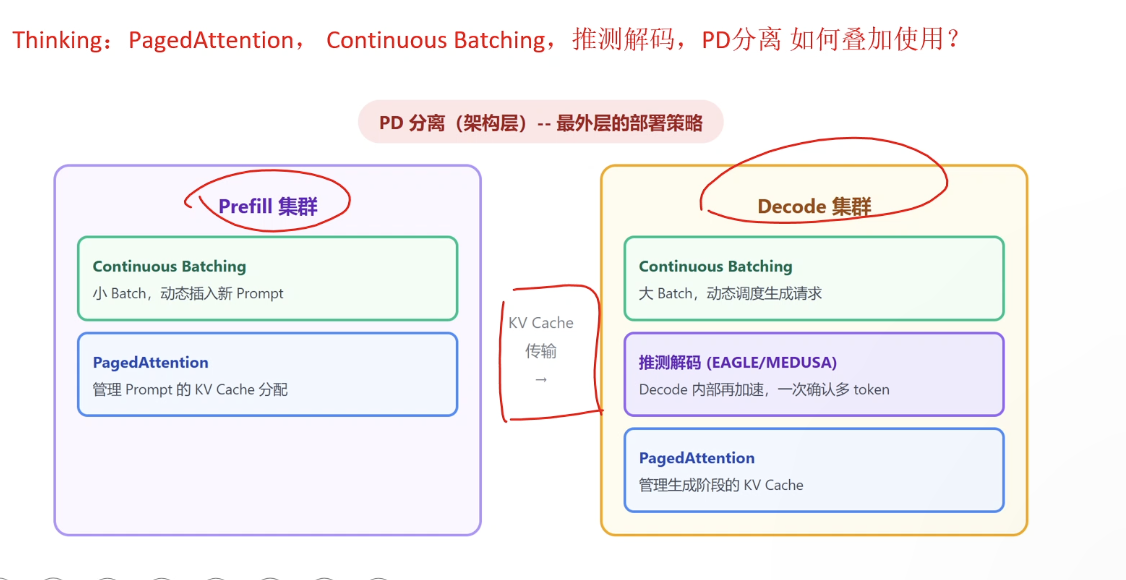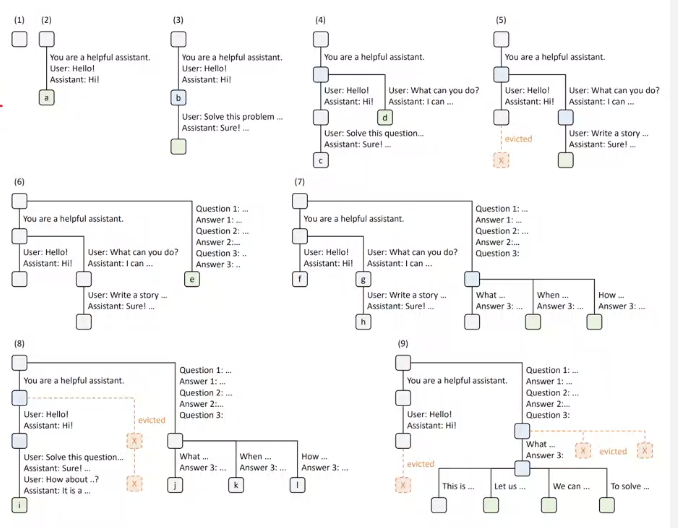
综述

  • agent
    • 提示词prompt
    • 工作流搭建
  • 模型部署和高并发(资源优化和分配)
  • 开发框架
    • langchain
    • pytorch
    • tensorflow
    • hugginface
  • 模型训练与微调
    • 高质量微调数据与评估
    • 微调原理
    • LLM蒸馏 (大模型到小模型)
    • 多模态
  • 知识库搜索
    • Embbedings和向量库
    • RAG技术
    • RAG多模态处理
    • RAG调优
  • AI Coding
    • 如何使用和经验
    • AI开发与AI重构
    • 分工与协作:前端、后段、产品经理
    • 部署Claude Code (信创要求高: 国央企、军队)
      几个模型大厂和六小厂
      云计算、GPU租赁:阿里云、火山引擎、AutoDL
      OPC(一个人公司,one person company)

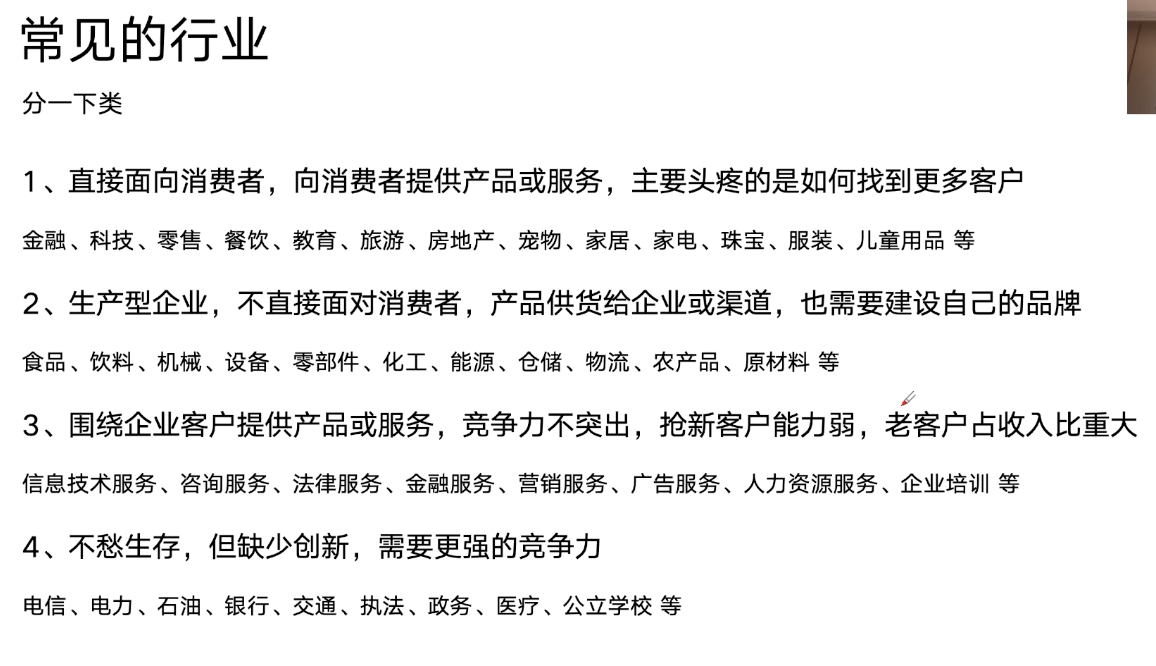
行业场景
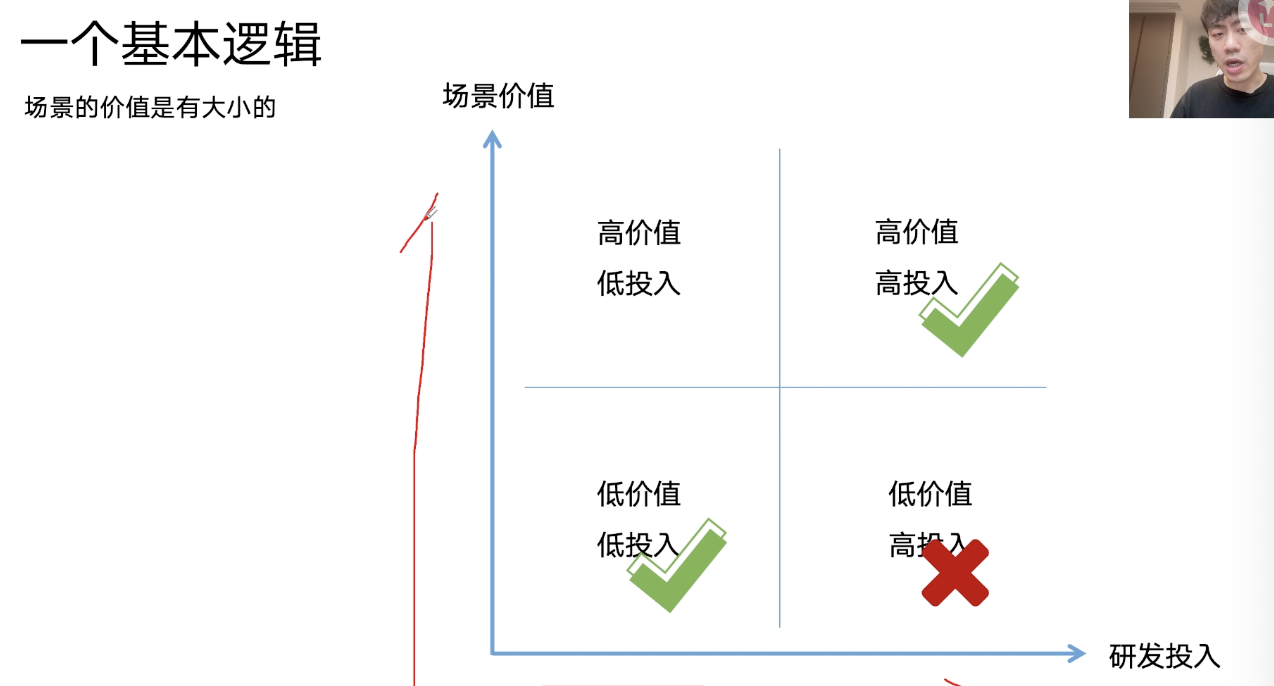


2C企业:
需要流量、成交口碑、副购、成本,
低价值低投入场景:文案、图片生成、数字人、网络信息搜索、对话数据解析、模版文件处理、软件操作、票据处理、简历面试
高价值高投入:图片定制生成、营销视频、视频行为分析、在线客服/销售、个性化服务、声音合成、产品效果展示、产品创意设计、合规审查、数据可视化、企业知识库
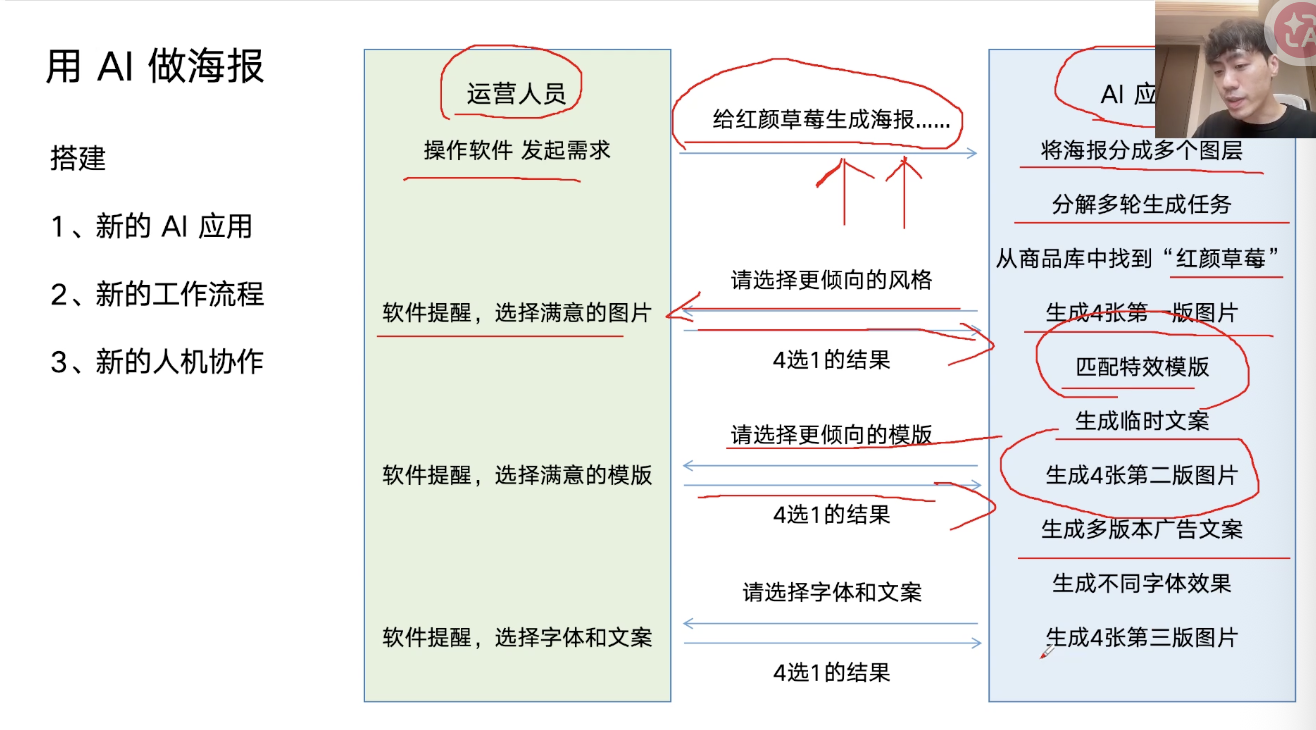
模型能力不行时需要工程应用处理
2B企业(生产性企业,利润低):
需求:稳定生产、提高效率、降低成本
低价值低投入:生产计划、采购计划、市场数据抓取、系统软件操作
高价值高投入:生产质量、生产设备监测、视频行为分析、原料消耗管理、调度物流配置、仓储管理、价格预测
服务企业:
需求:升级产品和服务、提升竞争力、降低服务成本、推出AI新产品和新服务
国央企:
需求:优化资源配置、提高办事效率、加快响应速度、安全防护

|673

提示词工程

系统提示词和用户提示词,prompt是与LLM打交道的唯一方式。应用层的技术是为了拼出一个合适的promt。

  • 身份设定
  • 背景设定
  • 参考资料
  • 样例
    • 没有样例:Zero-Shot
    • 一个样例:One-Shot
    • 多个样例:Few-Shot
    • 如何动态添加样例而不是手写样例
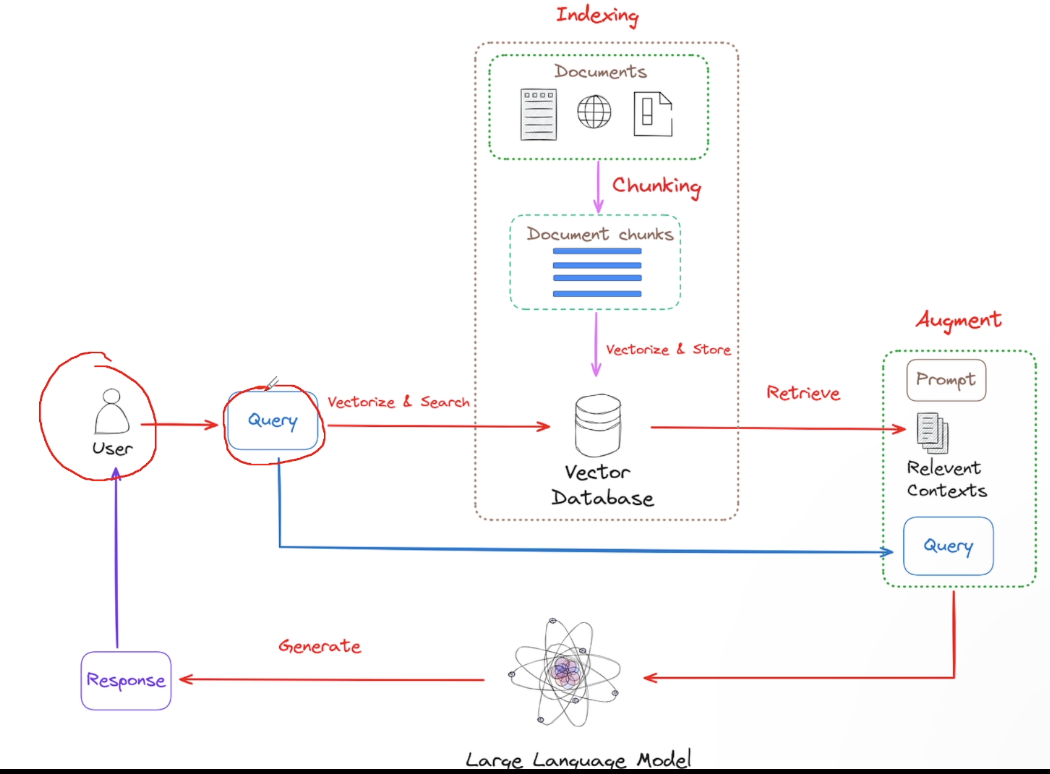
      • RAG:Retrieval-Augmented Generation(回答问题之前先做一轮内部知识搜索)
        • 将参考资料和样例放在prompt中,就叫做In-Context-Learning(下一轮对话需要注入上下文,否则会忘掉)
        • 模型接收提示词有字数限制,且内容多性能下降,需要知识库塞入这些内容。
        • 构建知识库:
          • 分析场景是宽场景还是窄场景
          • 搜集文件(pdf、word、md、html、表格、图片)并纯文字化-》
          • 分块/切片(100~2000文字)(ai、agent、人工)-〉
            • 技巧:每一个切片是一个对立的主题(一行一个主题)
            • 技巧:人为切分固定数量的文本
            • 技巧:问答对格式,一个问答对为一个chunk,优先使用rag而不是微调
          • 向量化embedding和存储
          • 优化检索结果
            • 没有检索到
            • 检索到了但是相似度不高
        • LLM调用知识库:
          • 用户query-》向量化embedding
          • 在向量库中搜索相似的向量
          • 拼接提示词(系统提示词+搜索到的知识向量+原始query向量)=》最终提示词
          • 最终提示词给LLM并给出反馈
  • 指令
  • 限制条件

RAG的高级技巧:双向奔赴

用户的query如何在向量库中找出来对应的信息,
融合策略:

  • Query改写(依靠LLM):
    • 汇总上下文信息,总结用户核心诉求作为query
      • query默认是用户问题
      • query的样式多种多样
      • 用户会多轮的形式提问
      • 多意图query
      • 反问型query
      • 条件型query,哪些需要检索知识库哪些检索数据库
      • 模糊指代型query
      • 对比型query
      • 上下文依赖型query
    • Agentic RAG:在检索RAG前agent判断是否进行改写query,针对上下文分析对RAG检索几次,如何拼接成提示词
  • 知识库处理技巧
    • 对场景的理解:清除用户会问什么,怎么问
    • 对技术的理解:问题的分类、不同问题对应的知识库、每个知识库的知识处理方式
      • 举例:
        • coze知识库 爬虫-》转纯文本txt,
          • 知识和问题内容不对等、长度不对等,需要使用excel表格填充问题和知识内容对,用LLM根据知识内容生成用户问题
          • 将问题变成数学向量放入向量库并加入meta信息(即对应的知识出处,创建时间、元文字的其他信息)
        • 微信对答知识库
          • 问答对(多个问题一个回答)
        • 长视频知识库
          • 视频变成文字处理方式:
            • 视频归类
              • 演讲类画面不重要音频为重
                • 找一个工具分离出音频
                • 找一个工具把声音转成文字(一般6万到8万字)
                • 切片(LLM辅助切片,观察数据梳理数据:例如最小颗粒度的知识点不会超过1000个文字),先取1000个字,让LLM分析讲了几个主题,将第一个主题的文字长度输出出来,再从第一个主题后的第一个文字开始取1000个文字,重复上述工作
                • 如果LLM切的不好,你要通过提示词告诉它你的主题是如何定义的
                • 三元组(问题、知识内容、图片),问题放入向量库并把知识和图片放入向量对应的meta元文字中
              • 视频画面传递信息
              • 两种类型交替出现(切割视频)

Agent

workflow agent 工作流智能体

设计agent时要给大语言模型多大的空间

  • LLM幻觉
  • LLM只会说,不会做
  • LLM规划的步骤不可靠
    如何应对极强的准确度、可控性=》模型提供智能,agent保证结果。
  • 意图识别,分流(function call)
  • 对其中每种意图做工作流(功 能模块)或者skill
    问:例如五道口有地铁站吗
    操作:
    1、检索知识库
    2、执行工作流(地点意图)
    得到两个结果,检索知识库的回答结果和工作流输出结果。将两个结果拼成最终的提示词给LLM让它给出反馈结果。
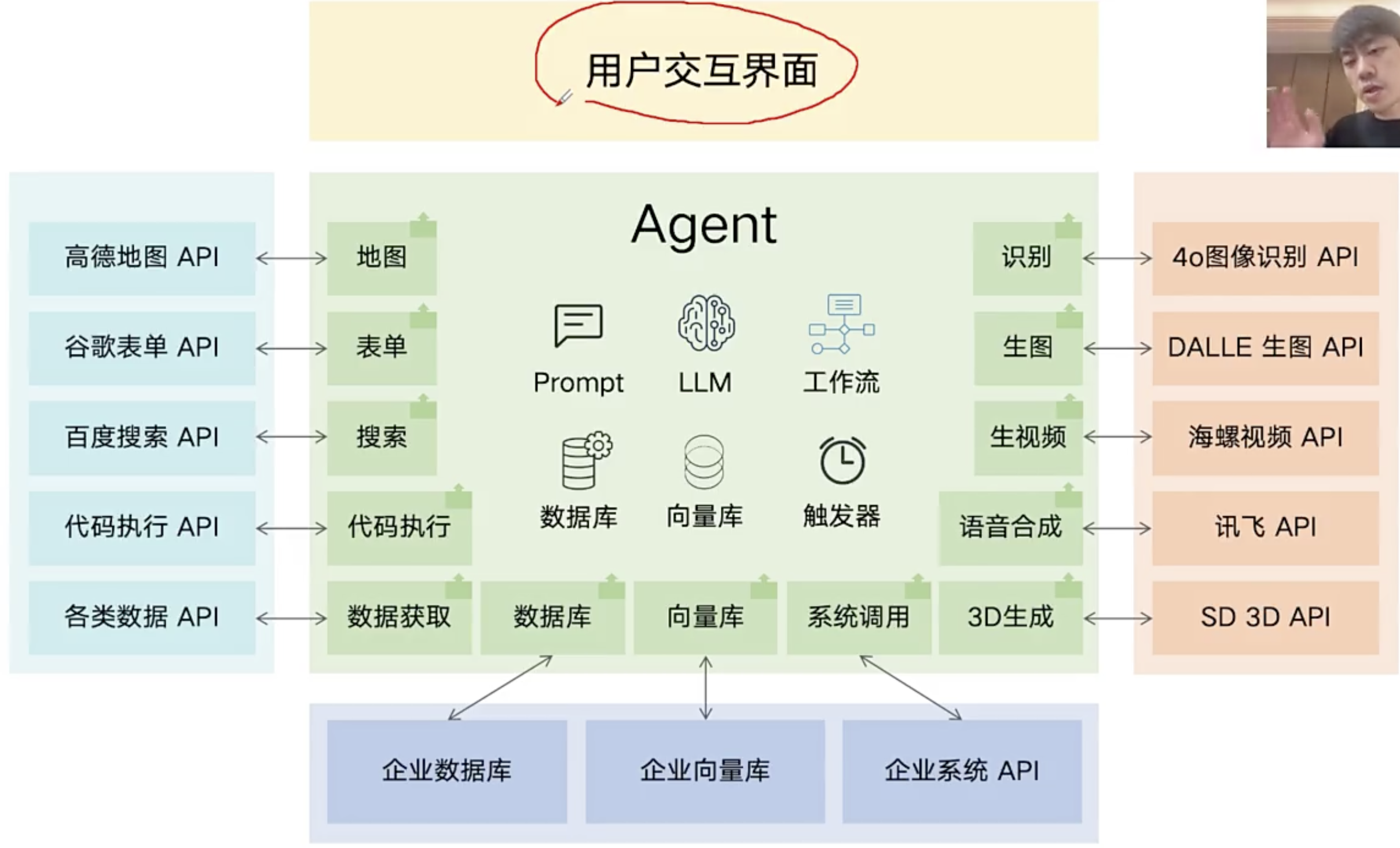
工作流和skill

工作流和skill是提前开发好的功能模块,大语言模型有function call能力(大语言模型能够看到用户的自然语言命令、要求和问题,并有能力自主判断是否要调用某个功能模块(工具)、调用哪些功能模块、调用工具时的参数是什么),但是你要把这些可被调用的工具写到系统提示此中,否则大语言模型不知道都有哪些工具可被它支配。

react agent 推理型智能体

通用agent例如open claw龙虾、permis爱马仕、manus、codex、claude使用推理智能体。
专用agent例如某个场景无自主性,工作流智能体。
有些任务无法提前设定步骤怎么办?
react:reasoning+acting:推理(要采用什么行动)、行动、整理并获得反馈,三者多轮循环,每轮循环都在更新拼接新的提示词。

推理阶段:

  • LLM推理使用哪个工具。返回文本
  • 我们要给出若干可用的行动工具skill到系统提示词中,让大语言从里面挑选。
  • 输出行动的名称。
    行动阶段:
  • 提前写好的行动代码(可以是人也可以是LLM写)
    反馈阶段:
  • agent拼接提示词

例如AutoGPT
模版提示词拼接内容:
三个板块

  • 引导LLM思考
  • 列出所有行动工具:ListFileNames、AskDocument
  • 输出的内容是当前最新的任务执行记录

模拟循环过程:

  • step0:
    • 原始提示词
    • LLM给出调用工具文本名{"action": ListFileNames}
    • agent执行ListFileNames,返回文本
1
2
3
各类电子产品销售数据.xlsx
各地供应商信息.xlsx
2023年供应商月销售额任务管理方案.pdf
  • step 1:
    • 新的拼接提示词=原始提示词+上轮返回的文本
1
2
3
各类电子产品销售数据.xlsx
各地供应商信息.xlsx
2023年供应商月销售额任务管理方案.pdf
  • LLM给出调用工具文本
1
2
3
4
5
6
7
8
9
{
"action":"AskDocument,
"params":{
"file_name":"2023年供应商月销售额任务管理方案.pdf",
"file_url":"/mnt/data/2023年供应商月销售额任务管理方案",
"file_type":"pdf",
"query":"查询供应商月度销售额的达标标准"
}
}
  • agent执行AskDocument
  • AskDocument执行结果的文本
1
2
3
4
2023年供应商月销售额任务管理方案.pdf
2023年供应商9月分的销售额达标标准是多少?
2023年供应商9月份的销售额达标标准是3万元。
根据文件2023年各季度销售额任务分配的第三季度(7月-9月)规定:9月销售额任务明确为3万元。

step 2:

  • 新提示词=原始提示词+上两轮提示词的结果,拼接在一起。
  • LLM给出的决策文本
1
2
3
4
5
6
7
{
"action":"InspectExcel",
"params":{
"file_name":"各类电子产品销售数据.xlsx",
"file_url":"/mnt/data/各类电子产品销售数据.xlsx"
}
}
  • agent执行InspectExcel
  • 返回文本结果
    react agent不怕大模型犯错,

思维链 Chain of Thought

用提示词引导到模型给出推理文字,然后再做任务
大模型无法反思只能一次输出内容,而agent有loop可以不断拼接提示词每次都让大模型输出内容可以达到反思的能。
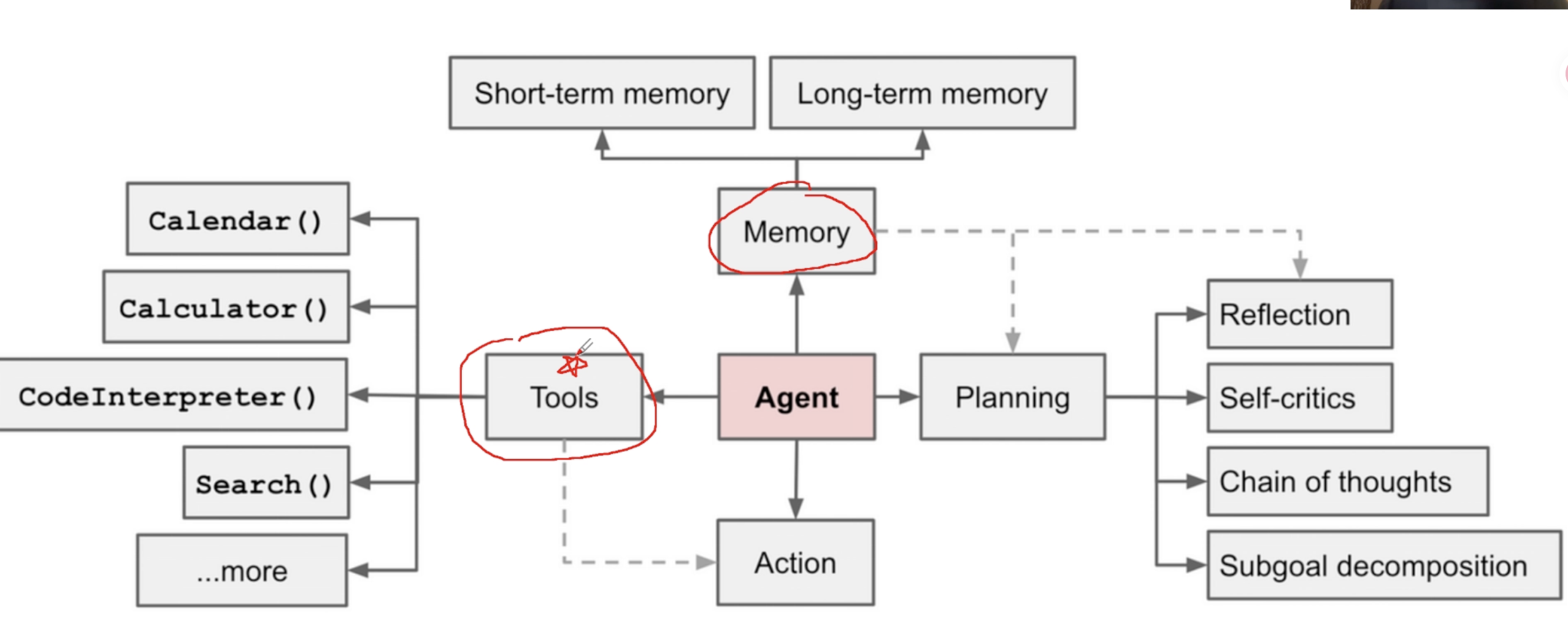
agent平台

多模态

视觉与语言的打通

一个模型同时看懂语言和视觉,模型可以输出文字、也可以输出图片和视频,好处视觉转译文字、融合推理(融合图片的推理和文字推理)、视觉编辑。

视觉识别与视觉推理

传统视觉识别模型:没有推理、精度高、需要提前定义类型

  • Yolo:目标识别,快
  • Unet:具体区域的分割,慢
    • 输入:1024*768图片
    • 输出:1024*768图片,每一个像素都被标注属于哪个对象
  • 优势:模型小、部署和使用成本低、识别精度高
  • 劣势:需要单独标注、训练模型
    多模态模型:有推理过程、精度低
  • Gemini、GPT
  • 优势:无需标注、无需训练、直接使用、有推理能力
  • 劣势:部署成本高、精度低

视觉生成:人工智能生成内容(Artificial Intelligence Generated Content,简称AIGC)

模型能力不足时的综合方案。
能力不足:只写提示词给模型,生成的视频无法满足需求。
例如:

  • 海报生成
  • 漫剧:对象的一致性问题
  • 电商视频
    • 中长尾商品素材匮乏
    • 爆款商品延展性差
    • 内容需求量大,制作成本高
    • 生产流程长,协同效率低
    • 素材管理智能程度低
    • 优质内容的筛选和复用难
    • 效果反馈不及时
    • 精细化内容营销难
      电商视频生成
  • 视频片段组合
    • 由哪些片段组合的
    • 这些片段哪来的
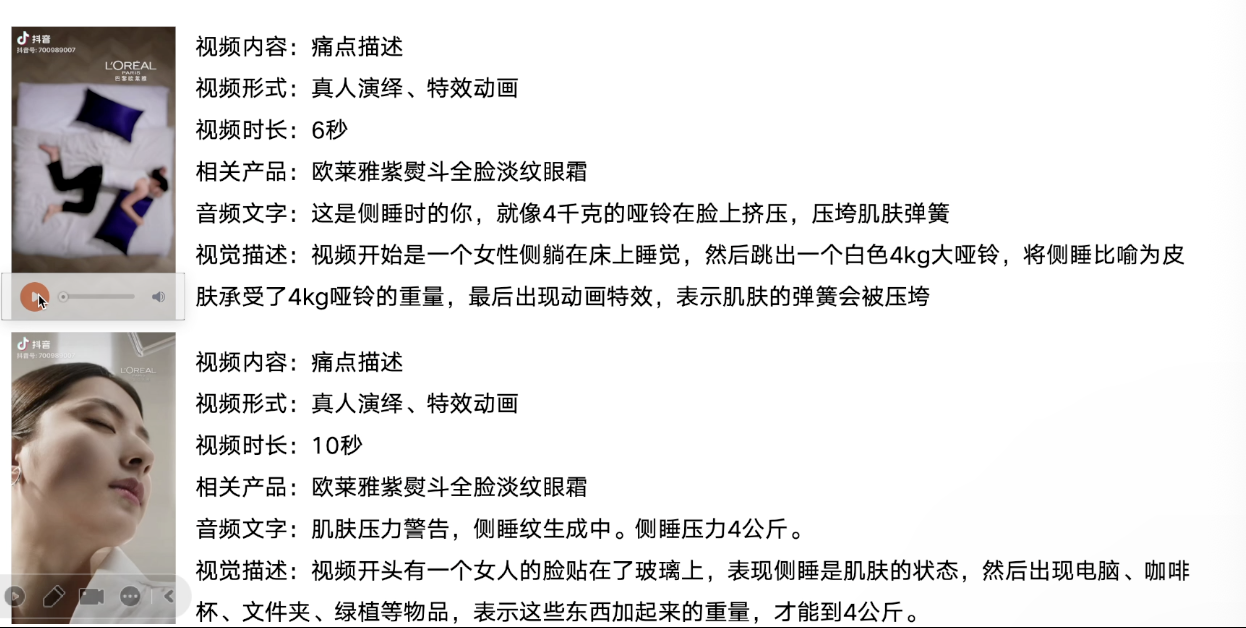
  • 如何得到视频片段:品牌视频切片、产品展示切片、模特展示切片、直播切片
    • AI+人工:json格式化切片
1
2
3
4
5
6
7
{
"start_time":"00:20",
"end_time": "01:10",
"visual_content": "场景切换,女士坐在灰色背景前,跳舞",
"on_screen_text": ["撑起肌肤小弹簧"],
"dialogue": "按压也会生成鱼尾纹"
}
  • 通过代码或工具,将视频中的音频分离

  • 从音频中提取文字

  • 通过多模态模型对画面进行文字描述

  • 人工补充修改文字描述

  • 整理成结构化信息

    • 切片后的视频还需要配置结构化文字描述
    • 打标签,你要自定义有哪些标签,不能让LLM瞎打标签。
  • 用普通LLM不用多模态模型(因为每个片段都有丰富的结构化文本描述)排列、拼接视频片段。

    • 渐进式批露:当提供的视频片段的结构文字数量很多时,让LLM规划视频内容,有多少条视频描述产品痛点、多少条产品描述、多少条促销,根据LLM挑选的各条视频+文字结构,然后排列,最后我们来实现视频的最终拼接。
  • 生成内容
    1、文生视频
    2、图生视频
    3、分析商家有什么(衣服)、没有什么(模特)
    4、将衣服穿到模特身上,例如flux、catVTON,但是衣服穿到模特身上总是会出问题,例如衣服变形,穿着不到位。
    catVTON局部重绘:将涂抹掉的区域重新绘制

    涂抹不到位问题:
    1、手动涂抹
    2、对一个模特的涂抹区域打标签,例如短裤区域涂抹、7分裤区域涂抹、全身裤区域涂抹,图片+结构化文本。
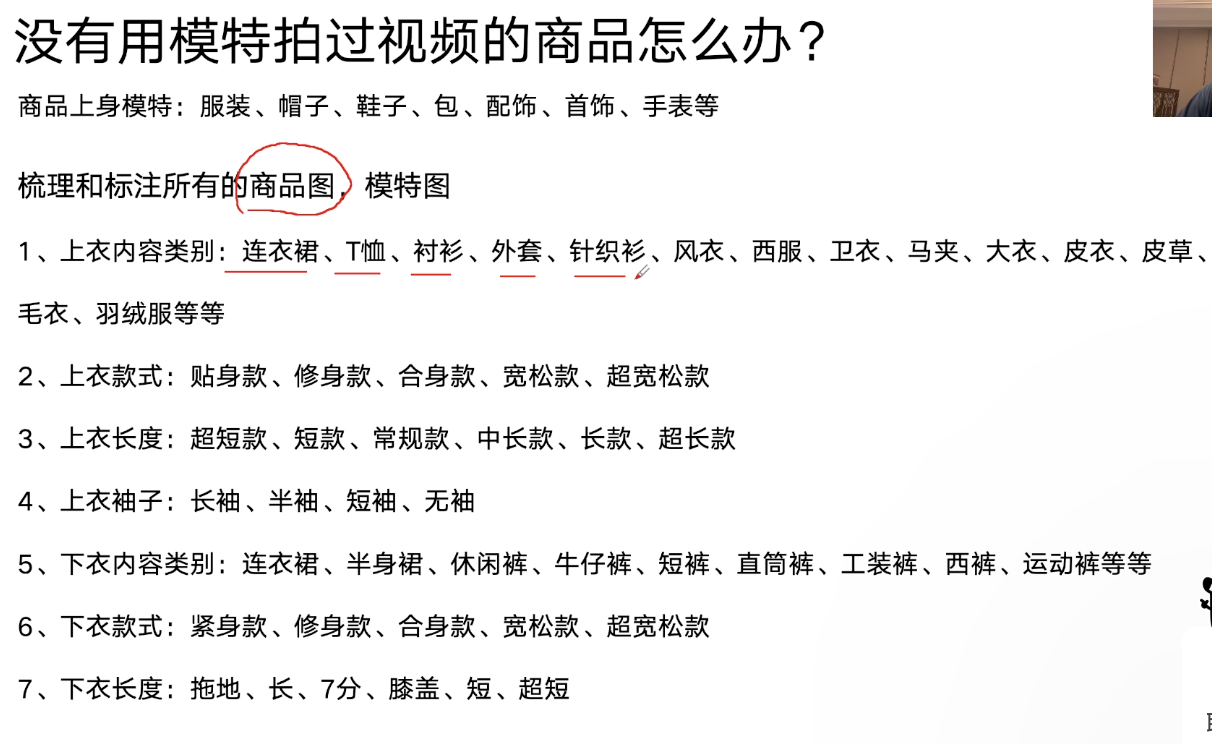
    3、为模特添加背景:人工+LLM梳理提示词模版

  • 套模版
    模型能力不足时的综合方案的评价
    1、水涨船高型
    2、擎天柱型

大模型原理和API使用

ChatGPT如何训练出来的

  • 搜集数据,监督学习模型
  • 训练奖励模型(reward model),对监督模型给出的文本结果使用Rank List (RLHF) 人工排序,奖励模型给监督模型对同一个问题生成的多个文本结果排序(打分),两者对比更新奖励模型
  • 训练强化模型(ppo),将强化模型生成的文本给奖励模型,让奖励模型给结果打分

不同语言模型的token如何定义

token是大语言模型处理文本的最小单元。token被转换成一个数字向量。不同模型使用不同的分词器(tokenizer)类定义token。
特殊token:分隔符、结束符、开始符。
控制大模型生成文本的多样性参数:

  • 温度temperature:在模型计算出下一个token所有可能的概率分布后,temperature调整分布的平滑度。高温度会让低概率的token更容易选中,更具创造性但是会不稳。
  • Top P核采样:它设定一个概率阈值(P),然后从高到低累加所有token的概率,直到总和超过P为止。模型只会在这个累加出来的核心词汇表中选择下一个token。Top P越大候选词汇表越大。

大语言模型中的超能力

  • 联网搜索
    LLM会根据用户提问涉及的咨询自动调用搜索工具Tool,并将问题转化为多个简洁的搜索关键词。接着程序调用搜索引擎API获取信息,将该信息作为上下文提供给模型。
  • 读取文件:将不同格式的信息翻译成结构化的文本
    • pdf
    • word/excel
    • 图片
    • 音频/视频
  • 记忆能力
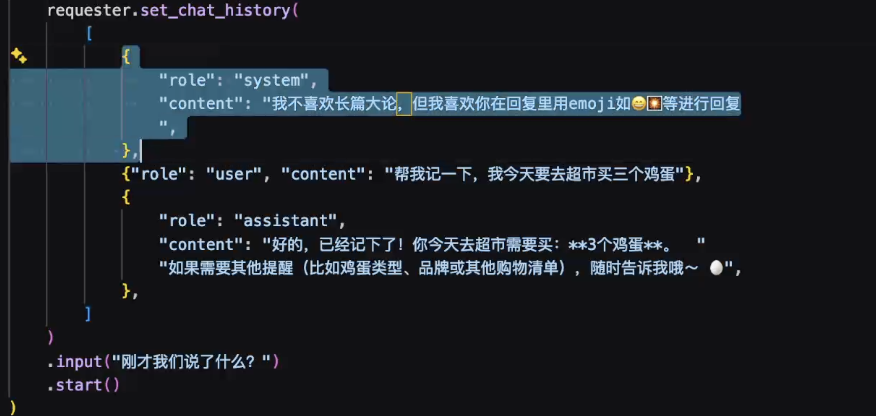
    • LLM本身无状态,每次对话都是全新互动,
      • 短期记忆:为了记忆系统会在每次对话时将最近几轮的问答作为上下文信息拼接到新提示词中发给模型。
      • 长期记忆:将信息存到数据库,使用时系统从数据库中读取信息并给模型。

API使用

API调用的是部署在云端的远程模型,而非自己电脑里的大模型。API Key是你的身份凭证,相当于门禁卡,需在代码中配置且不可泄漏;流式输出(streaming)让回答像打字机逐字呈现。

1
2
3
4
5
review = '这款音效特别好 给你意想不到的音质。'
messages=[
{"role": "system", "content": "你是一名舆情分析师,帮我判断产品口碑的正负向,回复请用一个词语:正向 或者 负向"},
{"role": "user", "content": review}
]

系统角色:角色扮演
用户角色:提问
dashscope阿里百炼工具箱封装了大模型接口。

Function Call

  1. 使用model=“qwen-max”
  2. 编写 get_current_weather
  3. 模型根据用户需求调用get_current_weather

大模型看图表

ocr是一比一还原文字,大模型不会一比一还原文字

运维事件处理

  1. 理解告警内容
  2. 分析排查function call
  3. 报告结果

框架

LangChain, LangGraph, DeepAgents,LlamaIndex, Hermes, OpenClaw, nanobot

AI编程

  • cursor rules:长期记忆
    • 全局规则:适用于所有项目
    • 项目规则:适用当前项目
    • 优先级:项目规则>全局规则
    • 全局rules会变成context engineering,软约束
      • 不重复造轮子,如果之前有实现过的类似的,你需要先理解实现逻辑,然后再进行修改和完善。
      • 生成的注释用中文,使用UTF-8编码
      • 你的操作系统是MacOS/Windows/Ubuntu
      • 如果用户没有明确说,就不需要编写测试脚本,也不需要写专门的项目说明md。
      • 代码中不要使用emoji。
      • 如果是代码迁移的时候(一个项目迁移到另一个项目中作为一个功能模块),先copy再改写,不要直接重复写一遍(容易有漏的或者错误的)
      • 写代码不考虑fallback,不考虑旧兼容,没有老用户处理思路是“消除fallback触发场景”而不是“加更多兜底”
      • 不一定要折中方案(折中方案就是还没有想好),方案清晰合理,不过度优化:
        • 方案评估:帮我梳理,给我建议及置信度(0-100)
        • 先执行置信度>=90的,针对>=75且<90的,方案分批调研,然后再做置信度>=90
    • 项目rules:
      • 在各项目遇到的Bug => 分析整理成共性经验,写到全局rules中
  • cursor为例的功能讲解
    • agent模式
      • 简单任务
      • 完整的自主智能体,同时编辑多个文件,独立执行多步骤任务:
    • plan模式
      • 复杂任务:调研产生md放到docs文件夹中
    • debug模式
      • 专治疑难杂症,粘贴错误信息,AI自动分析堆栈、定位原因、提供修复方案
    • ask模式
      • 纯咨询,不修改代码,用于解释代码逻辑、学习新技术、讨论架构方案
  • 一个文件夹用于一个项目
  • 模型
    • Auto
    • Opus4.8:Anthropic旗舰大模型,擅长复杂算法、架构设计和长上下文理解,适合高难度任务
    • Composer2.5:基于Kimi K2.5
    • Sonnet4.6:性价比之选,日常编码
    • GPT-5.5:在特定语言python/JS和架构上有优势,与Claude互补
    • GPT-5.5 Codex: 擅长严格的代码逻辑、检查
    • Claude code + deepseek-V4-pro
      • 配置claude
      • claude --dangerously-skip-permissions
    • coding plan => glm-5.1(国产最好)
    • 智谱、阿里云百炼、腾讯、字节、讯飞

flask: Python Web框架,给前端页面提供数据接口
echarts:百度的图表框架(图表库),有丰富的图表样式
prompt中添加Harness 马具,约束

harness约束
目标+关键点=》让agent写一个plan.md

Function Calling与MCP

agent = llm(大脑) + tools(工具)+RAG(私有话知识库)
tools = function call 或者 MCP或者skills

Function Calling:大模型与真实世界交互的桥梁,从语言理解到具体行动

  • 扩展模型能力
  • 结构化输出
  • 动态决策流程

例子:门票助手

目标:门票助手,对门票业务进行查询
功能:

  • 查询某天的门票销量,按周进行统计

  • 统计某月的入园人数

  • 查询某个时间范围内各销售渠道的订单金额排名
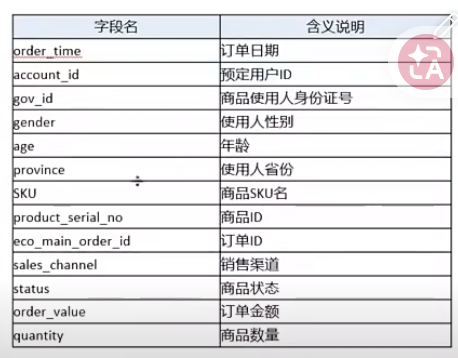
    数据表:

  • 表名tkt_orders

  • 字段名

    结果:ai有50%能写对,如何技术化语言、模块化方式提升写对概率

  • system prompt: 角色+建表sql语句+私有知识+few shot(示例,错题本)

  • Tools:基于Qwen Agent使用@register_tool('exc_sql'),其他模型的装饰器可能不同

    1
    2
    3
    4
    5
    6
    7
    8
    9
    10
    11
    12
    13
    14
    15
    16
    17
    18
    19
    20
    21
    22
    23
    24
    25
    26
    27
    28
    29
    30
    # ====== exc_sql 工具类实现 ======
    @register_tool('exc_sql')
    class ExcSQLTool(BaseTool):
    """
    SQL查询工具,执行传入的SQL语句并返回结果。
    """
    description = '对于生成的SQL,进行SQL查询' #调用条件
    parameters = [{
    'name': 'sql_input',
    'type': 'string',
    'description': '生成的SQL语句',
    'required': True
    }] #调用时需要的参数,这里只有一个参数,该参数有含义描述,类型以及是不是必须输入的参数

    def call(self, params: str, **kwargs) -> str:
    import json
    args = json.loads(params)
    sql_input = args['sql_input']
    database = args.get('database', 'ubr')
    # 创建数据库连接
    engine = create_engine(
    f'mysql+mysqlconnector://student123:student321@rm-uf6z891lon6dxuqblqo.mysql.rds.aliyuncs.com:3306/{database}?charset=utf8mb4',
    connect_args={'connect_timeout': 10}, pool_size=10, max_overflow=20
    )
    try:
    df = pd.read_sql(sql_input, engine)
    # 返回前10行,防止数据过多
    return df.head(10).to_markdown(index=False)
    except Exception as e:
    return f"SQL执行出错: {str(e)}"
  • 配置大模型

    1
    2
    3
    4
    5
    6
    7
    8
    9
    llm_cfg = {

    'model': 'qwen-turbo-latest',

    'timeout': 30,

    'retry_count': 3,

    }
  • 初始化agent实例

    1
    2
    3
    4
    5
    6
    7
    8
    9
    10
    11
    12
    13
    bot = Assistant(

    llm=llm_cfg,

    name='门票助手',

    description='门票查询与订单分析',

    system_message=system_prompt,

    function_list=['exc_sql'],  # 只传工具名字符串

    )
  • 创建app(gui或者tui)

    1
    2
    3
    4
    5
    6
    7
    8
    9
    10
    11
    12
    13
    14
    15
    16
    17
    18
    19
    20
    21
    22
    23
    24
    25
    26
    27
    28
    29
    30
    31
    32
    33
    34
    35
    36
    37
    38
    39
    40
    41
    42
    43
    44
    45
    46
    47
    48
    49
    50
    51
    52
    53
    54
    55
    56
    57
    58
    59
    60
    61
    62
    63
    64
    65
    66
    67
    68
    def app_tui():
    """终端交互模式

    提供命令行交互界面,支持:
    - 连续对话
    - 文件输入
    - 实时响应
    """
    try:
    # 初始化助手
    bot = init_agent_service()

    # 对话历史
    messages = []
    while True:
    try:
    # 获取用户输入
    query = input('user question: ')
    # 获取可选的文件输入
    file = input('file url (press enter if no file): ').strip()

    # 输入验证
    if not query:
    print('user question cannot be empty!')
    continue

    # 构建消息
    if not file:
    messages.append({'role': 'user', 'content': query})
    else:
    messages.append({'role': 'user', 'content': [{'text': query}, {'file': file}]})

    print("正在处理您的请求...")
    # 运行助手并处理响应
    response = []
    for response in bot.run(messages):
    print('bot response:', response)
    messages.extend(response)
    except Exception as e:
    print(f"处理请求时出错: {str(e)}")
    print("请重试或输入新的问题")
    except Exception as e:
    print(f"启动终端模式失败: {str(e)}")


    def app_gui():
    """图形界面模式,提供 Web 图形界面"""
    try:
    print("正在启动 Web 界面...")
    # 初始化助手
    bot = init_agent_service()
    # 配置聊天界面,列举3个典型门票查询问题
    chatbot_config = {
    'prompt.suggestions': [
    '2023年4、5、6月一日门票,二日门票的销量多少?帮我按照周进行统计',
    '2023年7月的不同省份的入园人数统计',
    '帮我查看2023年10月1-7日销售渠道订单金额排名',
    ]
    }
    print("Web 界面准备就绪,正在启动服务...")
    # 启动 Web 界面
    WebUI(
    bot,
    chatbot_config=chatbot_config
    ).run()
    except Exception as e:
    print(f"启动 Web 界面失败: {str(e)}")
    print("请检查网络连接和 API Key 配置")
  • 针对已有代码的改写方式:

    • 使用@脚本名指定要修改的代码
  • 门票助手可视化数据表

    • 编写新的工具(函数),传入markdown的图表,进行可视化
      • 无法处理大表,展示不全
    • 在原exc_sql工具的基础上修改,增加画图功能,返回结果增加数据表markdown可视化 (推荐、代码展示如下)
    • 使用LLM查询数据表并根据 LLM response的文字做图
      • 软约束、费token、不一定准
    1
    2
    3
    4
    5
    6
    7
    8
    9
    10
    11
    12
    13
    14
    15
    16
    17
    18
    19
    20
    21
    22
    23
    24
    25
    26
    27
    28
    29
    30
    31
    32
    33
    34
    35
    36
    37
    38
    39
    40
    41
    42
    43
    44
    45
    46
    47
    48
    49
    50
    51
    52
    53
    54
    55
    56
    57
    58
    59
    60
    61
    62
    63
    64
    65
    66
    67
    68
    69
    70
    71
    72
    73
    74
    75
    76
    77
    78
    79
    80
    81
    82
    83
    84
    85
    86
    87
    88
    89
    90
    91
    92
    93
    94
    95
    96
    97
    @register_tool('exc_sql')
    class ExcSQLTool(BaseTool):
    """
    SQL查询工具,执行传入的SQL语句并返回结果,并自动进行可视化。
    """
    description = '对于生成的SQL,进行SQL查询,并自动可视化'
    parameters = [{
    'name': 'sql_input',
    'type': 'string',
    'description': '生成的SQL语句',
    'required': True
    }]

    def call(self, params: str, **kwargs) -> str:
    import json
    import matplotlib.pyplot as plt
    import io, os, time
    import numpy as np
    from sqlalchemy import text # 导入text类型用于处理原生SQL
    args = json.loads(params)
    sql_input = args['sql_input']
    print('sql_input=', sql_input)
    database = args.get('database', 'ubr')

    engine = create_engine(
    f'mysql+pymysql://student123:student321@rm-uf6z891lon6dxuqblqo.mysql.rds.aliyuncs.com:3306/{database}?charset=utf8mb4',
    connect_args={'connect_timeout': 10}, pool_size=10, max_overflow=20
    )
    # 使用 SQLAlchemy 的 text() 包装 SQL 语句,避免格式化问题
    df = pd.read_sql(text(sql_input), engine)
    print('df=', df)
    md = df.head(10).to_markdown(index=False)
    # 自动创建目录
    save_dir = os.path.join(os.path.dirname(__file__), 'image_show')
    os.makedirs(save_dir, exist_ok=True)
    filename = f'bar_{int(time.time() * 1000)}.png'
    save_path = os.path.join(save_dir, filename)
    # 生成图表
    generate_chart_png(df, save_path) #使用
    img_path = os.path.join('image_show', filename)
    img_md = f'![柱状图]({img_path})'
    return f"{md}\n\n{img_md}"

    # ========== 通用可视化函数 ==========
    def generate_chart_png(df_sql, save_path):
    columns = df_sql.columns
    x = np.arange(len(df_sql))
    # 获取object类型
    object_columns = df_sql.select_dtypes(include='O').columns.tolist()
    if columns[0] in object_columns:
    object_columns.remove(columns[0])
    num_columns = df_sql.select_dtypes(exclude='O').columns.tolist()
    if len(object_columns) > 0:
    # 对数据进行透视,以便为每个日期和销售渠道创建堆积柱状图
    pivot_df = df_sql.pivot_table(index=columns[0], columns=object_columns,
    values=num_columns,
    fill_value=0)
    # 绘制堆积柱状图
    fig, ax = plt.subplots(figsize=(10, 6))
    # 为每个销售渠道和票类型创建柱状图
    bottoms = None
    for col in pivot_df.columns:
    # 避免格式化字符问题,对可能包含Y的字符串进行处理
    label_str = str(col)
    safe_label = label_str.replace('%', '%%').replace('{', '{{').replace('}', '}}')
    ax.bar(pivot_df.index, pivot_df[col], bottom=bottoms, label=safe_label)
    if bottoms is None:
    bottoms = pivot_df[col].copy()
    else:
    bottoms += pivot_df[col]
    else:
    print('进入到else...')
    bottom = np.zeros(len(df_sql))
    for column in columns[1:]:
    # 避免格式化字符问题
    label_str = str(column)
    safe_label = label_str.replace('%', '%%').replace('{', '{{').replace('}', '}}')
    plt.bar(x, df_sql[column], bottom=bottom, label=safe_label)
    bottom += df_sql[column]
    # 对x轴标签进行安全处理,避免格式化问题
    safe_xtick_labels = []
    for val in df_sql[columns[0]]:
    val_str = str(val)
    safe_val = val_str.replace('%', '%%').replace('{', '{{').replace('}', '}}')
    safe_xtick_labels.append(safe_val)
    plt.xticks(x, safe_xtick_labels)
    plt.legend()
    plt.title("销售统计")
    # 对x轴标签也进行安全处理
    xlabel_str = str(columns[0])
    safe_xlabel = xlabel_str.replace('%', '%%').replace('{', '{{').replace('}', '}}')
    plt.xlabel(safe_xlabel)
    plt.ylabel("门票数量")
    plt.xticks(rotation=45)
    plt.tight_layout()
    plt.savefig(save_path)
    plt.close()

MCP:model context protocol,开放协议标准,目的是标准化LLM与外部数据源、工具及服务之间的交互方式。
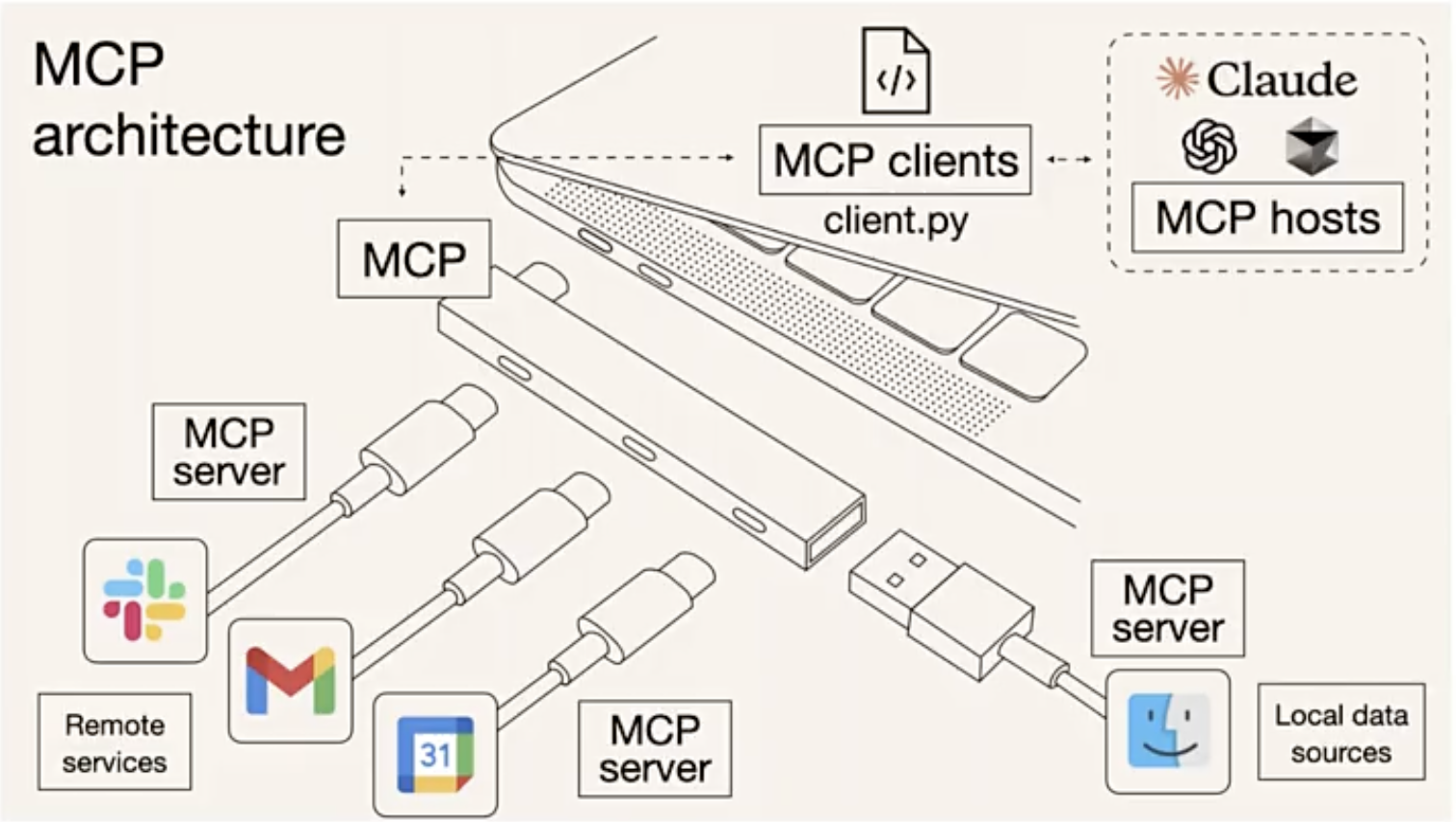
function call与MCP区别

维度 function call MCP
定位 模型厂商私有接口(OpenAI,Qwen) 开放协议类似HTTP/USB-C
扩展性 需为每个模型单独适配 一次开发,多模型兼容
复杂性 适合简单、单次调用任务 支持多轮对话(复杂上下文管理)
生态依赖 依赖特定模型(gpt-4) 跨模型、跨平台(claude、cursor)
安全性 依赖云端API密钥 支持本地化数据控制
性质 功能 协议
范围 特定场景(单一数据源与功能) 通用(多数据源、多功能)
目标 扩展模型能力 统一接口,实现互操作
  1. 架构与组件
    MCP采用客户端-服务器(Client-Server)架构,核心组件:
    • MCP Host:运行AI模型的环境,如Claude Desktop、Cursor IDE
    • MCP Client:嵌入在Host中的组件,负责发起请求并与MCP Server通信
    • MCP Server:轻量级服务,提供特定功能(查询、API调用),供AI模型调用
  2. 核心功能:
    • Resources(知识扩展):提供结构化数据(数据库、文档)以增强AI上下文理解
    • Tools(工具调用):允许AI执行外部操作(发送邮件、查询Git、调用智能合约)
    • Prompts(提示模版):预定义的指令模版,优化AI的任务执行

搭建MCP
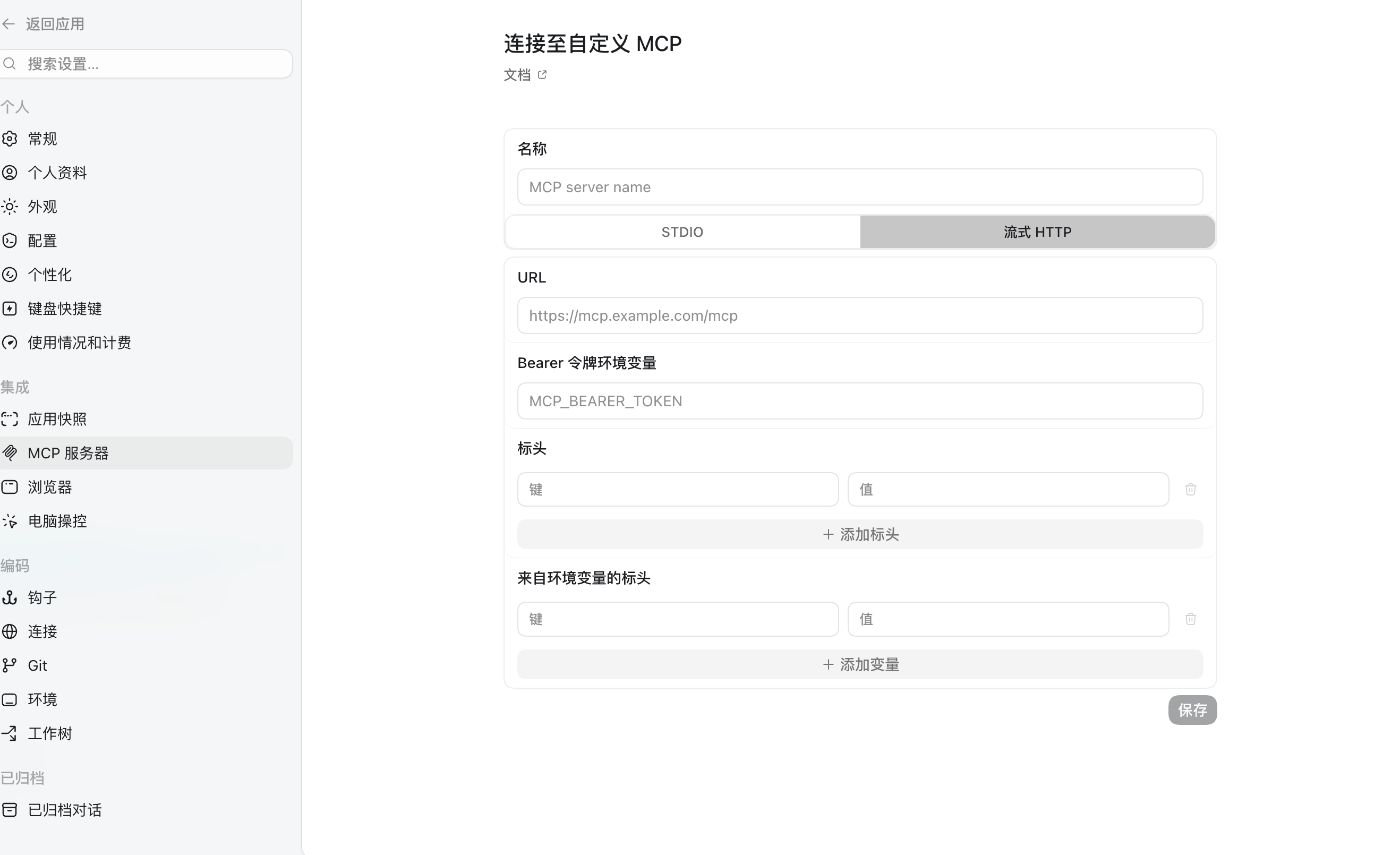

使用在线版的function call, 配置一个json文档,codex在toml文档中配置参考,参考魔塔社区。
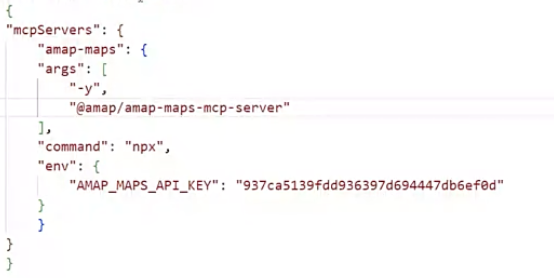
  • mcpServers(他在一对花括号中)是function call list中的工具名字
  • amap-maps是mcp名字

模式:

  • sse:http协议建立长链接,中转
  • stdio (standard I/O):直连,需要key

Skills是进阶版的function call,有一个SKILL.md

MCP SDK功能

python mcp sdk
pip install mcp

  • 创建MCP Server:提供标准化的API,供AI模型调用外部功能(如文件操作、数据库查询)
  • 注册工具(tools):通过@mcp.tool()装饰器,将python函数暴露给AI模型使用
  • 安全交互:支持权限控制,确保AI不会越权访问敏感数据
  • 跨平台兼容:支持与OpenAI、Anthropic Claude等LLM集成
  • 启动mcp inspector调试命令(有一个网页端来调试):mcp dev <python脚本>

FastMCP是python MCP SDK中的轻量级服务器框架:

  • 简单易用:仅需几行代码即可启动MCP Server
  • 支持多种传输方式:如stdio,http
  • 自动工具发现(让agent发现):通过@mcp.tool()注解自动注册函数(mcp服务),供AI使用

mcp服务文件txt_counter.py

1
2
3
4
5
6
7
8
9
10
11
12
13
14
15
16
17
18
19
20
21
22
23
24
25
26
27
28
29
30
31
32
33
34
35
36
37
38
39
40
41
42
43
44
45
46
47
48
49
50
51
52
53
54
55
56
57
58
59
60
61
62
63
64
65
66
67
68
69
70
71
72
73
74
import os
from pathlib import Path
from mcp.server.fastmcp import FastMCP

# 创建 MCP Server
mcp = FastMCP("桌面 TXT 文件统计器")

@mcp.tool()
def count_desktop_txt_files() -> int:
"""统计桌面上 .txt 文件的数量"""
# 获取桌面路径
desktop_path = Path(os.path.expanduser("~/Desktop"))

# 统计 .txt 文件
txt_files = list(desktop_path.glob("*.txt"))
return len(txt_files)

@mcp.tool()
def list_desktop_txt_files() -> str:
"""获取桌面上所有 .txt 文件的列表"""
# 获取桌面路径
desktop_path = Path(os.path.expanduser("~/Desktop"))

# 获取所有 .txt 文件
txt_files = list(desktop_path.glob("*.txt"))

# 返回文件名列表
if not txt_files:
return "桌面上没有找到 .txt 文件。"

# 格式化文件名列表
file_list = "\n".join([f"- {file.name}" for file in txt_files])
return f"在桌面上找到 {len(txt_files)} 个 .txt 文件:\n{file_list}"

@mcp.tool()
def read_txt_file(filename: str) -> str:
"""读取指定txt文件的内容

Args:
filename: txt文件的名称(例如:test.txt)

Returns:
文件内容,如果文件不存在则返回错误信息
"""
# 获取桌面路径
desktop_path = Path(os.path.expanduser("~/Desktop"))
file_path = desktop_path / filename

# 检查文件是否存在
if not file_path.exists():
return f"错误:文件 '{filename}' 不存在于桌面上。"

# 检查文件是否是txt文件
if file_path.suffix.lower() != '.txt':
return f"错误:文件 '{filename}' 不是txt文件。"

try:
# 读取文件内容
with open(file_path, 'r', encoding='utf-8') as f:
content = f.read()
return f"文件 '{filename}' 的内容:\n\n{content}"
except Exception as e:
return f"读取文件时发生错误:{str(e)}"

if __name__ == "__main__":
# 如果检测到被 mcp dev 调用,就导出官方 Server 对象
import sys
if "mcp" in sys.modules and hasattr(mcp, "_server"):
# fastmcp 内部已经包了一个官方 Server,直接暴露
mcp._server.run() #可选择通信方式http或者stdio
else:
# 平时手动 python txt_counter.py 就走 fastmcp 自己的启动
mcp.run()#可选择通信方式http或者stdio

客户端agent使用mcp服务文件assistant_mcp_txt_bot.py

1
2
3
4
5
6
7
8
9
10
11
12
13
14
15
16
17
18
19
20
21
22
23
24
25
26
27
28
29
30
31
32
33
34
35
36
37
38
39
40
41
42
43
44
45
46
47
48
49
50
51
52
53
54
55
56
57
58
59
60
61
62
63
64
65
66
67
68
69
70
71
72
73
74
75
76
77
78
79
80
81
82
83
84
85
86
87
88
89
90
91
92
93
94
95
96
97
98
99
100
101
102
103
104
105
106
107
108
109
110
111
112
113
114
115
116
117
118
119
120
121
122
123
124
125
126
127
128
129
130
131
132
133
134
135
136
137
138
139
140
141
142
143
144
145
146
147
148
149
150
151
152
153
154
155
156
157
158
159
160
161
162
163
164
165
166
167
168
169
170
171
172
173
174
175
176
177
178
179
180
181
182
183
"""基于 Assistant 实现的文本计数智能助手

这个模块提供了一个智能文本计数助手,可以:
1. 通过自然语言进行文本分析
2. 支持多种交互方式(GUI、TUI、测试模式)
3. 支持文本字符数、单词数、行数统计等功能
"""

import os
import asyncio
from typing import Optional
import dashscope
from qwen_agent.agents import Assistant
from qwen_agent.gui import WebUI

# 配置 DashScope
dashscope.api_key = os.getenv('DASHSCOPE_API_KEY', '') # 从环境变量获取 API Key
dashscope.timeout = 30 # 设置超时时间为 30 秒

def init_agent_service():
"""初始化文本计数助手服务

配置说明:
- 使用 qwen-max 作为底层语言模型
- 设置系统角色为文本分析助手
- 配置文本计数 MCP 工具

Returns:
Assistant: 配置好的文本计数助手实例
"""
# LLM 模型配置
llm_cfg = {
'model': 'qwen-max',
'timeout': 30, # 设置模型调用超时时间
'retry_count': 3, # 设置重试次数
}
# 系统角色设定
system = ('你扮演一个文本分析助手,你具有计算文本字符数、单词数、行数等能力。'
'你可以帮助用户分析文本的基本统计信息。'
'你应该充分利用文本计数服务的功能来提供专业的分析。')
# MCP 工具配置
tools = [{
"mcpServers": {
"txt-counter": {
"command": "python",
"args": ["txt_counter.py"],
"port": 6277 #在6277端口按照mcp服务启动时的通信协议进行通信
}
}
}]

try:
# 创建助手实例
bot = Assistant(
llm=llm_cfg,
name='文本计数助手',
description='文本统计与分析',
system_message=system,
function_list=tools,
)
print("助手初始化成功!")
return bot
except Exception as e:
print(f"助手初始化失败: {str(e)}")
raise

def test(query='帮我统计这段文本的字数:Hello World', file: Optional[str] = None):
"""测试模式

用于快速测试单个查询

Args:
query: 查询语句,默认为简单的文本统计
file: 可选的输入文件路径
"""
try:
# 初始化助手
bot = init_agent_service()

# 构建对话消息
messages = []

# 根据是否有文件输入构建不同的消息格式
if not file:
messages.append({'role': 'user', 'content': query})
else:
messages.append({'role': 'user', 'content': [{'text': query}, {'file': file}]})

print("正在处理您的请求...")
# 运行助手并打印响应
for response in bot.run(messages):
print('bot response:', response)
except Exception as e:
print(f"处理请求时出错: {str(e)}")

def app_tui():
"""终端交互模式

提供命令行交互界面,支持:
- 连续对话
- 文件输入
- 实时响应
"""
try:
# 初始化助手
bot = init_agent_service()

# 对话历史
messages = []
while True:
try:
# 获取用户输入
query = input('user question: ')
# 获取可选的文件输入
file = input('file url (press enter if no file): ').strip()

# 输入验证
if not query:
print('user question cannot be empty!')
continue

# 构建消息
if not file:
messages.append({'role': 'user', 'content': query})
else:
messages.append({'role': 'user', 'content': [{'text': query}, {'file': file}]})

print("正在处理您的请求...")
# 运行助手并处理响应
response = []
for response in bot.run(messages):
print('bot response:', response)
messages.extend(response)
except Exception as e:
print(f"处理请求时出错: {str(e)}")
print("请重试或输入新的问题")
except Exception as e:
print(f"启动终端模式失败: {str(e)}")

def app_gui():
"""图形界面模式

提供 Web 图形界面,特点:
- 友好的用户界面
- 预设查询建议
- 智能文本分析
"""
try:
print("正在启动 Web 界面...")
# 初始化助手
bot = init_agent_service()
# 配置聊天界面
chatbot_config = {
'prompt.suggestions': [
'帮我统计这段文本的字数:Hello World',
'计算下面这段文本的行数:\n第一行\n第二行\n第三行',
'这段文本有多少个单词:The quick brown fox jumps over the lazy dog',
'分析这段多语言文本:你好,世界!Hello World!',
'统计下面文本的标点符号数量:Hello, World! How are you?',
'帮我计算这段代码的行数:\ndef hello():\n print("Hello")\n return True',
'这段文本中有多少个中文字符:你好,这是一段中文文本',
'统计这段文本的空格数量:Hello World !',
'计算这段文本的总字符数(包括空格和标点)',
'分析这段文本的基本信息(字数、行数、单词数)'
]
}

print("Web 界面准备就绪,正在启动服务...")
# 启动 Web 界面
WebUI(
bot,
chatbot_config=chatbot_config
).run()
except Exception as e:
print(f"启动 Web 界面失败: {str(e)}")
print("请检查网络连接和 API Key 配置")

if __name__ == '__main__':
# 运行模式选择
# test() # 测试模式
# app_tui() # 终端交互模式
app_gui() # 图形界面模式(默认)

mcp的应用场景

  1. 发邮件
  2. 桌面管理
  3. 私有知识管理
  4. 系统的对接
    数据源的质量很重要
    做一个决策 vs 做一个好的决策

之前的[LLM中使用function call](<./LLM.md>/#大模型原理和API使用)和在agent中使用function call的差异

  • agent:给agent注册FC,agent内置了拦截和调用
  • LLM:给LLM注册FC,然后自己拦截,自己调用FC

Agent工具开发

AI Agent
Agent = LLM + tool + RAG
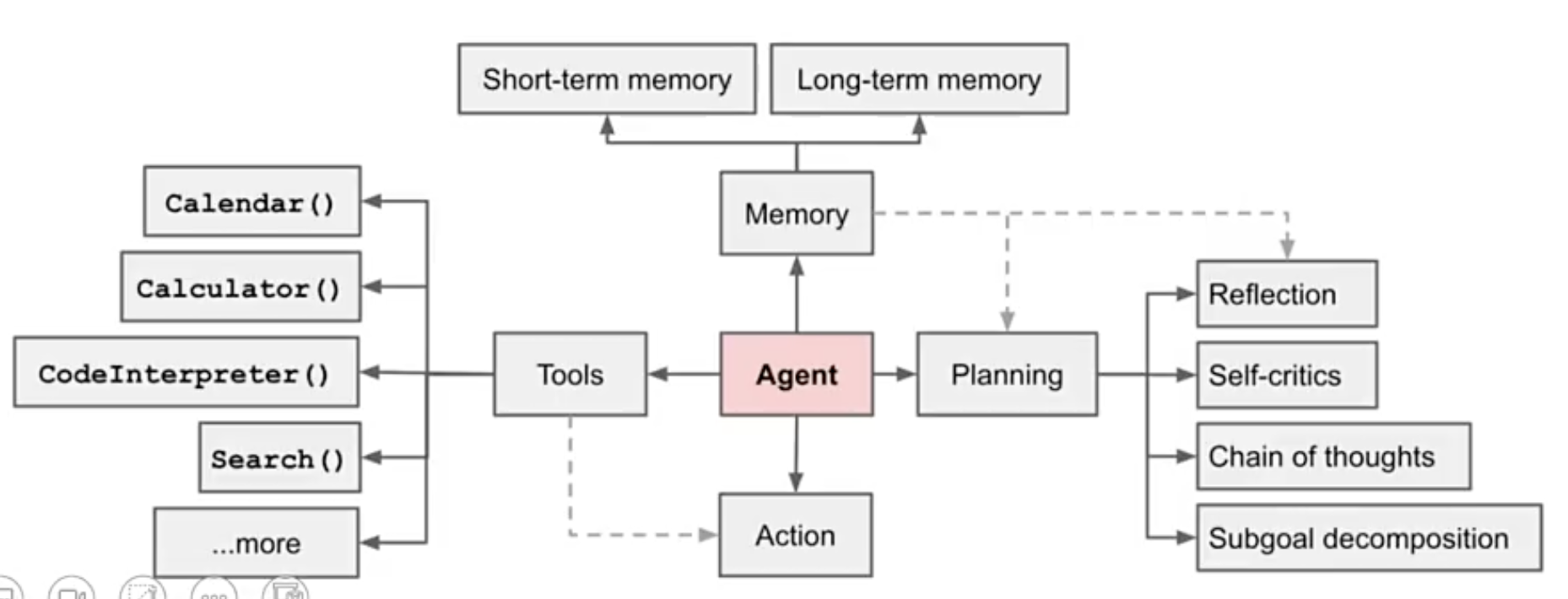
  • LLM:自主理解、规划、执行复杂任务。
  • 规划planning:任务分解为较小的、可管理的子目标。
  • 记忆memory:短期记忆,进行上下文学习;长期记忆,一般通过外部载体存储(文件、数据库)和快速检索实现。
  • 工具使用tool use:调用外部API,获取额外信息。

智能体自主规划设计

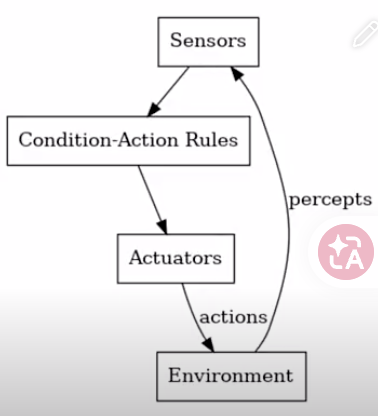
  • 反应式reactive
  • 深思熟虑式deliberative
  • 混合式hybrid

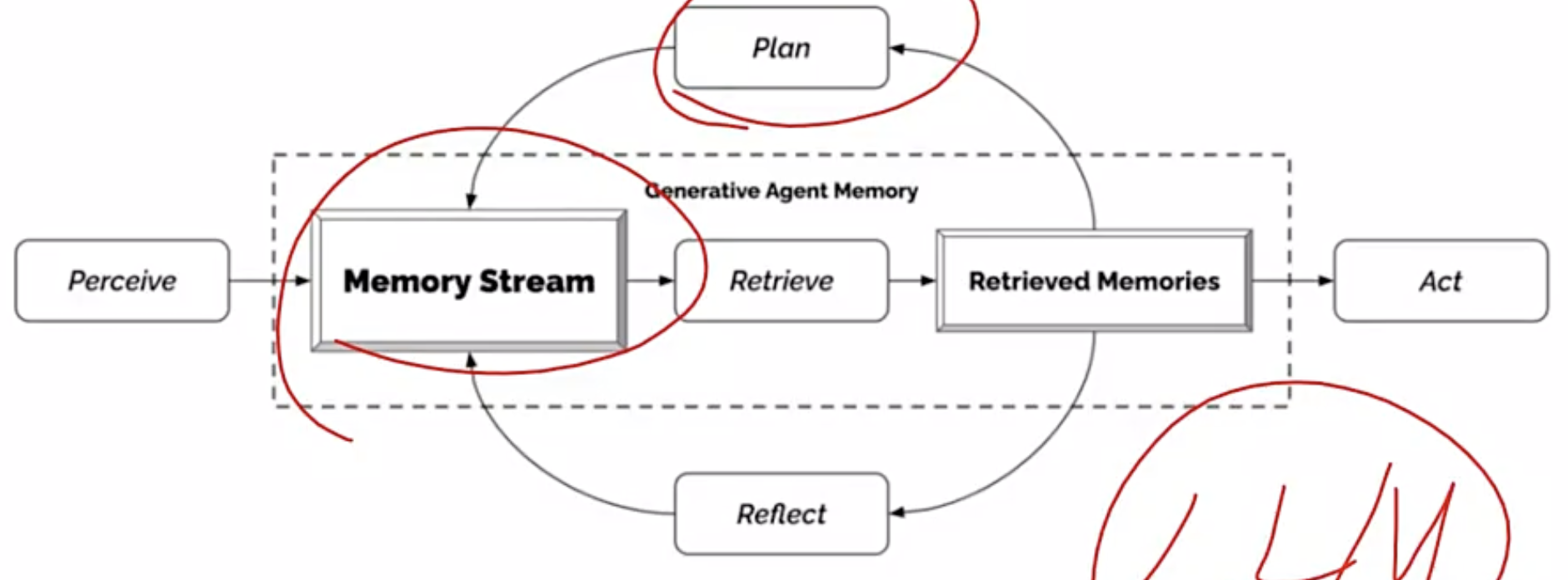
生成智能体
Q:如何定义Agent
A:非代码提示词方式
智能体与环境交互
智能体之间信息传播
智能体的关系记忆
AI Agent框架对比

框架工具 核心定位 架构特点 适用场景
LangChain 开源LLM应用开发框架 基于链(chain)的线性或分支工作流,支持Agent模式 快速构建RAG,对话系统、工具调用等线性任务
LangGraph LangChain的扩展,专注于复杂工作流 基于图(Graph)的循环和条件逻辑,支持多Agent协作 需要循环、动态分支或状态管理的复杂任务(如自适应RAG、多Agent系统)
Qwen-Agent 通义千问的AI Agent框架 基于阿里云大模型,支持多模态交互与工具调用 开源,集成多种工具,MCP调用
Coze 字节跳动的无代码AI Bot平台 可视化拖拽界面,内置知识库、多模态插件 快速部署社交平台机器人、轻量级工作流
Dify 开源LLM应用开发平台 API优先,支持Prompt工程与灵活编排 开发者定制化LLM应用,需深度集成或私有化部署
OpenClaw,Hermes Agent+Skills(内置一些Skills,例如read_file,write_file,cron,web search) 两段式调用,第一段:Skills(元数据name,description)决定调用什么工具;第二段:指导说明书SKILL.md说明怎么调,read_file通过加载这个SKILL.md了解具体的调用方法
Q:Agent和工作流的区别
A:Agent开放型,自主性,需要外界(对话)推动;工作流固定的套路

反应式模式

该模式适合简单的问题,基于当前环境做决策,无长期规划。
工作原理:

  • 感知:获取环境输入
  • 决策:LLM立即响应
  • 执行:执行动作并观察结果,循环往复直至任务完成
1
2
3
4
5
6
7
8
9
10
11
12
13
14
15
16
17
18
19
20
21
22
23
24
25
26
27
28
29
30
31
32
33
34
35
36
37
38
39
40
41
42
43
44
45
46
47
48
49
50
51
52
53
54
55
56
57
58
59
60
61
62
63
64
65
66
67
68
69
70
71
72
73
74
75
76
77
78
79
80
81
82
83
84
85
86
87
88
89
90
91
92
93
94
95
96
97
98
99
100
101
102
103
104
105
106
107
108
109
110
111
112
113
114
115
116
117
118
119
120
121
122
123
124
125
126
127
128
129
130
131
132
133
134
135
136
137
138
139
140
141
142
143
144
145
146
147
148
149
150
151
152
153
154
155
156
157
158
#!/usr/bin/env python
# -*- coding: utf-8 -*-

"""
私募基金运作指引问答助手 - 反应式智能体实现

适合反应式架构的私募基金问答助手,使用LangGraph实现主动思考和工具选择。
"""

import re
import os
from typing import List, Dict, Any, Annotated, TypedDict
from langchain_core.prompts import PromptTemplate
from langchain_core.tools import tool
from langchain_core.messages import HumanMessage, AIMessage, SystemMessage
from langchain_community.chat_models import ChatTongyi
from langchain.agents import create_agent

# 通义千问API密钥
DASHSCOPE_API_KEY = os.getenv("DASHSCOPE_API_KEY")

# 简化的私募基金规则数据库
FUND_RULES_DB = [
{
"id": "rule001", #规则id
"category": "设立与募集",
"question": "私募基金的合格投资者标准是什么?",
"answer": "合格投资者是指具备相应风险识别能力和风险承担能力,投资于单只私募基金的金额不低于100万元且符合下列条件之一的单位和个人:\n1. 净资产不低于1000万元的单位\n2. 金融资产不低于300万元或者最近三年个人年均收入不低于50万元的个人"
},
{
"id": "rule002",
"category": "设立与募集",
"question": "私募基金的最低募集规模要求是多少?",
"answer": "私募证券投资基金的最低募集规模不得低于人民币1000万元。对于私募股权基金、创业投资基金等其他类型的私募基金,监管规定更加灵活,通常需符合基金合同的约定。"
},
{
"id": "rule014",
"category": "监管规定",
"question": "私募基金管理人的风险准备金要求是什么?",
"answer": "私募证券基金管理人应当按照管理费收入的10%计提风险准备金,主要用于赔偿因管理人违法违规、违反基金合同、操作错误等给基金财产或者投资者造成的损失。"
}
]


@tool #注册工具
def search_rules_by_keywords(keywords: str) -> str:
"""通过关键词搜索相关私募基金规则。输入应为相关关键词,多个关键词用逗号或空格分隔。"""
keywords = keywords.strip().lower()
keyword_list = re.split(r'[,,\s]+', keywords)

matched_rules = []
for rule in FUND_RULES_DB:
rule_text = (rule["category"] + " " + rule["question"]).lower()
match_count = sum(1 for kw in keyword_list if kw in rule_text)
if match_count > 0:
matched_rules.append((rule, match_count))

matched_rules.sort(key=lambda x: x[1], reverse=True)

if not matched_rules:
return "未找到与关键词相关的规则。"

result = []
for rule, _ in matched_rules[:2]:
result.append(f"类别: {rule['category']}\n问题: {rule['question']}\n答案: {rule['answer']}")

return "\n\n".join(result)


@tool
def search_rules_by_category(category: str) -> str:
"""根据规则类别查询私募基金规则。输入应为类别名称,可选类别:设立与募集、监管规定。"""
category = category.strip()
matched_rules = []

for rule in FUND_RULES_DB:
if category.lower() in rule["category"].lower():
matched_rules.append(rule)

if not matched_rules:
return f"未找到类别为 '{category}' 的规则。"

result = []
for rule in matched_rules:
result.append(f"问题: {rule['question']}\n答案: {rule['answer']}")

return "\n\n".join(result)


@tool
def answer_question(query: str) -> str:
"""在知识库中搜索并回答用户关于私募基金的问题。输入应为完整的用户问题。"""
query = query.strip()

best_rule = None
best_score = 0

for rule in FUND_RULES_DB:
query_words = set(query.lower().split())
rule_words = set((rule["question"] + " " + rule["category"]).lower().split())
common_words = query_words.intersection(rule_words)

score = len(common_words) / max(1, len(query_words))
if score > best_score:
best_score = score
best_rule = rule

if best_score < 0.2 or best_rule is None:
return "在知识库中未找到与该问题直接相关的信息。请尝试使用关键词搜索或类别查询。"

return f"根据知识库信息:\n\n类别: {best_rule['category']}\n问题: {best_rule['question']}\n答案: {best_rule['answer']}"


def create_fund_qa_agent():
llm = ChatTongyi(model="qwen-plus", dashscope_api_key=DASHSCOPE_API_KEY)

tools = [search_rules_by_keywords, search_rules_by_category, answer_question]

system_prompt = """你是一个私募基金问答助手,专门回答关于私募基金规则和运作的问题。

你可以使用以下工具来查询信息:
1. search_rules_by_keywords: 通过关键词搜索相关规则
2. search_rules_by_category: 按类别查询规则(类别:设立与募集、监管规定)
3. answer_question: 直接搜索并回答问题

注意:
1. 如果知识库中没有相关信息,请明确告知用户"对不起,在我的知识库中没有关于[具体主题]的详细信息"
2. 如果你基于自己的知识提供补充信息,请用"根据我的经验"或"一般来说"等前缀明确标识
3. 回答要专业、简洁、准确"""

agent = create_agent(llm, tools, system_prompt=system_prompt)

return agent


if __name__ == "__main__":
fund_qa_agent = create_fund_qa_agent()

print("=== 私募基金运作指引问答助手(反应式智能体)===\n")
print("使用模型:qwen-plus")
print("您可以提问关于私募基金的各类问题,输入'退出'结束对话\n")

while True:
user_input = input("请输入您的问题:")
if user_input.lower() in ['退出', 'exit', 'quit']:
print("感谢使用,再见!")
break

response = fund_qa_agent.invoke({"messages": [HumanMessage(content=user_input)]})

# 获取最后一条AI消息作为回答
for msg in reversed(response["messages"]):
if isinstance(msg, AIMessage) and msg.content:
print(f"回答: {msg.content}\n")
break

print("-" * 40)

agent方式中的大模型调用哪个工具是根据语义概率选择的。
对比RAG方式:文件切分chunks =》筛选Top5 Chunks =〉prompt提示词;整个pipeline稳定。
对于复杂任务,推荐Tool,同时RAG提供指导说明书few shot示例(错题本)。

  • 情况一:如果用户提问了xxxx,你可以通过XXXTool,Tool2查找相关的信息。
  • 情况二:

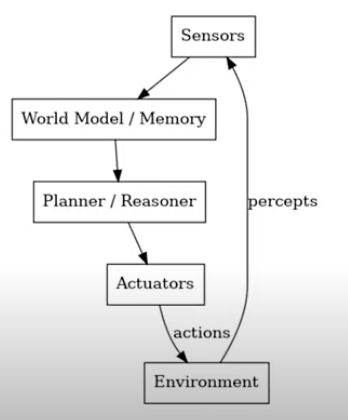
深思熟虑模式


模式流程:

  • 感知:获取环境信息
  • 建模:更新内部世界状态表示
  • 推理:生成候选计划并模拟结果
  • 决策:选择最优方案执行
    相比反应式堆叠了多个工具(pipeline)
1
2
3
4
5
6
7
8
9
10
11
12
13
14
15
16
17
18
19
20
21
22
23
24
25
26
27
28
29
30
31
32
33
34
35
36
37
38
39
40
41
42
43
44
45
46
47
48
49
50
51
52
53
54
55
56
57
58
59
60
61
62
63
64
65
66
67
68
69
70
71
72
73
74
75
76
77
78
79
80
81
82
83
84
85
86
87
88
89
90
91
92
93
94
95
96
97
98
99
100
101
102
103
104
105
106
107
108
109
110
111
112
113
114
115
116
117
118
119
120
121
122
123
124
125
126
127
128
129
130
131
132
133
134
135
136
137
138
139
140
141
142
143
144
145
146
147
148
149
150
151
152
153
154
155
156
157
158
159
160
161
162
163
164
165
166
167
168
169
170
171
172
173
174
175
176
177
178
179
180
181
182
183
184
185
186
187
188
189
190
191
192
193
194
195
196
197
198
199
200
201
202
203
204
205
206
207
208
209
210
211
212
213
214
215
216
217
218
219
220
221
222
223
224
225
226
227
228
229
230
231
232
233
234
235
236
237
238
239
240
241
242
243
244
245
246
247
248
249
250
251
252
253
254
255
256
257
258
259
260
261
262
263
264
265
266
267
268
269
270
271
272
273
274
275
276
277
278
279
280
281
282
283
284
285
286
287
288
289
290
291
292
293
294
295
296
297
298
299
300
301
302
303
304
305
306
307
308
309
310
311
312
313
314
315
316
317
318
319
320
321
322
323
324
325
326
327
328
329
330
331
332
333
334
335
336
337
338
339
340
341
342
343
344
345
346
347
348
349
350
351
352
353
354
355
356
357
358
359
360
361
362
363
364
365
366
367
368
369
370
371
372
373
374
375
376
377
378
379
380
381
382
383
384
385
386
387
388
389
390
391
392
393
394
395
396
397
398
399
400
401
402
403
404
405
406
407
408
409
410
411
412
413
414
415
416
417
418
419
420
421
422
423
424
425
426
427
428
429
430
431
432
433
434
435
436
437
438
439
440
441
442
443
444
445
446
447
448
449
450
451
452
453
454
455
456
457
458
459
460
461
462
463
464
465
466
467
468
469
470
471
472
473
474
475
476
477
478
479
480
481
482
483
484
485
486
487
488
489
490
491
492
493
494
495
496
497
498
499
500
501
502
503
504
505
506
507
508
509
510
511
512
513
514
515
516
517
518
519
520
521
522
523
524
525
526
527
528
529
530
531
532
533
534
535
536
537
538
539
540
541
#!/usr/bin/env python
# -*- coding: utf-8 -*-

"""
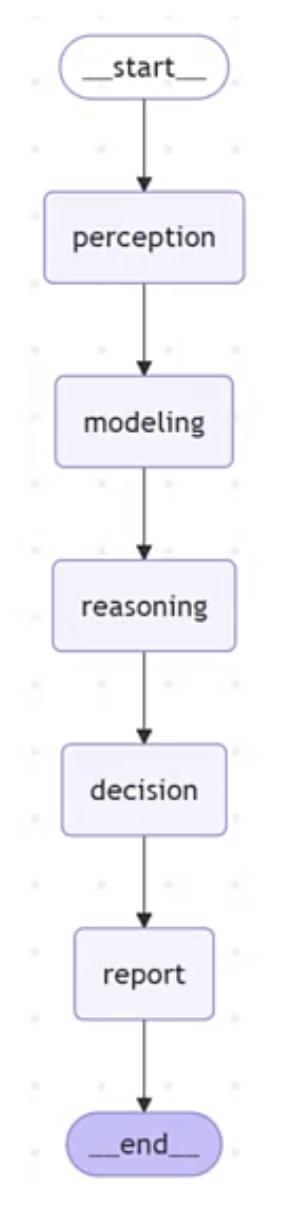
深思熟虑智能体(Deliberative Agent)- 智能投研助手

基于LangGraph实现的深思熟虑型智能体,适用于投资研究场景,能够整合数据,
进行多步骤分析和推理,生成投资观点和研究报告。

核心流程:
1. 感知:收集市场数据和信息
2. 建模:构建内部世界模型,理解市场状态
3. 推理:生成多个候选分析方案并模拟结果
4. 决策:选择最优投资观点并形成报告
5. 报告:生成完整研究报告
"""

import os
import json
from typing import Dict, List, Any, Literal, TypedDict, Optional, Union, Tuple
from datetime import datetime

from langchain_core.prompts import ChatPromptTemplate
from langchain_community.llms import Tongyi
from langchain_core.output_parsers import StrOutputParser, JsonOutputParser, PydanticOutputParser
from pydantic import BaseModel, Field, field_validator
from langgraph.graph import StateGraph, END

# 设置API密钥
DASHSCOPE_API_KEY = os.getenv("DASHSCOPE_API_KEY")

# 创建LLM实例
llm = Tongyi(model_name="qwen-flash", dashscope_api_key=DASHSCOPE_API_KEY)

# 定义输出模型
class PerceptionOutput(BaseModel):
"""感知阶段输出的市场数据和信息"""
market_overview: str = Field(..., description="市场概况和最新动态") #标注元数据:约束、描述、类型等
key_indicators: Dict[str, str] = Field(..., description="关键经济和市场指标")
recent_news: List[str] = Field(..., description="近期重要新闻")
industry_trends: Dict[str, str] = Field(..., description="行业趋势分析")

class ModelingOutput(BaseModel):
"""建模阶段输出的内部世界模型"""
market_state: str = Field(..., description="当前市场状态评估")
economic_cycle: str = Field(..., description="经济周期判断")
risk_factors: List[str] = Field(..., description="主要风险因素")
opportunity_areas: List[str] = Field(..., description="潜在机会领域")
market_sentiment: str = Field(..., description="市场情绪分析")

class ReasoningPlan(BaseModel):
"""推理阶段生成的候选分析方案"""
plan_id: str = Field(..., description="方案ID")
hypothesis: str = Field(..., description="投资假设")
analysis_approach: str = Field(..., description="分析方法")
expected_outcome: str = Field(..., description="预期结果")
confidence_level: float = Field(..., description="置信度(0-1)")
pros: List[str] = Field(..., description="方案优势")
cons: List[str] = Field(..., description="方案劣势")

class DecisionOutput(BaseModel):
"""决策阶段选择的最优投资观点"""
selected_plan_id: str = Field(..., description="选中的方案ID")
investment_thesis: str = Field(..., description="投资论点")
supporting_evidence: List[str] = Field(..., description="支持证据")
risk_assessment: str = Field(..., description="风险评估")
recommendation: str = Field(..., description="投资建议")
timeframe: str = Field(..., description="时间框架")

# 定义智能体状态,是一个 `dict`,不是一个传统类,无法用点引用成员变量
class ResearchAgentState(TypedDict):
"""研究智能体的状态"""
# 输入
research_topic: str # 研究主题
industry_focus: str # 行业焦点
time_horizon: str # 时间范围(短期/中期/长期)

# 处理状态
perception_data: Optional[Dict[str, Any]] # 感知阶段收集的数据
world_model: Optional[Dict[str, Any]] # 内部世界模型
reasoning_plans: Optional[List[Dict[str, Any]]] # 候选分析方案
selected_plan: Optional[Dict[str, Any]] # 选中的最优方案

# 输出
final_report: Optional[str] # 最终研究报告

# 控制流
current_phase: Literal["perception", "modeling", "reasoning", "decision", "report"]
error: Optional[str] # 错误信息


# 提示模板
PERCEPTION_PROMPT = """你是一个专业的投资研究分析师,请收集和整理关于以下研究主题的市场数据和信息:

研究主题: {research_topic}
行业焦点: {industry_focus}
时间范围: {time_horizon}

请从以下几个方面进行市场感知:
1. 市场概况和最新动态
2. 关键经济和市场指标
3. 近期重要新闻(至少3条)
4. 行业趋势分析(至少针对3个细分领域)

根据你的专业知识和经验,提供尽可能详细和准确的信息。

输出格式要求为JSON,包含以下字段:
- market_overview: 字符串
- key_indicators: 字典,键为指标名称,值为指标值和简要解释
- recent_news: 字符串列表,每项为一条重要新闻
- industry_trends: 字典,键为细分领域,值为趋势分析
"""

MODELING_PROMPT = """你是一个资深投资策略师,请根据以下市场数据和信息,构建市场内部模型,进行深度分析:

研究主题: {research_topic}
行业焦点: {industry_focus}
时间范围: {time_horizon}

市场数据和信息:
{perception_data}

请构建一个全面的市场内部模型,包括:
1. 当前市场状态评估
2. 经济周期判断
3. 主要风险因素(至少3个)
4. 潜在机会领域(至少3个)
5. 市场情绪分析

输出格式要求为JSON,包含以下字段:
- market_state: 字符串
- economic_cycle: 字符串
- risk_factors: 字符串列表
- opportunity_areas: 字符串列表
- market_sentiment: 字符串
"""

REASONING_PROMPT = """你是一个战略投资顾问,请根据以下市场模型,生成3个不同的投资分析方案:

研究主题: {research_topic}
行业焦点: {industry_focus}
时间范围: {time_horizon}

市场内部模型:
{world_model}

请为每个方案提供:
1. 方案ID(简短标识符)
2. 投资假设
3. 分析方法
4. 预期结果
5. 置信度(0-1之间的小数)
6. 方案优势(至少3点)
7. 方案劣势(至少2点)

这些方案应该有明显的差异,代表不同的投资思路或分析角度。

输出格式要求为JSON数组,每个元素包含以下字段:
- plan_id: 字符串
- hypothesis: 字符串
- analysis_approach: 字符串
- expected_outcome: 字符串
- confidence_level: 浮点数
- pros: 字符串列表
- cons: 字符串列表
"""

DECISION_PROMPT = """你是一个投资决策委员会主席,请评估以下候选分析方案,选择最优方案并形成投资决策:

研究主题: {research_topic}
行业焦点: {industry_focus}
时间范围: {time_horizon}

市场内部模型:
{world_model}

候选分析方案:
{reasoning_plans}

请基于方案的假设、分析方法、预期结果、置信度以及优缺点,选择最优的投资方案,并给出详细的决策理由。
你的决策应该综合考虑投资潜力、风险水平和时间框架的匹配度。

输出格式要求为JSON,包含以下字段:
- selected_plan_id: 字符串
- investment_thesis: 字符串
- supporting_evidence: 字符串列表
- risk_assessment: 字符串
- recommendation: 字符串
- timeframe: 字符串
"""

REPORT_PROMPT = """你是一个专业的投资研究报告撰写人,请根据以下信息生成一份完整的投资研究报告:

研究主题: {research_topic}
行业焦点: {industry_focus}
时间范围: {time_horizon}

市场数据和信息:
{perception_data}

市场内部模型:
{world_model}

选定的投资决策:
{selected_plan}

请生成一份结构完整、逻辑清晰的投研报告,包括但不限于:
1. 报告标题和摘要
2. 市场和行业背景
3. 核心投资观点
4. 详细分析论证
5. 风险因素
6. 投资建议
7. 时间框架和预期回报

报告应当专业、客观,同时提供足够的分析深度和洞见。
"""

# 第一阶段:感知 - 收集市场数据和信息
def perception(state: ResearchAgentState) -> ResearchAgentState:
"""感知阶段:收集和整理市场数据和信息"""

print("1. 感知阶段:收集市场数据和信息...")

try:
# 准备提示,根据一个带变量占位符的字符串模板,创建一个 ChatPromptTemplate 对象,用于后续动态填充参数生成 Prompt。
prompt = ChatPromptTemplate.from_template(PERCEPTION_PROMPT)

# 构建输入
input_data = {
"research_topic": state["research_topic"],
"industry_focus": state["industry_focus"],
"time_horizon": state["time_horizon"]
}

# 调用LLM,是 LangChain Expression Language (LCEL) 的写法,表示将多个组件通过管道(`|`)串联成一个执行链(Chain)。
chain = prompt | llm | JsonOutputParser()
result = chain.invoke(input_data)

# 更新状态
return {
**state,
"perception_data": result,
"current_phase": "modeling"#下一阶段状态
}
except Exception as e:
return {
**state,
"error": f"感知阶段出错: {str(e)}",
"current_phase": "perception" # 保持在当前阶段
}

# 第二阶段:建模 - 构建内部世界模型
def modeling(state: ResearchAgentState) -> ResearchAgentState:
"""建模阶段:构建内部世界模型,理解市场状态"""

print("2. 建模阶段:构建内部世界模型...")

try:
# 确保感知数据已存在
if not state.get("perception_data"):
return {
**state,
"error": "建模阶段缺少感知数据",
"current_phase": "perception" # 回到感知阶段
}

# 准备提示
prompt = ChatPromptTemplate.from_template(MODELING_PROMPT)

# 构建输入
input_data = {
"research_topic": state["research_topic"],
"industry_focus": state["industry_focus"],
"time_horizon": state["time_horizon"],
"perception_data": json.dumps(state["perception_data"], ensure_ascii=False, indent=2)
}

# 调用LLM
chain = prompt | llm | JsonOutputParser()
result = chain.invoke(input_data)

# 更新状态
return {
**state,
"world_model": result,
"current_phase": "reasoning"
}
except Exception as e:
return {
**state,
"error": f"建模阶段出错: {str(e)}",
"current_phase": "modeling" # 保持在当前阶段
}

# 第三阶段:推理 - 生成候选分析方案
def reasoning(state: ResearchAgentState) -> ResearchAgentState:
"""推理阶段:生成多个候选分析方案并模拟结果"""

print("3. 推理阶段:生成候选分析方案...")

try:
# 确保世界模型已存在
if not state.get("world_model"):
return {
**state,
"error": "推理阶段缺少世界模型",
"current_phase": "modeling" # 回到建模阶段
}

# 准备提示
prompt = ChatPromptTemplate.from_template(REASONING_PROMPT)

# 构建输入
input_data = {
"research_topic": state["research_topic"],
"industry_focus": state["industry_focus"],
"time_horizon": state["time_horizon"],
"world_model": json.dumps(state["world_model"], ensure_ascii=False, indent=2)
}

# 调用LLM
chain = prompt | llm | JsonOutputParser()
result = chain.invoke(input_data)

# 更新状态
return {
**state,
"reasoning_plans": result,
"current_phase": "decision"
}
except Exception as e:
return {
**state,
"error": f"推理阶段出错: {str(e)}",
"current_phase": "reasoning" # 保持在当前阶段
}

# 第四阶段:决策 - 选择最优方案
def decision(state: ResearchAgentState) -> ResearchAgentState:
"""决策阶段:评估候选方案并选择最优投资观点"""

print("4. 决策阶段:选择最优投资观点...")

try:
# 确保候选方案已存在
if not state.get("reasoning_plans"):
return {
**state,
"error": "决策阶段缺少候选方案",
"current_phase": "reasoning" # 回到推理阶段
}

# 准备提示
prompt = ChatPromptTemplate.from_template(DECISION_PROMPT)

# 构建输入
input_data = {
"research_topic": state["research_topic"],
"industry_focus": state["industry_focus"],
"time_horizon": state["time_horizon"],
"world_model": json.dumps(state["world_model"], ensure_ascii=False, indent=2),
"reasoning_plans": json.dumps(state["reasoning_plans"], ensure_ascii=False, indent=2)
}

# 调用LLM
chain = prompt | llm | JsonOutputParser()
result = chain.invoke(input_data)

# 更新状态
return {
**state,
"selected_plan": result,
"current_phase": "report"
}
except Exception as e:
return {
**state,
"error": f"决策阶段出错: {str(e)}",
"current_phase": "decision" # 保持在当前阶段
}

# 第五阶段:报告 - 生成完整研究报告
def report_generation(state: ResearchAgentState) -> ResearchAgentState:
"""报告阶段:生成完整的投资研究报告"""

print("5. 报告阶段:生成完整研究报告...")

try:
# 确保选定方案已存在
if not state.get("selected_plan"):
return {
**state,
"error": "报告阶段缺少选定方案",
"current_phase": "decision" # 回到决策阶段
}

# 准备提示
prompt = ChatPromptTemplate.from_template(REPORT_PROMPT)

# 构建输入
input_data = {
"research_topic": state["research_topic"],
"industry_focus": state["industry_focus"],
"time_horizon": state["time_horizon"],
"perception_data": json.dumps(state["perception_data"], ensure_ascii=False, indent=2),
"world_model": json.dumps(state["world_model"], ensure_ascii=False, indent=2),
"selected_plan": json.dumps(state["selected_plan"], ensure_ascii=False, indent=2)
}

# 调用LLM
chain = prompt | llm | StrOutputParser()
result = chain.invoke(input_data)

# 更新状态
return {
**state,
"final_report": result,
"current_phase": "completed"
}
except Exception as e:
return {
**state,
"error": f"报告生成阶段出错: {str(e)}",
"current_phase": "report" # 保持在当前阶段
}

# 路由函数 - 根据当前阶段决定下一步
def router(state: ResearchAgentState) -> str:
"""根据当前阶段路由到下一步或结束"""

# 如果有错误,保持在当前阶段
if state.get("error"):
return state["current_phase"]

# 根据当前阶段决定下一步
current = state["current_phase"]

if current == "perception":
return "modeling"
elif current == "modeling":
return "reasoning"
elif current == "reasoning":
return "decision"
elif current == "decision":
return "report"
elif current == "report":
return END
else:
return END

# 创建智能体工作流图
def create_research_agent_workflow() -> StateGraph:
"""创建深思熟虑型研究智能体工作流图"""

# 创建状态图
workflow = StateGraph(ResearchAgentState)

# 添加节点
workflow.add_node("perception", perception)
workflow.add_node("modeling", modeling)
workflow.add_node("reasoning", reasoning)
workflow.add_node("decision", decision)
workflow.add_node("report", report_generation)

# 设置入口点
workflow.set_entry_point("perception")

# 设置边和转换条件
workflow.add_edge("perception", "modeling")
workflow.add_edge("modeling", "reasoning")
workflow.add_edge("reasoning", "decision")
workflow.add_edge("decision", "report")
workflow.add_edge("report", END)

# 编译工作流
return workflow.compile()

# 测试函数
def run_research_agent(topic: str, industry: str, horizon: str) -> Dict[str, Any]:
"""运行研究智能体并返回结果"""

# 创建工作流
agent = create_research_agent_workflow()

# 准备初始状态
initial_state = {
"research_topic": topic,
"industry_focus": industry,
"time_horizon": horizon,
"perception_data": None,
"world_model": None,
"reasoning_plans": None,
"selected_plan": None,
"final_report": None,
"current_phase": "perception",
"error": None
}
print("LangGraph Mermaid流程图:")
print(agent.get_graph().draw_mermaid())

# 运行智能体
result = agent.invoke(initial_state)

return result

# 主函数
if __name__ == "__main__":
print("=== 深思熟虑智能体 - 智能投研助手 ===\n")
print("使用模型:qwen-flash\n")

# 用户输入
topic = input("请输入研究主题 (例如: 新能源汽车行业投资机会): ")
industry = input("请输入行业焦点 (例如: 电动汽车制造、电池技术): ")
horizon = input("请输入时间范围 [短期/中期/长期]: ")

print("\n智能投研助手开始工作...\n")

try:
# 运行智能体
result = run_research_agent(topic, industry, horizon)

# 处理结果
if result.get("error"):
print(f"\n发生错误: {result['error']}")
else:
print("\n=== 最终研究报告 ===\n")
print(result.get("final_report", "未生成报告"))

# 保存报告
timestamp = datetime.now().strftime("%Y%m%d_%H%M%S")
filename = f"research_report_{timestamp}.txt"

with open(filename, "w", encoding="utf-8") as f:
f.write(result.get("final_report", "未生成报告"))

print(f"\n报告已保存为: {filename}")

except Exception as e:
print(f"\n运行过程中发生错误: {str(e)}")

118

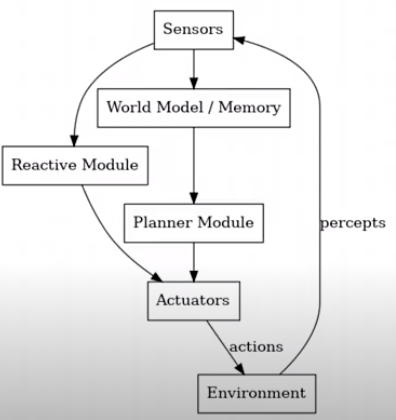
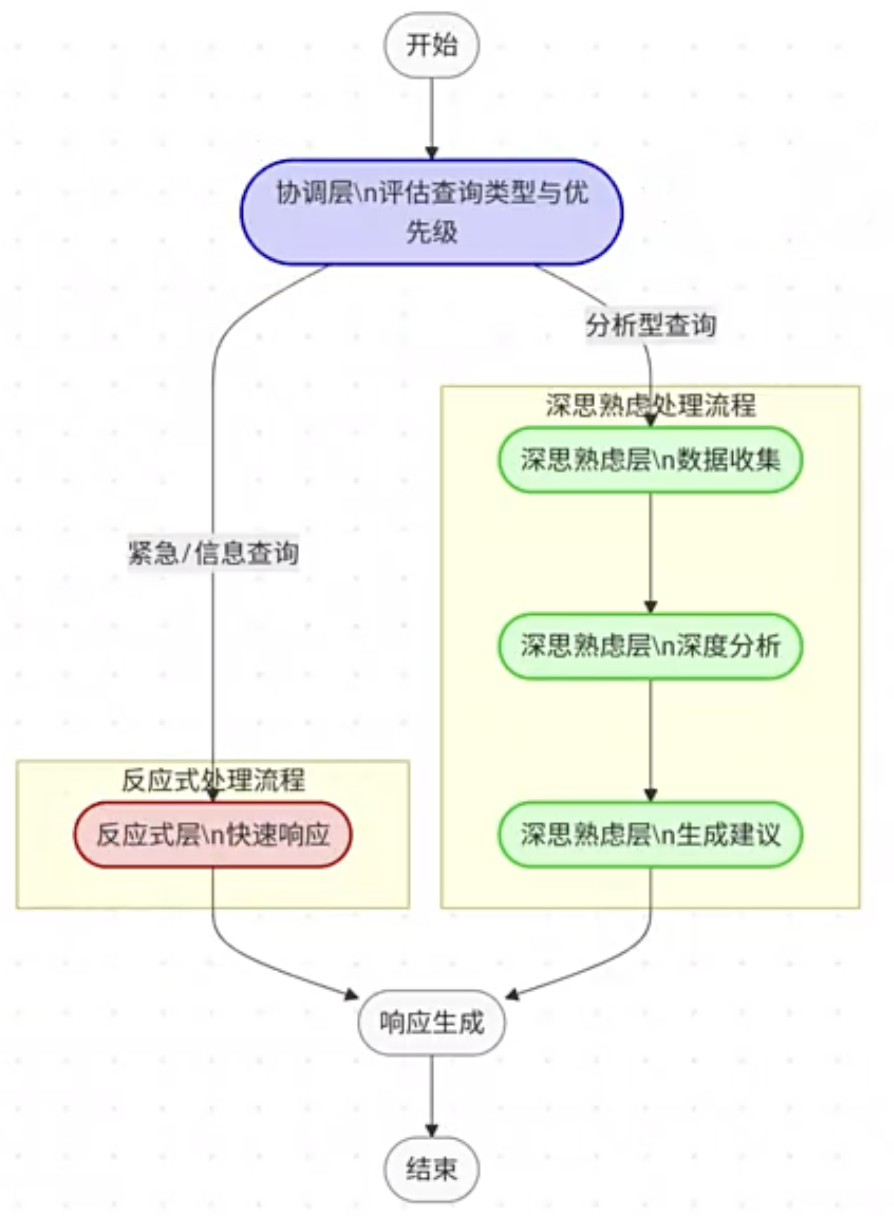
混合式模式Hybrid Agent Architecture

混合模式会根据意图识别出是使用反应式还是深思熟虑式的规划。
三层设计:

  • 底层(反应式):即时处理紧急任务(如避障)
  • 中层(协调):管理任务优先级(可选),大模型LLM意图识别
  • 顶层(深思熟虑):进行长期目标规划(如路径优化)
    运作机制:
    通过仲裁系统(如监督器sensor)动态切换模式:
  • 紧急情况-》启用反应式快速响应
  • 常规情况-〉启用深思熟虑规划
1
2
3
4
5
6
7
8
9
10
11
12
13
14
15
16
17
18
19
20
21
22
23
24
25
26
27
28
29
30
31
32
33
34
35
36
37
38
39
40
41
42
43
44
45
46
47
48
49
50
51
52
53
54
55
56
57
58
59
60
61
62
63
64
65
66
67
68
69
70
71
72
73
74
75
76
77
78
79
80
81
82
83
84
85
86
87
88
89
90
91
92
93
94
95
96
97
98
99
100
101
102
103
104
105
106
107
108
109
110
111
112
113
114
115
116
117
118
119
120
121
122
123
124
125
126
127
128
129
130
131
132
133
134
135
136
137
138
139
140
141
142
143
144
145
146
147
148
149
150
151
152
153
154
155
156
157
158
159
160
161
162
163
164
165
166
167
168
169
170
171
172
173
174
175
176
177
178
179
180
181
182
183
184
185
186
187
188
189
190
191
192
193
194
195
196
197
198
199
200
201
202
203
204
205
206
207
208
209
210
211
212
213
214
215
216
217
218
219
220
221
222
223
224
225
226
227
228
229
230
231
232
233
234
235
236
237
238
239
240
241
242
243
244
245
246
247
248
249
250
251
252
253
254
255
256
257
258
259
260
261
262
263
264
265
266
267
268
269
270
271
272
273
274
275
276
277
278
279
280
281
282
283
284
285
286
287
288
289
290
291
292
293
294
295
296
297
298
299
300
301
302
303
304
305
306
307
308
309
310
311
312
313
314
315
316
317
318
319
320
321
322
323
324
325
326
327
328
329
330
331
332
333
334
335
336
337
338
339
340
341
342
343
344
345
346
347
348
349
350
351
352
353
354
355
356
357
358
359
360
361
362
363
364
365
366
367
368
369
370
371
372
373
374
375
376
377
378
379
380
381
382
383
384
385
386
387
388
389
390
391
392
393
394
395
396
397
398
399
400
401
402
403
404
405
406
407
408
409
410
411
412
413
414
415
416
417
418
419
420
421
422
423
424
425
426
427
428
429
430
431
432
433
434
435
436
437
438
439
440
441
442
443
444
445
446
447
448
449
450
451
452
453
454
455
456
457
458
459
460
461
462
463
464
465
466
467
468
469
470
471
472
473
474
475
476
477
478
479
480
481
482
483
484
485
486
487
488
489
490
491
492
493
494
495
496
497
498
499
500
501
502
503
504
505
506
507
508
509
510
511
512
513
514
515
516
#!/usr/bin/env python
# -*- coding: utf-8 -*-

"""
混合智能体(Hybrid Agent)- 财富管理投顾AI助手

基于LangGraph实现的混合型智能体,结合反应式架构的即时响应能力和深思熟虑架构的长期规划能力,
通过协调层动态切换处理模式,提供智能化财富管理咨询服务。

三层架构:
1. 底层(反应式):即时响应客户查询,提供快速反馈
2. 中层(协调):评估任务类型和优先级,动态选择处理模式
3. 顶层(深思熟虑):进行复杂的投资分析和长期财务规划
"""

import os
import json
from datetime import datetime
from typing import Dict, List, Any, Literal, TypedDict, Optional, Annotated

from langchain_core.prompts import ChatPromptTemplate
from langchain_core.messages import HumanMessage, AIMessage, ToolMessage, BaseMessage
from langchain_core.tools import tool
from langchain_core.output_parsers import StrOutputParser, JsonOutputParser
from langchain_community.chat_models import ChatTongyi
from pydantic import BaseModel, Field
from langgraph.graph import StateGraph, END
from langgraph.graph.message import add_messages
from langgraph.prebuilt import ToolNode
import warnings
warnings.filterwarnings("ignore")

# 设置API密钥
DASHSCOPE_API_KEY = os.getenv("DASHSCOPE_API_KEY")

# 创建LLM实例(使用ChatTongyi以支持工具调用)
llm = ChatTongyi(model_name="qwen-turbo-latest", dashscope_api_key=DASHSCOPE_API_KEY)

# 定义客户信息数据结构
class CustomerProfile(BaseModel):
"""客户画像信息"""
customer_id: str = Field(..., description="客户ID")
risk_tolerance: Literal["保守型", "稳健型", "平衡型", "成长型", "进取型"] = Field(..., description="风险承受能力")
investment_horizon: Literal["短期", "中期", "长期"] = Field(..., description="投资期限")
financial_goals: List[str] = Field(..., description="财务目标")
investment_preferences: List[str] = Field(..., description="投资偏好")
portfolio_value: float = Field(..., description="投资组合总价值")
current_allocations: Dict[str, float] = Field(..., description="当前资产配置")

# 定义工具
@tool
def query_shanghai_index() -> str:
"""查询上证指数实时行情,获取当前点位、涨跌和涨跌幅信息"""
name = "上证指数"
price = "3125.62"
change = "6.32"
pct = "0.20"
result = f"{name} 当前点位: {price},涨跌: {change},涨跌幅: {pct}%"
print(f"[工具调用] {result}")
return result

@tool
def query_portfolio_allocation(asset_type: str) -> str:
"""查询客户投资组合中特定资产类型的配置比例

Args:
asset_type: 资产类型,如"股票"、"债券"、"现金"、"另类投资"
"""
# 模拟数据
allocations = {
"股票": "40%",
"债券": "30%",
"现金": "10%",
"另类投资": "20%"
}
result = allocations.get(asset_type, f"未找到{asset_type}的配置信息")
print(f"[工具调用] 查询{asset_type}配置: {result}")
return f"{asset_type}在投资组合中的配置比例为: {result}"

@tool
def query_market_news() -> str:
"""查询最新市场新闻和动态"""
news = [
"央行维持利率不变,市场预期稳定",
"科技板块持续走强,半导体行业领涨",
"外资连续三日净流入A股市场"
]
result = "最新市场动态:\n" + "\n".join(f"- {n}" for n in news)
print(f"[工具调用] {result}")
return result

# 工具列表
tools = [query_shanghai_index, query_portfolio_allocation, query_market_news]

# 绑定工具到LLM
llm_with_tools = llm.bind_tools(tools)

# 创建工具节点, tool_calls会调用具体节点(一个或多个),LLM 会在返回的 `AIMessage.tool_calls` 里指定要调用的工具
tool_node = ToolNode(tools)

# 定义状态类型,类型中的每个字段是各状态中可能用到的记录信息的字段
class WealthAdvisorState(TypedDict):
"""财富顾问智能体的状态"""
# 输入
user_query: str
customer_profile: Optional[Dict[str, Any]]

# 处理状态
query_type: Optional[Literal["emergency", "informational", "analytical"]]
processing_mode: Optional[Literal["reactive", "deliberative"]]
market_data: Optional[Dict[str, Any]]
analysis_results: Optional[Dict[str, Any]]

# 消息历史(用于工具调用)
messages: Annotated[List[BaseMessage], add_messages] #Annotated给类型增加额外元数据(Metadata),此处以追加的方式处理List数据类型

# 输出
final_response: Optional[str]

# 控制流
current_phase: Optional[str]
error: Optional[str]

# 提示模板
ASSESSMENT_PROMPT = """你是一个财富管理投顾AI助手的协调层。请评估以下用户查询,确定其类型和应该采用的处理模式。

用户查询: {user_query}

请判断:
1. 查询类型:
- "emergency": 紧急的或直接的查询,需要立即响应(如市场状况、账户信息、产品信息等)
- "informational": 信息性的查询,需要特定领域知识(如税务政策、投资工具介绍等)
- "analytical": 需要深度分析的查询(如投资组合优化、长期理财规划等)

2. 建议的处理模式:
- "reactive": 适用于需要快速反应的查询
- "deliberative": 适用于需要深度思考和分析的查询

请以JSON格式返回结果,包含以下字段:
- query_type: 查询类型(上述三种类型之一)
- processing_mode: 处理模式(上述两种模式之一)
- reasoning: 决策理由的简要说明
"""

DATA_COLLECTION_PROMPT = """你是一个财富管理投顾AI助手的数据收集模块。基于以下用户查询,确定需要收集哪些市场和财务数据进行深入分析。

用户查询: {user_query}

客户信息:
{customer_profile}

请确定需要收集的数据类型,例如:
- 资产类别表现数据
- 经济指标
- 行业趋势
- 历史回报率
- 风险指标
- 税收信息
- 其他相关数据

以JSON格式返回结果,包含以下字段:
- required_data_types: 需要收集的数据类型列表
- data_sources: 建议的数据来源列表
- collected_data: 模拟收集的数据(为简化示例,请生成合理的模拟数据)
"""

ANALYSIS_PROMPT = """你是一个财富管理投顾AI助手的分析引擎。请根据收集的数据对用户的投资情况进行深入分析。

用户查询: {user_query}

客户信息:
{customer_profile}

市场数据:
{market_data}

请提供全面的投资分析,包括:
1. 当前市场状况评估
2. 客户投资组合分析
3. 个性化投资建议
4. 风险评估
5. 预期结果和回报预测

以JSON格式返回分析结果,包含以下字段:
- market_assessment: 市场评估
- portfolio_analysis: 投资组合分析
- recommendations: 投资建议列表
- risk_analysis: 风险分析
- expected_outcomes: 预期结果
"""

RECOMMENDATION_PROMPT = """你是一个财富管理投顾AI助手。请根据深入分析结果,为客户准备最终的咨询建议。

用户查询: {user_query}

客户信息:
{customer_profile}

分析结果:
{analysis_results}

请提供专业、个性化且详细的投资建议,语言应友好易懂,避免过多专业术语。建议应包括:
1. 总体投资策略
2. 具体行动步骤
3. 资产配置建议
4. 风险管理策略
5. 时间框架
6. 预期收益
7. 后续跟进计划

返回格式应为自然语言文本,适合直接呈现给客户。
"""

# 第一阶段:情境评估 - 确定查询类型和处理模式
def assess_query(state: WealthAdvisorState) -> Dict[str, Any]:
print("[DEBUG] 进入节点: assess_query")

prompt = ChatPromptTemplate.from_template(ASSESSMENT_PROMPT)
chain = prompt | llm | JsonOutputParser()
result = chain.invoke({"user_query": state["user_query"]})

print(f"[DEBUG] LLM评估输出: {result}")

processing_mode = result.get("processing_mode", "reactive")
if processing_mode not in ["reactive", "deliberative"]:
processing_mode = "reactive"

query_type = result.get("query_type", "emergency")
if query_type not in ["emergency", "informational", "analytical"]:
query_type = "emergency"

print(f"[DEBUG] 分支判断: processing_mode={processing_mode}, query_type={query_type}")

return {
"query_type": query_type,
"processing_mode": processing_mode,
}

# 反应式处理 - 初始化消息并调用带工具的LLM
def reactive_agent(state: WealthAdvisorState) -> Dict[str, Any]:
print("[DEBUG] 进入节点: reactive_agent")

customer_info = json.dumps(state.get("customer_profile", {}), ensure_ascii=False, indent=2) #dict转json字符串

system_prompt = f"""你是一个专业的财富管理投顾AI助手,请根据用户的问题提供专业、简洁、准确的回答。

客户信息:
{customer_info}

你可以使用以下工具来获取实时数据:
- query_shanghai_index: 查询上证指数实时行情
- query_portfolio_allocation: 查询投资组合中特定资产的配置比例
- query_market_news: 查询最新市场新闻

请根据用户问题判断是否需要调用工具,如果需要请调用相应工具获取数据后再回答。"""

messages = state.get("messages", [])
if not messages:
messages = [HumanMessage(content=f"{system_prompt}\n\n用户问题: {state['user_query']}")]

response = llm_with_tools.invoke(messages)
print(f"[DEBUG] LLM响应: {response}")

return {"messages": [response]}

# 判断是否需要继续调用工具
def should_continue_tools(state: WealthAdvisorState) -> str:
messages = state.get("messages", [])
if not messages:
return "end"

last_message = messages[-1]

# 检查是否有工具调用,判断 LLM 最后一条消息是否包含工具调用(Tool Calls)
if hasattr(last_message, "tool_calls") and last_message.tool_calls:
print(f"[DEBUG] 检测到工具调用: {last_message.tool_calls}")
return "tools"

return "end"

# 从消息中提取最终响应
def extract_reactive_response(state: WealthAdvisorState) -> Dict[str, Any]:
print("[DEBUG] 进入节点: extract_reactive_response")

messages = state.get("messages", [])

# 找到最后一条AI消息作为最终响应
for msg in reversed(messages):
if isinstance(msg, AIMessage) and msg.content:
return {"final_response": msg.content}

return {"final_response": "无法生成响应"}

# 数据收集 - 收集进行深度分析所需的数据
def collect_data(state: WealthAdvisorState) -> Dict[str, Any]:
print("[DEBUG] 进入节点: collect_data")

prompt = ChatPromptTemplate.from_template(DATA_COLLECTION_PROMPT)
chain = prompt | llm | JsonOutputParser()

result = chain.invoke({
"user_query": state["user_query"],
"customer_profile": json.dumps(state.get("customer_profile", ), ensure_ascii=False, indent=2)
})

return {
"market_data": result.get("collected_data", {}),
"current_phase": "analyze"
} #返回节点类型中的部分字段

# 深度分析 - 分析数据和客户情况
def analyze_data(state: WealthAdvisorState) -> Dict[str, Any]:
print("[DEBUG] 进入节点: analyze_data")

prompt = ChatPromptTemplate.from_template(ANALYSIS_PROMPT)
chain = prompt | llm | JsonOutputParser()

result = chain.invoke({
"user_query": state["user_query"],
"customer_profile": json.dumps(state.get("customer_profile", {}), ensure_ascii=False, indent=2),
"market_data": json.dumps(state.get("market_data", {}), ensure_ascii=False, indent=2)
})

return {
"analysis_results": result,
"current_phase": "recommend"
}

# 生成建议 - 根据分析结果提供投资建议
def generate_recommendations(state: WealthAdvisorState) -> Dict[str, Any]:
print("[DEBUG] 进入节点: generate_recommendations")

prompt = ChatPromptTemplate.from_template(RECOMMENDATION_PROMPT)
chain = prompt | llm | StrOutputParser()

result = chain.invoke({
"user_query": state["user_query"],
"customer_profile": json.dumps(state.get("customer_profile", {}), ensure_ascii=False, indent=2),
"analysis_results": json.dumps(state.get("analysis_results", {}), ensure_ascii=False, indent=2)
})

return {
"final_response": result,
"current_phase": "respond"
}

# 创建智能体工作流
def create_wealth_advisor_workflow() -> StateGraph:
"""创建财富顾问混合智能体工作流"""

workflow = StateGraph(WealthAdvisorState)

# 添加节点
workflow.add_node("assess", assess_query)#节点就是agent=prompt(可选)+llm(可选)+tools(必选)
workflow.add_node("reactive_agent", reactive_agent)
workflow.add_node("tools", tool_node)
workflow.add_node("extract_response", extract_reactive_response)
workflow.add_node("collect_data", collect_data)
workflow.add_node("analyze", analyze_data)
workflow.add_node("recommend", generate_recommendations)

# 设置入口点
workflow.set_entry_point("assess")

# 评估后的分支路由
workflow.add_conditional_edges(
"assess",
#`x`不是你定义的,而是`add_conditional_edges()`在内部调用这个函数时传进去的参数类型是WealthAdvisorState。
lambda x: "reactive_agent" if x.get("processing_mode") == "reactive" else "collect_data",
{
"reactive_agent": "reactive_agent", #lambda返回值:节点名
"collect_data": "collect_data"
}
)

# 反应式Agent的工具调用循环
workflow.add_conditional_edges(
"reactive_agent",
should_continue_tools,
{
"tools": "tools",
"end": "extract_response"
}
)

# 工具执行后返回Agent继续处理,决定使用哪几个tools
workflow.add_edge("tools", "reactive_agent")

# 提取响应后结束
workflow.add_edge("extract_response", END)

# 深思熟虑模式的流程
workflow.add_edge("collect_data", "analyze")
workflow.add_edge("analyze", "recommend")
workflow.add_edge("recommend", END)

return workflow.compile()

# 示例客户画像数据
SAMPLE_CUSTOMER_PROFILES = {
"customer1": {
"customer_id": "C10012345",
"risk_tolerance": "平衡型",
"investment_horizon": "中期",
"financial_goals": ["退休规划", "子女教育金"],
"investment_preferences": ["ESG投资", "科技行业"],
"portfolio_value": 1500000.0,
"current_allocations": {
"股票": 0.40,
"债券": 0.30,
"现金": 0.10,
"另类投资": 0.20
}
},
"customer2": {
"customer_id": "C10067890",
"risk_tolerance": "进取型",
"investment_horizon": "长期",
"financial_goals": ["财富增长", "资产配置多元化"],
"investment_preferences": ["新兴市场", "高成长行业"],
"portfolio_value": 3000000.0,
"current_allocations": {
"股票": 0.65,
"债券": 0.15,
"现金": 0.05,
"另类投资": 0.15
}
}
}

# 运行智能体
def run_wealth_advisor(user_query: str, customer_id: str = "customer1") -> Dict[str, Any]:
"""运行财富顾问智能体并返回结果"""

agent = create_wealth_advisor_workflow()
customer_profile = SAMPLE_CUSTOMER_PROFILES.get(customer_id, SAMPLE_CUSTOMER_PROFILES["customer1"])

initial_state = {
"user_query": user_query,
"customer_profile": customer_profile,
"query_type": None,
"processing_mode": None,
"market_data": None,
"analysis_results": None,
"messages": [],
"final_response": None,
"current_phase": "assess",
"error": None
}

print("LangGraph Mermaid流程图:")
print(agent.get_graph().draw_mermaid())

result = agent.invoke(initial_state)
return result

# 主函数
if __name__ == "__main__":
print("=== 混合智能体 - 财富管理投顾AI助手 ===\n")
print("使用模型:Qwen-Turbo-Latest\n")
print("\n" + "-"*50 + "\n")

SAMPLE_QUERIES = [
# 紧急/简单查询 - 适合反应式处理
"今天上证指数的表现如何?",
"我的投资组合中股票占比是多少?",
"请解释一下什么是ETF?",

# 分析性查询 - 适合深思熟虑处理
"根据当前市场情况,我应该如何调整投资组合以应对可能的经济衰退?",
"考虑到我的退休目标,请评估我当前的投资策略并提供优化建议。",
"我想为子女准备教育金,请帮我设计一个10年期的投资计划。"
]

print("请选择一个示例查询或输入您自己的查询:\n")
for i, query in enumerate(SAMPLE_QUERIES, 1):
print(f"{i}. {query}")
print("0. 输入自定义查询")

choice = input("\n请输入选项数字(0-6): ")

if choice == "0":
user_query = input("请输入您的查询: ")
else:
idx = int(choice) - 1
if 0 <= idx < len(SAMPLE_QUERIES):
user_query = SAMPLE_QUERIES[idx]
else:
print("无效选择,使用默认查询")
user_query = SAMPLE_QUERIES[0]

customer_id = "customer1"
customer_choice = input("\n选择客户 (1: 平衡型投资者, 2: 进取型投资者): ")
if customer_choice == "2":
customer_id = "customer2"

print(f"\n用户查询: {user_query}")
print(f"选择客户: {SAMPLE_CUSTOMER_PROFILES[customer_id]['risk_tolerance']} 投资者")
print("\n正在处理...\n")

start_time = datetime.now()
result = run_wealth_advisor(user_query, customer_id)
end_time = datetime.now()

process_mode = result.get("processing_mode", "未知")
if process_mode == "reactive":
print("【处理模式: 反应式】- 快速响应简单查询")
else:
print("【处理模式: 深思熟虑】- 深度分析复杂查询")

print("\n=== 响应结果 ===\n")
print(result.get("final_response", "未生成响应"))

process_time = (end_time - start_time).total_seconds()
print(f"\n处理用时: {process_time:.2f}秒")

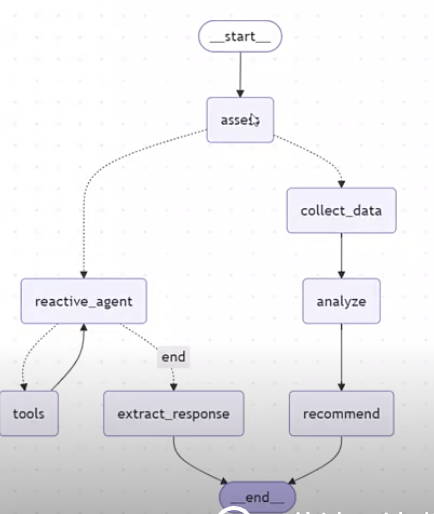
虚线代表条件边,由LLM的响应结果决定走哪条边

  • 如果最后一条 AI 消息包含工具调用 → 跳转到 ToolNode 执行工具。
  • 如果没有工具调用 → 说明模型已经完成回答,工作流结束。
1
2
3
4
5
6
7
8
9
10
11
12
13
14
15
16
17
18
19
20
21
22
23
用户
│
▼
LLM
│
▼
AIMessage
│
├── 普通回答
│
└── tool_calls
│
▼
ToolNode
│
▼
执行工具
│
▼
ToolMessage
│
▼
再次调用LLM

如果 reactive_agent 生成的最后一条 AIMessage 里有 tool_calls

→ 去 tools 执行工具

如果没有 tool_calls

→ 去 extract_response 整理最终回答

1
2
3
4
5
6
7
8
9
10
11
12
13
14
15
16
17
18
19
20
21
22
23
24
25
26
27
reactive_agent

      │

      ▼

检查是否有 tool_calls

      │

 ┌────┴────┐

 │         │

有工具调用   没有工具调用

 │         │

 ▼         ▼

tools   extract_response

 │

 ▼

reactive_agent

LangGraph/LangChain:工作流模式(固定流程图,mermaid)组合各子Agent成一个整体
Qwen-Agent: Agent模式

1
2
3
4
5
6
7
8
9
10
11
12
13
14
15
16
17
18
19
20
21
22
23
24
25
26
27
28
29
30
31
32
33
34
35
36
37
38
39
40
41
42
43
44
45
46
47
48
49
50
51
52
53
54
55
56
57
58
59
60
61
62
63
64
65
66
67
68
69
70
71
72
73
74
75
76
77
78
79
80
81
82
83
84
85
86
87
88
89
90
91
92
93
94
95
96
97
98
99
100
101
102
103
104
105
106
107
108
109
110
111
112
113
114
115
116
117
118
119
120
121
122
123
124
125
126
127
128
129
130
131
132
133
134
135
136
137
138
139
140
141
142
143
144
145
146
147
148
149
150
151
152
153
154
155
156
157
158
159
160
161
162
163
164
165
166
167
168
169
170
171
172
173
174
175
176
177
178
179
180
181
182
183
184
185
186
187
188
189
190
191
192
193
194
195
196
197
198
199
200
201
202
203
204
205
206
207
208
209
210
211
212
213
214
215
216
217
218
219
220
221
222
223
224
225
226
227
228
229
230
231
232
233
234
235
236
237
238
239
240
241
242
243
244
245
246
247
248
249
250
251
252
253
254
255
256
257
258
259
260
261
262
263
264
265
266
267
268
269
270
271
272
273
274
275
276
277
278
279
280
281
282
283
284
285
286
287
288
289
290
291
292
293
294
295
296
297
298
299
300
301
302
303
304
305
306
307
308
309
310
311
312
313
314
315
316
317
318
319
320
321
322
323
324
325
326
327
328
329
330
331
332
333
334
335
336
337
338
339
340
341
342
343
344
345
346
347
348
349
350
351
352
353
354
355
356
357
358
359
360
361
362
363
364
365
366
367
368
369
370
371
372
373
374
375
376
377
378
379
380
381
382
383
384
385
386
387
388
389
390
391
392
393
394
395
396
397
398
399
400
401
402
403
404
405
406
407
408
409
410
411
412
413
414
415
416
417
418
419
420
421
422
423
424
425
426
427
428
429
430
431
432
433
434
435
436
437
438
439
440
441
442
443
444
445
446
447
448
449
450
451
452
453
454
455
456
457
458
459
460
461
462
463
464
465
466
467
468
469
470
471
472
473
474
475
476
477
478
479
480
481
482
483
484
485
486
487
488
489
490
491
492
493
494
495
496
497
498
499
500
501
502
503
504
505
506
507
508
509
510
511
512
513
514
515
516
517
518
519
520
521
522
523
524
525
526
527
528
529
530
531
532
533
534
535
536
537
538
539
540
541
542
543
544
545
546
547
548
549
550
551
552
553
554
555
556
557
558
559
560
561
562
563
564
565
566
567
568
569
570
571
572
573
574
575
576
577
578
579
580
581
582
583
584
585
586
587
588
589
590
591
592
593
594
595
596
597
598
599
600
601
602
603
604
605
606
607
608
609
610
611
612
613
614
615
616
617
618
619
620
621
622
623
624
625
626
627
628
629
630
631
632
633
634
635
636
637
638
639
640
641
642
643
644
645
646
647
648
649
650
651
652
653
654
655
656
657
658
659
660
661
662
663
664
665
666
667
668
669
670
671
672
673
674
675
676
677
678
679
680
681
682
683
684
685
686
687
688
689
690
691
692
693
694
695
696
697
698
699
700
701
702
703
704
705
706
707
708
709
710
711
712
713
714
715
716
717
718
719
720
721
722
723
724
725
726
727
728
729
730
731
732
733
734
735
736
737
738
739
740
741
742
743
744
745
746
747
748
749
750
751
752
753
754
755
756
757
758
759
760
761
762
763
764
765
766
767
768
769
770
771
772
773
774
775
776
777
778
779
780
781
782
783
784
785
786
787
788
789
790
791
792
793
794
795
796
797
798
799
800
801
802
803
804
805
806
807
808
809
810
811
812
813
814
815
816
817
818
819
820
821
822
823
824
825
826
827
828
829
830
831
832
833
834
835
836
837
838
839
840
841
842
843
844
845
846
847
848
849
850
851
852
853
854
855
856
857
858
859
860
861
862
863
864
865
866
867
868
869
870
871
872
873
874
875
876
877
878
879
880
881
882
883
884
885
886
887
888
889
890
891
892
893
894
895
896
897
898
899
900
901
902
903
904
905
906
907
908
909
910
911
912
913
914
915
916
917
918
919
920
921
922
923
924
925
926
927
928
929
930
931
932
933
934
935
936
937
938
939
940
941
942
943
944
945
946
947
948
949
950
951
952
953
954
955
956
957
958
959
960
961
962
963
964
965
966
967
968
969
970
971
972
973
974
975
976
977
978
979
980
981
982
983
984
985
986
987
988
989
990
991
992
993
994
995
996
997
998
999
1000
1001
1002
1003
1004
1005
1006
1007
1008
1009
1010
1011
1012
1013
1014
1015
1016
1017
1018
1019
1020
1021
1022
1023
1024
1025
1026
1027
1028
1029
1030
1031
1032
1033
1034
1035
1036
1037
1038
1039
1040
1041
1042
1043
1044
1045
1046
1047
1048
1049
1050
1051
1052
1053
1054
1055
1056
1057
1058
1059
1060
1061
1062
1063
1064
1065
1066
1067
1068
1069
1070
1071
1072
1073
1074
1075
1076
1077
1078
1079
1080
1081
1082
1083
1084
1085
1086
1087
1088
1089
1090
1091
1092
1093
1094
1095
1096
1097
1098
1099
1100
1101
1102
1103
1104
1105
1106
1107
1108
1109
1110
1111
1112
1113
1114
1115
1116
1117
1118
1119
1120
1121
1122
1123
1124
1125
1126
1127
1128
1129
1130
1131
1132
1133
1134
1135
#!/usr/bin/env python
# -*- coding: utf-8 -*-

"""
深思熟虑智能体(Deliberative Agent)- 智能投研助手

基于 qwen-agent 实现的深思熟虑型智能体,适用于投资研究场景,能够整合数据,
进行多步骤分析和推理,生成投资观点和研究报告。

核心流程:
1. 感知:收集市场数据和信息
2. 建模:构建内部世界模型,理解市场状态
3. 推理:生成多个候选分析方案并模拟结果
4. 决策:选择最优投资观点并形成报告
5. 报告:生成完整研究报告
"""

import os
import json
import dashscope
from qwen_agent.agents import Assistant
from qwen_agent.gui import WebUI
from qwen_agent.tools.base import BaseTool, register_tool
from datetime import datetime
from typing import Dict, List, Any, Optional

# 解决中文显示问题
import matplotlib.pyplot as plt
plt.rcParams['font.sans-serif'] = ['SimHei', 'Microsoft YaHei', 'SimSun', 'Arial Unicode MS']
plt.rcParams['axes.unicode_minus'] = False

# 定义资源文件根目录
ROOT_RESOURCE = os.path.join(os.path.dirname(__file__), 'resource')

# 配置 DashScope
dashscope.api_key = os.getenv('DASHSCOPE_API_KEY', '')
dashscope.timeout = 30

# ====== 智能投研助手 system prompt ======
system_prompt = """我是智能投研助手,一个基于深思熟虑型智能体架构的专业投资研究分析师。

我的工作流程包括五个阶段:

1. **感知阶段**:收集和整理市场数据、经济指标、行业新闻等信息
2. **建模阶段**:构建市场内部模型,分析市场状态、经济周期、风险因素等
3. **推理阶段**:生成多个候选投资分析方案,评估不同策略的可行性
4. **决策阶段**:基于综合分析选择最优投资观点和策略
5. **报告阶段**:生成完整的投资研究报告

我擅长分析:
- 宏观经济环境和政策影响
- 行业发展趋势和竞争格局
- 公司基本面和技术面分析
- 风险评估和投资机会识别
- 投资组合策略建议

**工具使用指南**:
- 当用户提供研究需求时,我会优先使用 `complete_analysis` 工具一次性完成所有五个阶段的分析
- 如果需要分步骤分析,我会按照以下顺序调用工具:
1. `market_perception` 工具进行感知阶段分析
2. `market_modeling` 工具构建市场模型
3. `investment_reasoning` 工具生成候选方案
4. `investment_decision` 工具选择最优方案
5. `generate_report` 工具生成完整报告

我会优先使用 `complete_analysis` 工具,因为它能够一次性完成所有分析并生成完整报告,效率更高。

当用户提供研究主题、行业焦点和时间范围时,我会按照深思熟虑的流程进行分析,确保每个阶段都有充分的思考和论证。
"""

# ====== 工具函数描述 ======
functions_desc = [
{
"name": "market_perception",
"description": "感知阶段:收集市场数据和信息,包括市场概况、关键指标、重要新闻、行业趋势等",
"parameters": {
"type": "object",
"properties": {
"research_topic": {
"type": "string",
"description": "研究主题,如'新能源汽车行业投资机会'"
},
"industry_focus": {
"type": "string",
"description": "行业焦点,如'电动汽车制造、电池技术'"
},
"time_horizon": {
"type": "string",
"description": "时间范围,如'短期/中期/长期'"
}
},
"required": ["research_topic", "industry_focus", "time_horizon"]
}
},
{
"name": "market_modeling",
"description": "建模阶段:构建市场内部模型,分析市场状态、经济周期、风险因素、机会领域等",
"parameters": {
"type": "object",
"properties": {
"research_topic": {
"type": "string",
"description": "研究主题"
},
"industry_focus": {
"type": "string",
"description": "行业焦点"
},
"time_horizon": {
"type": "string",
"description": "时间范围"
},
"perception_data": {
"type": "string",
"description": "感知阶段收集的市场数据(JSON格式)"
}
},
"required": ["research_topic", "industry_focus", "time_horizon", "perception_data"]
}
},
{
"name": "investment_reasoning",
"description": "推理阶段:生成多个候选投资分析方案,评估不同策略的可行性和预期结果",
"parameters": {
"type": "object",
"properties": {
"research_topic": {
"type": "string",
"description": "研究主题"
},
"industry_focus": {
"type": "string",
"description": "行业焦点"
},
"time_horizon": {
"type": "string",
"description": "时间范围"
},
"world_model": {
"type": "string",
"description": "市场内部模型(JSON格式)"
}
},
"required": ["research_topic", "industry_focus", "time_horizon", "world_model"]
}
},
{
"name": "investment_decision",
"description": "决策阶段:评估候选方案,选择最优投资观点,形成投资决策",
"parameters": {
"type": "object",
"properties": {
"research_topic": {
"type": "string",
"description": "研究主题"
},
"industry_focus": {
"type": "string",
"description": "行业焦点"
},
"time_horizon": {
"type": "string",
"description": "时间范围"
},
"world_model": {
"type": "string",
"description": "市场内部模型(JSON格式)"
},
"reasoning_plans": {
"type": "string",
"description": "候选分析方案(JSON格式)"
}
},
"required": ["research_topic", "industry_focus", "time_horizon", "world_model", "reasoning_plans"]
}
},
{
"name": "generate_report",
"description": "报告阶段:生成完整的投资研究报告,整合所有分析结果",
"parameters": {
"type": "object",
"properties": {
"research_topic": {
"type": "string",
"description": "研究主题"
},
"industry_focus": {
"type": "string",
"description": "行业焦点"
},
"time_horizon": {
"type": "string",
"description": "时间范围"
},
"perception_data": {
"type": "string",
"description": "感知阶段收集的市场数据(JSON格式)"
},
"world_model": {
"type": "string",
"description": "市场内部模型(JSON格式)"
},
"selected_plan": {
"type": "string",
"description": "选定的投资决策(JSON格式)"
}
},
"required": ["research_topic", "industry_focus", "time_horizon", "perception_data", "world_model", "selected_plan"]
}
}
]

# ====== 会话隔离存储 ======
_last_analysis_dict = {}

def get_session_id(kwargs):
"""根据 kwargs 获取当前会话的唯一 session_id"""
messages = kwargs.get('messages')
if messages is not None:
return id(messages)
return None

# ====== 感知阶段工具 ======
@register_tool('market_perception')
class MarketPerceptionTool(BaseTool):
"""感知阶段:收集市场数据和信息"""
description = '感知阶段:收集市场数据和信息,包括市场概况、关键指标、重要新闻、行业趋势等'
parameters = [{
'name': 'research_topic',
'type': 'string',
'description': '研究主题,如"新能源汽车行业投资机会"',
'required': True
}, {
'name': 'industry_focus',
'type': 'string',
'description': '行业焦点,如"电动汽车制造、电池技术"',
'required': True
}, {
'name': 'time_horizon',
'type': 'string',
'description': '时间范围,如"短期/中期/长期"',
'required': True
}]

def call(self, params: str, **kwargs) -> str:
import json
args = json.loads(params)
research_topic = args['research_topic']
industry_focus = args['industry_focus']
time_horizon = args['time_horizon']

# 获取会话ID
session_id = get_session_id(kwargs)

# 模拟感知阶段的数据收集
perception_data = {
"market_overview": f"基于{research_topic}的市场概况分析,重点关注{industry_focus}领域在{time_horizon}时间框架下的发展态势。",
"key_indicators": {
"GDP增长率": "5.2% - 经济基本面稳健",
"CPI指数": "2.1% - 通胀压力可控",
"PMI指数": "51.2 - 制造业扩张",
"市场情绪指数": "中性偏乐观"
},
"recent_news": [
f"政策支持{industry_focus}发展,相关补贴政策延续",
f"{industry_focus}技术突破,成本持续下降",
f"国际竞争加剧,{industry_focus}产业链重构"
],
"industry_trends": {
"技术创新": f"{industry_focus}领域技术迭代加速",
"市场格局": "头部企业集中度提升,中小企业分化明显",
"政策环境": "支持政策持续,监管框架完善"
}
}

# 存储到会话中
if session_id:
if session_id not in _last_analysis_dict:
_last_analysis_dict[session_id] = {}
_last_analysis_dict[session_id]['perception_data'] = perception_data

return f"## 感知阶段完成\n\n**市场概况**: {perception_data['market_overview']}\n\n**关键指标**:\n" + \
"\n".join([f"- {k}: {v}" for k, v in perception_data['key_indicators'].items()]) + \
f"\n\n**重要新闻**:\n" + "\n".join([f"- {news}" for news in perception_data['recent_news']]) + \
f"\n\n**行业趋势**:\n" + "\n".join([f"- {k}: {v}" for k, v in perception_data['industry_trends'].items()])

# ====== 建模阶段工具 ======
@register_tool('market_modeling')
class MarketModelingTool(BaseTool):
"""建模阶段:构建市场内部模型"""
description = '建模阶段:构建市场内部模型,分析市场状态、经济周期、风险因素、机会领域等'
parameters = [{
'name': 'research_topic',
'type': 'string',
'description': '研究主题',
'required': True
}, {
'name': 'industry_focus',
'type': 'string',
'description': '行业焦点',
'required': True
}, {
'name': 'time_horizon',
'type': 'string',
'description': '时间范围',
'required': True
}, {
'name': 'perception_data',
'type': 'string',
'description': '感知阶段收集的市场数据(JSON格式)',
'required': True
}]

def call(self, params: str, **kwargs) -> str:
import json
args = json.loads(params)
research_topic = args['research_topic']
industry_focus = args['industry_focus']
time_horizon = args['time_horizon']

# 安全解析 perception_data
try:
perception_data = json.loads(args['perception_data'])
except (json.JSONDecodeError, TypeError):
perception_data = {
"market_overview": f"基于{research_topic}的市场概况分析,重点关注{industry_focus}领域在{time_horizon}时间框架下的发展态势。",
"key_indicators": {
"GDP增长率": "5.2% - 经济基本面稳健",
"CPI指数": "2.1% - 通胀压力可控",
"PMI指数": "51.2 - 制造业扩张",
"市场情绪指数": "中性偏乐观"
},
"recent_news": [
f"政策支持{industry_focus}发展,相关补贴政策延续",
f"{industry_focus}技术突破,成本持续下降",
f"国际竞争加剧,{industry_focus}产业链重构"
],
"industry_trends": {
"技术创新": f"{industry_focus}领域技术迭代加速",
"市场格局": "头部企业集中度提升,中小企业分化明显",
"政策环境": "支持政策持续,监管框架完善"
}
}

# 获取会话ID
session_id = get_session_id(kwargs)

# 构建市场内部模型
world_model = {
"market_state": f"当前{industry_focus}市场处于成长期向成熟期过渡阶段,{time_horizon}内有望保持稳定增长",
"economic_cycle": "经济处于复苏期,政策支持力度加大,为行业发展提供有利环境",
"risk_factors": [
"技术路线变更风险",
"政策调整不确定性",
"国际竞争加剧",
"原材料价格波动"
],
"opportunity_areas": [
"技术创新带来的成本下降",
"政策支持持续加码",
"市场需求快速增长",
"产业链完善度提升"
],
"market_sentiment": "市场情绪整体乐观,投资者对行业前景看好,但需关注短期波动"
}

# 存储到会话中
if session_id:
if session_id not in _last_analysis_dict:
_last_analysis_dict[session_id] = {}
_last_analysis_dict[session_id]['world_model'] = world_model

return f"## 建模阶段完成\n\n**市场状态**: {world_model['market_state']}\n\n**经济周期**: {world_model['economic_cycle']}\n\n**主要风险因素**:\n" + \
"\n".join([f"- {risk}" for risk in world_model['risk_factors']]) + \
f"\n\n**潜在机会领域**:\n" + "\n".join([f"- {opportunity}" for opportunity in world_model['opportunity_areas']]) + \
f"\n\n**市场情绪**: {world_model['market_sentiment']}"

# ====== 推理阶段工具 ======
@register_tool('investment_reasoning')
class InvestmentReasoningTool(BaseTool):
"""推理阶段:生成候选投资分析方案"""
description = '推理阶段:生成多个候选投资分析方案,评估不同策略的可行性和预期结果'
parameters = [{
'name': 'research_topic',
'type': 'string',
'description': '研究主题',
'required': True
}, {
'name': 'industry_focus',
'type': 'string',
'description': '行业焦点',
'required': True
}, {
'name': 'time_horizon',
'type': 'string',
'description': '时间范围',
'required': True
}, {
'name': 'world_model',
'type': 'string',
'description': '市场内部模型(JSON格式)',
'required': True
}]

def call(self, params: str, **kwargs) -> str:
import json
args = json.loads(params)
research_topic = args['research_topic']
industry_focus = args['industry_focus']
time_horizon = args['time_horizon']

# 安全解析 world_model
try:
world_model = json.loads(args['world_model'])
except (json.JSONDecodeError, TypeError):
world_model = {
"market_state": f"当前{industry_focus}市场处于成长期向成熟期过渡阶段,{time_horizon}内有望保持稳定增长",
"economic_cycle": "经济处于复苏期,政策支持力度加大,为行业发展提供有利环境",
"risk_factors": [
"技术路线变更风险",
"政策调整不确定性",
"国际竞争加剧",
"原材料价格波动"
],
"opportunity_areas": [
"技术创新带来的成本下降",
"政策支持持续加码",
"市场需求快速增长",
"产业链完善度提升"
],
"market_sentiment": "市场情绪整体乐观,投资者对行业前景看好,但需关注短期波动"
}

# 获取会话ID
session_id = get_session_id(kwargs)

# 生成候选分析方案
reasoning_plans = [
{
"plan_id": "growth_focused",
"hypothesis": f"基于{industry_focus}的快速增长趋势,重点投资成长性企业",
"analysis_approach": "自上而下分析,关注行业增长驱动因素和龙头企业",
"expected_outcome": f"{time_horizon}内获得15-25%的年化回报",
"confidence_level": 0.75,
"pros": ["行业增长确定性高", "政策支持明确", "技术壁垒相对较低"],
"cons": ["估值可能偏高", "竞争激烈", "依赖政策支持"]
},
{
"plan_id": "value_focused",
"hypothesis": "关注被低估的优质企业,等待价值回归",
"analysis_approach": "自下而上分析,寻找基本面良好但估值合理的标的",
"expected_outcome": f"{time_horizon}内获得10-20%的年化回报",
"confidence_level": 0.65,
"pros": ["安全边际较高", "风险相对可控", "适合稳健投资者"],
"cons": ["回报可能有限", "需要耐心等待", "可能错过快速上涨"]
},
{
"plan_id": "innovation_focused",
"hypothesis": "押注技术创新带来的颠覆性机会",
"analysis_approach": "重点关注技术突破和商业模式创新",
"expected_outcome": f"{time_horizon}内获得20-40%的年化回报",
"confidence_level": 0.55,
"pros": ["潜在回报巨大", "先发优势明显", "符合长期趋势"],
"cons": ["风险极高", "技术路线不确定", "需要专业判断"]
}
]

# 存储到会话中
if session_id:
if session_id not in _last_analysis_dict:
_last_analysis_dict[session_id] = {}
_last_analysis_dict[session_id]['reasoning_plans'] = reasoning_plans

result = "## 推理阶段完成\n\n**候选投资方案**:\n\n"
for i, plan in enumerate(reasoning_plans, 1):
result += f"### 方案{i}: {plan['plan_id']}\n"
result += f"**投资假设**: {plan['hypothesis']}\n"
result += f"**分析方法**: {plan['analysis_approach']}\n"
result += f"**预期结果**: {plan['expected_outcome']}\n"
result += f"**置信度**: {plan['confidence_level']}\n"
result += f"**优势**: {', '.join(plan['pros'])}\n"
result += f"**劣势**: {', '.join(plan['cons'])}\n\n"

return result

# ====== 决策阶段工具 ======
@register_tool('investment_decision')
class InvestmentDecisionTool(BaseTool):
"""决策阶段:选择最优投资观点"""
description = '决策阶段:评估候选方案,选择最优投资观点,形成投资决策'
parameters = [{
'name': 'research_topic',
'type': 'string',
'description': '研究主题',
'required': True
}, {
'name': 'industry_focus',
'type': 'string',
'description': '行业焦点',
'required': True
}, {
'name': 'time_horizon',
'type': 'string',
'description': '时间范围',
'required': True
}, {
'name': 'world_model',
'type': 'string',
'description': '市场内部模型(JSON格式)',
'required': True
}, {
'name': 'reasoning_plans',
'type': 'string',
'description': '候选分析方案(JSON格式)',
'required': True
}]

def call(self, params: str, **kwargs) -> str:
import json
args = json.loads(params)
research_topic = args['research_topic']
industry_focus = args['industry_focus']
time_horizon = args['time_horizon']

# 安全解析 world_model
try:
world_model = json.loads(args['world_model'])
except (json.JSONDecodeError, TypeError):
# 如果解析失败,使用默认值
world_model = {
"market_state": f"当前{industry_focus}市场处于成长期向成熟期过渡阶段",
"economic_cycle": "经济处于复苏期",
"risk_factors": ["技术路线变更风险", "政策调整不确定性"],
"opportunity_areas": ["技术创新带来的成本下降", "政策支持持续加码"],
"market_sentiment": "市场情绪整体乐观"
}

# 安全解析 reasoning_plans
try:
reasoning_plans = json.loads(args['reasoning_plans'])
except (json.JSONDecodeError, TypeError):
# 如果解析失败,使用默认值
reasoning_plans = [
{
"plan_id": "growth_focused",
"hypothesis": f"基于{industry_focus}的快速增长趋势,重点投资成长性企业",
"analysis_approach": "自上而下分析,关注行业增长驱动因素和龙头企业",
"expected_outcome": f"{time_horizon}内获得15-25%的年化回报",
"confidence_level": 0.75,
"pros": ["行业增长确定性高", "政策支持明确", "技术壁垒相对较低"],
"cons": ["估值可能偏高", "竞争激烈", "依赖政策支持"]
},
{
"plan_id": "value_focused",
"hypothesis": "关注被低估的优质企业,等待价值回归",
"analysis_approach": "自下而上分析,寻找基本面良好但估值合理的标的",
"expected_outcome": f"{time_horizon}内获得10-20%的年化回报",
"confidence_level": 0.65,
"pros": ["安全边际较高", "风险相对可控", "适合稳健投资者"],
"cons": ["回报可能有限", "需要耐心等待", "可能错过快速上涨"]
}
]

# 获取会话ID
session_id = get_session_id(kwargs)

# 选择最优方案(这里选择成长型策略)
selected_plan = {
"selected_plan_id": "growth_focused",
"investment_thesis": f"基于{industry_focus}的强劲增长势头和明确的政策支持,建议采用成长型投资策略",
"supporting_evidence": [
"行业增长确定性高,市场需求旺盛",
"政策支持力度持续加大",
"技术成熟度不断提升,成本持续下降"
],
"risk_assessment": "主要风险包括估值偏高、竞争加剧和政策调整,建议分散投资并设置止损",
"recommendation": f"建议{time_horizon}内配置60-80%资金于成长型标的,20-40%配置于价值型标的",
"timeframe": f"{time_horizon}投资周期,建议定期评估和调整"
}

# 存储到会话中
if session_id:
if session_id not in _last_analysis_dict:
_last_analysis_dict[session_id] = {}
_last_analysis_dict[session_id]['selected_plan'] = selected_plan

return f"## 决策阶段完成\n\n**选定方案**: {selected_plan['selected_plan_id']}\n\n**投资论点**: {selected_plan['investment_thesis']}\n\n**支持证据**:\n" + \
"\n".join([f"- {evidence}" for evidence in selected_plan['supporting_evidence']]) + \
f"\n\n**风险评估**: {selected_plan['risk_assessment']}\n\n**投资建议**: {selected_plan['recommendation']}\n\n**时间框架**: {selected_plan['timeframe']}"

# ====== 完整分析工具 ======
@register_tool('complete_analysis')
class CompleteAnalysisTool(BaseTool):
"""完整分析:一次性完成所有五个阶段的分析"""
description = '完整分析:一次性完成感知、建模、推理、决策、报告五个阶段的分析'
parameters = [{
'name': 'research_topic',
'type': 'string',
'description': '研究主题,如"新能源汽车行业投资机会"',
'required': True
}, {
'name': 'industry_focus',
'type': 'string',
'description': '行业焦点,如"电动汽车制造、电池技术"',
'required': True
}, {
'name': 'time_horizon',
'type': 'string',
'description': '时间范围,如"短期/中期/长期"',
'required': True
}]

def call(self, params: str, **kwargs) -> str:
import json
args = json.loads(params)
research_topic = args['research_topic']
industry_focus = args['industry_focus']
time_horizon = args['time_horizon']

# 获取会话ID
session_id = get_session_id(kwargs)

# 第一阶段:感知
perception_data = {
"market_overview": f"基于{research_topic}的市场概况分析,重点关注{industry_focus}领域在{time_horizon}时间框架下的发展态势。",
"key_indicators": {
"GDP增长率": "5.2% - 经济基本面稳健",
"CPI指数": "2.1% - 通胀压力可控",
"PMI指数": "51.2 - 制造业扩张",
"市场情绪指数": "中性偏乐观"
},
"recent_news": [
f"政策支持{industry_focus}发展,相关补贴政策延续",
f"{industry_focus}技术突破,成本持续下降",
f"国际竞争加剧,{industry_focus}产业链重构"
],
"industry_trends": {
"技术创新": f"{industry_focus}领域技术迭代加速",
"市场格局": "头部企业集中度提升,中小企业分化明显",
"政策环境": "支持政策持续,监管框架完善"
}
}

# 第二阶段:建模
world_model = {
"market_state": f"当前{industry_focus}市场处于成长期向成熟期过渡阶段,{time_horizon}内有望保持稳定增长",
"economic_cycle": "经济处于复苏期,政策支持力度加大,为行业发展提供有利环境",
"risk_factors": [
"技术路线变更风险",
"政策调整不确定性",
"国际竞争加剧",
"原材料价格波动"
],
"opportunity_areas": [
"技术创新带来的成本下降",
"政策支持持续加码",
"市场需求快速增长",
"产业链完善度提升"
],
"market_sentiment": "市场情绪整体乐观,投资者对行业前景看好,但需关注短期波动"
}

# 第三阶段:推理
reasoning_plans = [
{
"plan_id": "growth_focused",
"hypothesis": f"基于{industry_focus}的快速增长趋势,重点投资成长性企业",
"analysis_approach": "自上而下分析,关注行业增长驱动因素和龙头企业",
"expected_outcome": f"{time_horizon}内获得15-25%的年化回报",
"confidence_level": 0.75,
"pros": ["行业增长确定性高", "政策支持明确", "技术壁垒相对较低"],
"cons": ["估值可能偏高", "竞争激烈", "依赖政策支持"]
},
{
"plan_id": "value_focused",
"hypothesis": "关注被低估的优质企业,等待价值回归",
"analysis_approach": "自下而上分析,寻找基本面良好但估值合理的标的",
"expected_outcome": f"{time_horizon}内获得10-20%的年化回报",
"confidence_level": 0.65,
"pros": ["安全边际较高", "风险相对可控", "适合稳健投资者"],
"cons": ["回报可能有限", "需要耐心等待", "可能错过快速上涨"]
},
{
"plan_id": "innovation_focused",
"hypothesis": "押注技术创新带来的颠覆性机会",
"analysis_approach": "重点关注技术突破和商业模式创新",
"expected_outcome": f"{time_horizon}内获得20-40%的年化回报",
"confidence_level": 0.55,
"pros": ["潜在回报巨大", "先发优势明显", "符合长期趋势"],
"cons": ["风险极高", "技术路线不确定", "需要专业判断"]
}
]

# 第四阶段:决策
selected_plan = {
"selected_plan_id": "growth_focused",
"investment_thesis": f"基于{industry_focus}的强劲增长势头和明确的政策支持,建议采用成长型投资策略",
"supporting_evidence": [
"行业增长确定性高,市场需求旺盛",
"政策支持力度持续加大",
"技术成熟度不断提升,成本持续下降"
],
"risk_assessment": "主要风险包括估值偏高、竞争加剧和政策调整,建议分散投资并设置止损",
"recommendation": f"建议{time_horizon}内配置60-80%资金于成长型标的,20-40%配置于价值型标的",
"timeframe": f"{time_horizon}投资周期,建议定期评估和调整"
}

# 存储到会话中
if session_id:
if session_id not in _last_analysis_dict:
_last_analysis_dict[session_id] = {}
_last_analysis_dict[session_id].update({
'perception_data': perception_data,
'world_model': world_model,
'reasoning_plans': reasoning_plans,
'selected_plan': selected_plan
})

# 生成完整报告
timestamp = datetime.now().strftime("%Y年%m月%d日 %H:%M")
report = f"""# {research_topic} - 投资研究报告

**报告时间**: {timestamp}
**行业焦点**: {industry_focus}
**投资周期**: {time_horizon}

---

## 执行摘要

本报告基于深思熟虑型智能体架构,通过五个阶段的分析,为{research_topic}提供全面的投资建议。

**核心投资观点**: {selected_plan['investment_thesis']}

**主要投资建议**: {selected_plan['recommendation']}

---

## 一、市场环境分析

### 1.1 市场概况
{perception_data['market_overview']}

### 1.2 关键经济指标
{chr(10).join([f"- **{k}**: {v}" for k, v in perception_data['key_indicators'].items()])}

### 1.3 重要市场动态
{chr(10).join([f"- {news}" for news in perception_data['recent_news']])}

### 1.4 行业趋势分析
{chr(10).join([f"- **{k}**: {v}" for k, v in perception_data['industry_trends'].items()])}

---

## 二、市场模型构建

### 2.1 市场状态评估
{world_model['market_state']}

### 2.2 经济周期判断
{world_model['economic_cycle']}

### 2.3 风险因素识别
{chr(10).join([f"- {risk}" for risk in world_model['risk_factors']])}

### 2.4 机会领域分析
{chr(10).join([f"- {opportunity}" for opportunity in world_model['opportunity_areas']])}

### 2.5 市场情绪分析
{world_model['market_sentiment']}

---

## 三、投资策略分析

### 3.1 候选方案对比

"""

# 添加候选方案对比
for i, plan in enumerate(reasoning_plans, 1):
report += f"#### 方案{i}: {plan['plan_id']}\n"
report += f"**投资假设**: {plan['hypothesis']}\n"
report += f"**分析方法**: {plan['analysis_approach']}\n"
report += f"**预期结果**: {plan['expected_outcome']}\n"
report += f"**置信度**: {plan['confidence_level']}\n"
report += f"**优势**: {', '.join(plan['pros'])}\n"
report += f"**劣势**: {', '.join(plan['cons'])}\n\n"

report += f"""### 3.2 选定策略
**策略类型**: {selected_plan['selected_plan_id']}

### 3.3 投资论点
{selected_plan['investment_thesis']}

### 3.4 支持证据
{chr(10).join([f"- {evidence}" for evidence in selected_plan['supporting_evidence']])}

---

## 四、风险评估与建议

### 4.1 风险评估
{selected_plan['risk_assessment']}

### 4.2 投资建议
{selected_plan['recommendation']}

### 4.3 时间框架
{selected_plan['timeframe']}

---

## 五、结论

基于深思熟虑的分析流程,我们认为{research_topic}在{time_horizon}内具有较好的投资价值。建议投资者根据自身风险承受能力和投资目标,合理配置资金,并持续关注市场变化。

**风险提示**: 投资有风险,入市需谨慎。本报告仅供参考,不构成投资建议。

---

*本报告由智能投研助手基于深思熟虑型智能体架构生成*
"""

# 保存报告到文件
timestamp = datetime.now().strftime("%Y%m%d_%H%M%S")
filename = f"research_report_{timestamp}.txt"

with open(filename, "w", encoding="utf-8") as f:
f.write(report)

return f"## 完整分析完成\n\n**报告已保存为**: {filename}\n\n{report}"

# ====== 报告生成工具 ======
@register_tool('generate_report')
class GenerateReportTool(BaseTool):
"""报告阶段:生成完整投资研究报告"""
description = '报告阶段:生成完整的投资研究报告,整合所有分析结果'
parameters = [{
'name': 'research_topic',
'type': 'string',
'description': '研究主题',
'required': True
}, {
'name': 'industry_focus',
'type': 'string',
'description': '行业焦点',
'required': True
}, {
'name': 'time_horizon',
'type': 'string',
'description': '时间范围',
'required': True
}, {
'name': 'perception_data',
'type': 'string',
'description': '感知阶段收集的市场数据(JSON格式)',
'required': True
}, {
'name': 'world_model',
'type': 'string',
'description': '市场内部模型(JSON格式)',
'required': True
}, {
'name': 'selected_plan',
'type': 'string',
'description': '选定的投资决策(JSON格式)',
'required': True
}]

def call(self, params: str, **kwargs) -> str:
import json
import os
args = json.loads(params)
research_topic = args['research_topic']
industry_focus = args['industry_focus']
time_horizon = args['time_horizon']

# 安全解析 perception_data
try:
perception_data = json.loads(args['perception_data'])
except (json.JSONDecodeError, TypeError):
perception_data = {
"market_overview": f"基于{research_topic}的市场概况分析,重点关注{industry_focus}领域在{time_horizon}时间框架下的发展态势。",
"key_indicators": {
"GDP增长率": "5.2% - 经济基本面稳健",
"CPI指数": "2.1% - 通胀压力可控",
"PMI指数": "51.2 - 制造业扩张",
"市场情绪指数": "中性偏乐观"
},
"recent_news": [
f"政策支持{industry_focus}发展,相关补贴政策延续",
f"{industry_focus}技术突破,成本持续下降",
f"国际竞争加剧,{industry_focus}产业链重构"
],
"industry_trends": {
"技术创新": f"{industry_focus}领域技术迭代加速",
"市场格局": "头部企业集中度提升,中小企业分化明显",
"政策环境": "支持政策持续,监管框架完善"
}
}

# 安全解析 world_model
try:
world_model = json.loads(args['world_model'])
except (json.JSONDecodeError, TypeError):
world_model = {
"market_state": f"当前{industry_focus}市场处于成长期向成熟期过渡阶段,{time_horizon}内有望保持稳定增长",
"economic_cycle": "经济处于复苏期,政策支持力度加大,为行业发展提供有利环境",
"risk_factors": [
"技术路线变更风险",
"政策调整不确定性",
"国际竞争加剧",
"原材料价格波动"
],
"opportunity_areas": [
"技术创新带来的成本下降",
"政策支持持续加码",
"市场需求快速增长",
"产业链完善度提升"
],
"market_sentiment": "市场情绪整体乐观,投资者对行业前景看好,但需关注短期波动"
}

# 安全解析 selected_plan
try:
selected_plan = json.loads(args['selected_plan'])
except (json.JSONDecodeError, TypeError):
selected_plan = {
"selected_plan_id": "growth_focused",
"investment_thesis": f"基于{industry_focus}的强劲增长势头和明确的政策支持,建议采用成长型投资策略",
"supporting_evidence": [
"行业增长确定性高,市场需求旺盛",
"政策支持力度持续加大",
"技术成熟度不断提升,成本持续下降"
],
"risk_assessment": "主要风险包括估值偏高、竞争加剧和政策调整,建议分散投资并设置止损",
"recommendation": f"建议{time_horizon}内配置60-80%资金于成长型标的,20-40%配置于价值型标的",
"timeframe": f"{time_horizon}投资周期,建议定期评估和调整"
}

# 生成完整报告
timestamp = datetime.now().strftime("%Y年%m月%d日 %H:%M")
report = f"""# {research_topic} - 投资研究报告

**报告时间**: {timestamp}
**行业焦点**: {industry_focus}
**投资周期**: {time_horizon}

---

## 执行摘要

本报告基于深思熟虑型智能体架构,通过五个阶段的分析,为{research_topic}提供全面的投资建议。

**核心投资观点**: {selected_plan['investment_thesis']}

**主要投资建议**: {selected_plan['recommendation']}

---

## 一、市场环境分析

### 1.1 市场概况
{perception_data['market_overview']}

### 1.2 关键经济指标
{chr(10).join([f"- **{k}**: {v}" for k, v in perception_data['key_indicators'].items()])}

### 1.3 重要市场动态
{chr(10).join([f"- {news}" for news in perception_data['recent_news']])}

### 1.4 行业趋势分析
{chr(10).join([f"- **{k}**: {v}" for k, v in perception_data['industry_trends'].items()])}

---

## 二、市场模型构建

### 2.1 市场状态评估
{world_model['market_state']}

### 2.2 经济周期判断
{world_model['economic_cycle']}

### 2.3 风险因素识别
{chr(10).join([f"- {risk}" for risk in world_model['risk_factors']])}

### 2.4 机会领域分析
{chr(10).join([f"- {opportunity}" for opportunity in world_model['opportunity_areas']])}

### 2.5 市场情绪分析
{world_model['market_sentiment']}

---

## 三、投资策略分析

### 3.1 选定策略
**策略类型**: {selected_plan['selected_plan_id']}

### 3.2 投资论点
{selected_plan['investment_thesis']}

### 3.3 支持证据
{chr(10).join([f"- {evidence}" for evidence in selected_plan['supporting_evidence']])}

---

## 四、风险评估与建议

### 4.1 风险评估
{selected_plan['risk_assessment']}

### 4.2 投资建议
{selected_plan['recommendation']}

### 4.3 时间框架
{selected_plan['timeframe']}

---

## 五、结论

基于深思熟虑的分析流程,我们认为{research_topic}在{time_horizon}内具有较好的投资价值。建议投资者根据自身风险承受能力和投资目标,合理配置资金,并持续关注市场变化。

**风险提示**: 投资有风险,入市需谨慎。本报告仅供参考,不构成投资建议。

---

*本报告由智能投研助手基于深思熟虑型智能体架构生成*
"""

# 保存报告到文件
timestamp = datetime.now().strftime("%Y%m%d_%H%M%S")
filename = f"research_report_{timestamp}.txt"

with open(filename, "w", encoding="utf-8") as f:
f.write(report)

return f"## 报告生成完成\n\n**报告已保存为**: {filename}\n\n{report}"

# ====== 初始化智能投研助手服务 ======
def init_agent_service():
"""初始化智能投研助手服务"""
llm_cfg = {
'model': 'qwen-turbo-2025-04-28',
'timeout': 30,
'retry_count': 3,
}
try:
bot = Assistant(
llm=llm_cfg,
name='智能投研助手',
description='基于深思熟虑型智能体的专业投资研究分析',
system_message=system_prompt,
function_list=['market_perception', 'market_modeling', 'investment_reasoning', 'investment_decision', 'generate_report'],
)
print("智能投研助手初始化成功!")
return bot
except Exception as e:
print(f"智能投研助手初始化失败: {str(e)}")
raise

def app_tui():
"""终端交互模式"""
try:
# 初始化助手
bot = init_agent_service()

# 对话历史
messages = []
print("=== 智能投研助手 - 终端模式 ===\n")
print("请输入您的研究需求,我将按照深思熟虑的流程为您分析。")
print("示例输入:'请分析新能源汽车行业在中期时间框架下的投资机会'")
print("输入 'quit' 退出\n")

while True:
try:
# 获取用户输入
query = input('用户问题: ')

if query.lower() == 'quit':
print("感谢使用智能投研助手!")
break

# 输入验证
if not query:
print('用户问题不能为空!')
continue

# 构建消息
messages.append({'role': 'user', 'content': query})

print("正在进行分析...")
# 运行助手并处理响应
response = []
for response in bot.run(messages):
print('助手回复:', response)
messages.extend(response)

except Exception as e:
print(f"处理请求时出错: {str(e)}")
print("请重试或输入新的问题")
except Exception as e:
print(f"启动终端模式失败: {str(e)}")

def app_gui():
"""图形界面模式,提供 Web 图形界面"""
try:
print("正在启动 Web 界面...")
# 初始化助手
bot = init_agent_service()
# 配置聊天界面,列举典型投研问题
chatbot_config = {
'prompt.suggestions': [
'请分析新能源汽车行业在中期时间框架下的投资机会',
'帮我研究人工智能技术在短期内的投资前景',
'分析医疗健康行业在长期投资周期中的发展机会',
]
}
print("Web 界面准备就绪,正在启动服务...")
# 启动 Web 界面
WebUI(
bot,
chatbot_config=chatbot_config
).run()
except Exception as e:
print(f"启动 Web 界面失败: {str(e)}")
print("请检查网络连接和 API Key 配置")

if __name__ == '__main__':
# 运行模式选择
app_gui() # 图形界面模式(默认)

Agent的能力优化与效果评估

Agent效果评估(测试代码)架构:

  • LangSmith (基于LangChain/LangGraph开发)
    • Prompt Ops
  • OpenEval (开源评估)
  • LangFuse (非LangChain家族的评估)

建立测试集

  • 简单直接的查询数据
    • 市场状况查询(今天上证指数表现如何)
    • 账户信息查询(我的投资组合中科技股占比)
    • 基础概念解释(什么是ETF)
  • 复杂分析查询
    • 投资组合调整建议
    • 长期财务规划
    • 风险评估和应对策略
  • 步骤
    1. 收集数据:整合市场数据、客户画像、历史数据
    2. 深度分析:构建市场模型、分析多种可能情景
    3. 生成建议:形成多个方案并选择最优解

LangSimth

1
2
3
4
5
6
7
8
9
10
11
12
13
14
15
16
17
18
19
20
21
22
23
24
25
26
27
28
29
30
31
32
33
34
35
36
37
38
39
40
41
42
43
44
45
46
47
48
49
50
51
52
53
54
55
56
57
58
59
60
61
62
63
64
65
66
67
68
69
70
71
72
73
74
75
76
77
78
79
80
81
82
83
84
85
86
87
88
89
90
91
92
93
94
95
96
97
98
99
100
101
102
103
104
105
106
107
108
109
110
111
112
113
114
115
116
117
118
119
120
121
122
123
124
125
126
127
128
129
130
131
132
133
134
135
136
137
138
139
140
141
142
143
144
145
146
147
148
149
150
151
152
153
154
155
156
157
158
159
160
161
162
163
164
165
166
167
168
169
170
171
172
173
174
175
176
177
178
179
180
181
182
183
184
185
186
187
188
189
190
191
192
193
194
195
196
197
198
199
200
201
202
203
204
205
206
207
208
209
210
211
212
213
214
215
216
217
218
219
220
221
222
223
224
225
226
227
228
229
230
231
232
233
234
235
236
237
238
239
240
241
242
243
244
245
246
247
248
249
250
251
252
253
254
255
256
257
258
259
260
261
262
263
264
265
266
267
268
269
270
271
272
273
274
275
276
277
278
279
280
281
282
283
284
285
286
287
288
289
290
291
292
293
294
295
296
297
298
299
300
301
302
303
304
305
306
307
308
309
310
311
312
313
314
315
316
317
318
319
320
321
322
323
324
325
326
327
328
329
330
331
332
333
334
335
336
337
338
339
340
341
342
343
344
345
346
347
348
349
350
351
352
353
354
355
356
357
358
359
360
361
362
363
364
365
366
367
368
369
370
371
372
373
374
375
376
377
378
379
380
381
382
383
384
385
386
387
388
389
390
391
392
393
394
395
396
397
398
399
400
401
402
403
404
405
406
407
408
409
410
411
412
413
414
415
416
417
418
419
420
421
422
423
424
425
426
427
428
429
430
431
432
433
434
435
436
437
438
439
440
441
442
443
444
445
446
447
448
449
450
451
452
453
454
455
456
457
458
459
460
461
462
463
464
465
466
467
468
469
470
471
472
473
474
475
476
477
478
479
480
481
482
483
484
485
486
487
488
489
490
491
492
493
494
495
496
497
498
499
500
501
502
503
504
505
506
507
508
509
510
511
512
513
514
515
516
517
518
519
520
521
522
523
524
525
526
527
528
529
530
531
532
533
534
535
536
537
538
539
540
541
542
543
544
545
546
547
548
549
550
551
552
553
554
555
556
557
558
559
560
561
562
563
564
565
566
567
568
569
570
571
572
573
574
575
576
577
578
579
580
581
582
583
584
585
586
587
588
589
590
591
592
593
594
595
596
597
598
599
600
601
602
603
604
605
606
607
608
609
610
611
612
613
614
615
616
617
618
619
620
621
622
623
624
625
626
627
628
629
630
631
632
633
634
635
636
637
638
639
640
641
642
643
644
645
646
647
648
649
650
651
652
653
654
655
656
657
658
659
660
661
662
663
664
665
666
667
668
669
670
671
672
673
674
675
676
677
678
679
680
681
682
683
684
685
686
687
688
689
690
691
692
693
694
695
696
697
698
699
700
701
702
703
704
#!/usr/bin/env python
# -*- coding: utf-8 -*-

"""
混合智能体(Hybrid Agent)- 财富管理投顾AI助手

基于LangGraph实现的混合型智能体,结合反应式架构的即时响应能力和深思熟虑架构的长期规划能力,
通过协调层动态切换处理模式,提供智能化财富管理咨询服务。

三层架构:
1. 底层(反应式):即时响应客户查询,提供快速反馈
2. 中层(协调):评估任务类型和优先级,动态选择处理模式
3. 顶层(深思熟虑):进行复杂的投资分析和长期财务规划

LangSmith 集成:
本智能体已集成 LangSmith 用于调试、追踪和监控。要启用 LangSmith:

1. 获取 API 密钥:
- 访问 https://smith.langchain.com
- 注册账号并获取 API 密钥

2. 设置环境变量(Windows PowerShell):
$env:LANGSMITH_API_KEY="your-api-key-here"
$env:LANGCHAIN_TRACING_V2="true"
$env:LANGCHAIN_PROJECT="wealth-advisor-hybrid-agent" # 可选,用于组织追踪记录

启用后,所有 LLM 调用和 Agent 执行流程都会自动记录到 LangSmith,
可以在 https://smith.langchain.com 查看详细的执行追踪、性能指标和调试信息。
"""

import os
import json
import re
from datetime import datetime
from typing import Dict, List, Any, Literal, TypedDict, Optional

# 修复 langchain 1.1.x 版本兼容性问题:在导入 langchain_core 之前设置必要的属性
import langchain
if not hasattr(langchain, 'verbose'):
langchain.verbose = False
if not hasattr(langchain, 'debug'):
langchain.debug = False
if not hasattr(langchain, 'llm_cache'):
langchain.llm_cache = None

from langchain_core.prompts import ChatPromptTemplate
from langchain_community.llms import Tongyi
from langchain_core.output_parsers import StrOutputParser, JsonOutputParser
from langchain_core.runnables import RunnableConfig
from pydantic import BaseModel, Field
from langgraph.graph import StateGraph, END
import warnings
warnings.filterwarnings("ignore")

# 设置API密钥
DASHSCOPE_API_KEY = os.getenv("DASHSCOPE_API_KEY")

# ==================== LangSmith 配置 ====================
# LangSmith 用于 Agent 调试、追踪和监控
# 使用前需要设置以下环境变量:
# 1. LANGSMITH_API_KEY: 从 https://smith.langchain.com 获取
# 2. LANGCHAIN_TRACING_V2: 设置为 "true" 启用追踪
# 3. LANGCHAIN_PROJECT: 项目名称(可选,用于组织追踪记录)
# 4. LANGCHAIN_ENDPOINT: LangSmith API端点(可选,默认使用官方端点)

# 检查是否启用 LangSmith
LANGSMITH_ENABLED = os.getenv("LANGCHAIN_TRACING_V2", "").lower() == "true"
LANGSMITH_PROJECT = os.getenv("LANGCHAIN_PROJECT", "wealth-advisor-hybrid-agent")
print("LANGSMITH_ENABLED=", LANGSMITH_ENABLED)

# 创建LLM实例
llm = Tongyi(model_name="qwen-turbo-latest", dashscope_api_key=DASHSCOPE_API_KEY)

# 定义客户信息数据结构
class CustomerProfile(BaseModel):
"""客户画像信息"""
customer_id: str = Field(..., description="客户ID")
risk_tolerance: Literal["保守型", "稳健型", "平衡型", "成长型", "进取型"] = Field(..., description="风险承受能力")
investment_horizon: Literal["短期", "中期", "长期"] = Field(..., description="投资期限")
financial_goals: List[str] = Field(..., description="财务目标")
investment_preferences: List[str] = Field(..., description="投资偏好")
portfolio_value: float = Field(..., description="投资组合总价值")
current_allocations: Dict[str, float] = Field(..., description="当前资产配置")

# 定义应急响应输出
class EmergencyResponseOutput(BaseModel):
"""紧急查询的即时响应"""
response_type: str = Field(..., description="响应类型")
direct_answer: str = Field(..., description="直接回答")
data_points: Optional[Dict[str, Any]] = Field(None, description="相关数据点")
suggested_actions: Optional[List[str]] = Field(None, description="建议操作")

# 定义深度分析输出
class InvestmentAnalysisOutput(BaseModel):
"""深度投资分析结果"""
market_assessment: str = Field(..., description="市场评估")
portfolio_analysis: Dict[str, Any] = Field(..., description="投资组合分析")
recommendations: List[Dict[str, Any]] = Field(..., description="投资建议")
risk_analysis: Dict[str, Any] = Field(..., description="风险分析")
expected_outcomes: Dict[str, Any] = Field(..., description="预期结果")

# 定义状态类型
class WealthAdvisorState(TypedDict):
"""财富顾问智能体的状态"""
# 输入
user_query: str # 用户查询
customer_profile: Optional[Dict[str, Any]] # 客户画像

# 处理状态
query_type: Optional[Literal["emergency", "informational", "analytical"]] # 查询类型
processing_mode: Optional[Literal["reactive", "deliberative"]] # 处理模式
emergency_response: Optional[Dict[str, Any]] # 紧急响应结果
market_data: Optional[Dict[str, Any]] # 市场数据
analysis_results: Optional[Dict[str, Any]] # 分析结果

# 输出
final_response: Optional[str] # 最终响应

# 控制流
current_phase: Optional[str]
error: Optional[str] # 错误信息

# 提示模板
ASSESSMENT_PROMPT = """你是一个财富管理投顾AI助手的协调层。请评估以下用户查询,确定其类型和应该采用的处理模式。

用户查询: {user_query}

请判断:
1. 查询类型:
- "emergency": 紧急的或直接的查询,需要立即响应(如市场状况、账户信息、产品信息等)
- "informational": 信息性的查询,需要特定领域知识(如税务政策、投资工具介绍等)
- "analytical": 需要深度分析的查询(如投资组合优化、长期理财规划等)

2. 建议的处理模式:
- "reactive": 适用于需要快速反应的查询
- "deliberative": 适用于需要深度思考和分析的查询

请以JSON格式返回结果,包含以下字段:
- query_type: 查询类型(上述三种类型之一)
- processing_mode: 处理模式(上述两种模式之一)
- reasoning: 决策理由的简要说明
"""

REACTIVE_PROMPT = """你是一个财富管理投顾AI助手,专注于提供快速准确的响应。请针对用户的查询提供直接的回答。

用户查询: {user_query}

客户信息:
{customer_profile}

请提供:
1. 直接回答用户问题
2. 相关的关键数据点(如适用)
3. 建议的后续操作(如适用)

以JSON格式返回响应,包含以下字段:
- response_type: 响应类型
- direct_answer: 直接回答
- data_points: 相关数据点(可选)
- suggested_actions: 建议操作(可选)
"""

DATA_COLLECTION_PROMPT = """你是一个财富管理投顾AI助手的数据收集模块。基于以下用户查询,确定需要收集哪些市场和财务数据进行深入分析。

用户查询: {user_query}

客户信息:
{customer_profile}

请确定需要收集的数据类型,例如:
- 资产类别表现数据
- 经济指标
- 行业趋势
- 历史回报率
- 风险指标
- 税收信息
- 其他相关数据

以JSON格式返回结果,包含以下字段:
- required_data_types: 需要收集的数据类型列表
- data_sources: 建议的数据来源列表
- collected_data: 模拟收集的数据(为简化示例,请生成合理的模拟数据)
"""

ANALYSIS_PROMPT = """你是一个财富管理投顾AI助手的分析引擎。请根据收集的数据对用户的投资情况进行深入分析。

用户查询: {user_query}

客户信息:
{customer_profile}

市场数据:
{market_data}

请提供全面的投资分析,包括:
1. 当前市场状况评估
2. 客户投资组合分析
3. 个性化投资建议
4. 风险评估
5. 预期结果和回报预测

以JSON格式返回分析结果,包含以下字段:
- market_assessment: 市场评估
- portfolio_analysis: 投资组合分析
- recommendations: 投资建议列表
- risk_analysis: 风险分析
- expected_outcomes: 预期结果
"""

RECOMMENDATION_PROMPT = """你是一个财富管理投顾AI助手。请根据深入分析结果,为客户准备最终的咨询建议。

用户查询: {user_query}

客户信息:
{customer_profile}

分析结果:
{analysis_results}

请提供专业、个性化且详细的投资建议,语言应友好易懂,避免过多专业术语。建议应包括:
1. 总体投资策略
2. 具体行动步骤
3. 资产配置建议
4. 风险管理策略
5. 时间框架
6. 预期收益
7. 后续跟进计划

返回格式应为自然语言文本,适合直接呈现给客户。
"""

def query_shanghai_index(_: str = "") -> str:
"""上证指数实时查询工具(模拟版),返回固定的行情数据"""
# 直接返回模拟数据,避免外部API不可用导致报错
name = "上证指数"
price = "3125.62"
change = "6.32"
pct = "0.20"
result = f"{name} 当前点位: {price},涨跌: {change},涨跌幅: {pct}%"
print('result=', result)
return result

# 第一阶段:情境评估 - 确定查询类型和处理模式
def assess_query(state: WealthAdvisorState) -> WealthAdvisorState:
print("[DEBUG] 进入节点: assess_query")
"""评估用户查询,确定类型和处理模式"""

try:
# 准备提示
prompt = ChatPromptTemplate.from_template(ASSESSMENT_PROMPT)

# 构建输入
input_data = {
"user_query": state["user_query"],
}

# 调用LLM
chain = prompt | llm | JsonOutputParser()
result = chain.invoke(input_data)
print("[DEBUG] LLM评估输出:", result)
print(f"[DEBUG] 分支判断: processing_mode={result.get('processing_mode', '未知')}, query_type={result.get('query_type', '未知')}")
# 获取处理模式,确保有值
processing_mode = result.get("processing_mode", "reactive")
if processing_mode not in ["reactive", "deliberative"]:
processing_mode = "reactive" # 默认使用反应式处理
# 获取查询类型,确保有值
query_type = result.get("query_type", "emergency")
if query_type not in ["emergency", "informational", "analytical"]:
query_type = "emergency" # 默认为紧急查询
# ==========================
# 更新状态
updated_state = {
**state,
"query_type": query_type,
"processing_mode": processing_mode,
}
return updated_state
except Exception as e:
return {
**state,
"error": f"评估阶段出错: {str(e)}",
"final_response": "评估查询时发生错误,无法处理您的请求。"
}

# 反应式处理 - 快速响应简单查询
def reactive_processing(state: WealthAdvisorState) -> WealthAdvisorState:
print("[DEBUG] 进入节点: reactive_processing")
"""反应式处理模式,提供快速响应,支持工具调用"""
try:
# 定义可用工具
tools_map = {
"上证指数查询": query_shanghai_index,
}

# 构建提示模板
REACTIVE_AGENT_PROMPT = """你是一个财富管理投顾AI助手,请根据用户的问题回答。

你可以使用以下工具:
- 上证指数查询: 用于查询上证指数的最新行情

如果用户询问上证指数相关信息,请在回答中包含 [CALL_TOOL:上证指数查询] 标记。
如果不需要使用工具,直接回答用户问题即可。

用户问题: {input}

请提供专业、简洁、准确的回答。
"""

user_query = state["user_query"]

# 第一轮:让LLM决定是否需要工具
prompt = ChatPromptTemplate.from_template(REACTIVE_AGENT_PROMPT)
chain = prompt | llm | StrOutputParser()
first_response = chain.invoke({"input": user_query})

# 检查是否需要调用工具
if "[CALL_TOOL:上证指数查询]" in first_response:
# 调用工具获取数据
tool_result = query_shanghai_index("")

# 构建最终回答的提示
FINAL_PROMPT = """你是一个财富管理投顾AI助手。

用户问题: {input}
工具返回数据: {tool_result}

请根据工具返回的数据,为用户提供专业、简洁的回答。
"""
final_prompt = ChatPromptTemplate.from_template(FINAL_PROMPT)
final_chain = final_prompt | llm | StrOutputParser()
final_response = final_chain.invoke({"input": user_query, "tool_result": tool_result})
else:
final_response = first_response.replace("[CALL_TOOL:上证指数查询]", "").strip()

return {
**state,
"final_response": final_response
}
except Exception as e:
return {
**state,
"error": f"反应式处理出错: {str(e)}",
"final_response": "处理您的查询时发生错误,无法提供响应。"
}

# 数据收集 - 收集进行深度分析所需的数据
def collect_data(state: WealthAdvisorState) -> WealthAdvisorState:
print("[DEBUG] 进入节点: collect_data")
"""收集市场数据和客户信息进行深入分析"""

try:
# 准备提示
prompt = ChatPromptTemplate.from_template(DATA_COLLECTION_PROMPT)

# 构建输入
input_data = {
"user_query": state["user_query"],
"customer_profile": json.dumps(state.get("customer_profile", {}), ensure_ascii=False, indent=2)
}

# 调用LLM
chain = prompt | llm | JsonOutputParser()
result = chain.invoke(input_data)

# 更新状态
return {
**state,
"market_data": result.get("collected_data", {}),
"current_phase": "analyze"
}
except Exception as e:
return {
**state,
"error": f"数据收集阶段出错: {str(e)}",
"current_phase": "collect_data" # 保持在当前阶段
}

# 深度分析 - 分析数据和客户情况
def analyze_data(state: WealthAdvisorState) -> WealthAdvisorState:
print("[DEBUG] 进入节点: analyze_data")
"""进行深度投资分析"""

try:
# 确保必要数据已收集
if not state.get("market_data"):
return {
**state,
"error": "分析阶段缺少市场数据",
"current_phase": "collect_data" # 回到数据收集阶段
}

# 准备提示
prompt = ChatPromptTemplate.from_template(ANALYSIS_PROMPT)

# 构建输入
input_data = {
"user_query": state["user_query"],
"customer_profile": json.dumps(state.get("customer_profile", {}), ensure_ascii=False, indent=2),
"market_data": json.dumps(state.get("market_data", {}), ensure_ascii=False, indent=2)
}

# 调用LLM
chain = prompt | llm | JsonOutputParser()
result = chain.invoke(input_data)

# 更新状态
return {
**state,
"analysis_results": result,
"current_phase": "recommend"
}
except Exception as e:
return {
**state,
"error": f"分析阶段出错: {str(e)}",
"current_phase": "analyze" # 保持在当前阶段
}

# 生成建议 - 根据分析结果提供投资建议
def generate_recommendations(state: WealthAdvisorState) -> WealthAdvisorState:
print("[DEBUG] 进入节点: generate_recommendations")
"""生成投资建议和行动计划"""

try:
# 确保分析结果已存在
if not state.get("analysis_results"):
return {
**state,
"error": "建议生成阶段缺少分析结果",
"current_phase": "analyze" # 回到分析阶段
}

# 准备提示
prompt = ChatPromptTemplate.from_template(RECOMMENDATION_PROMPT)

# 构建输入
input_data = {
"user_query": state["user_query"],
"customer_profile": json.dumps(state.get("customer_profile", {}), ensure_ascii=False, indent=2),
"analysis_results": json.dumps(state.get("analysis_results", {}), ensure_ascii=False, indent=2)
}

# 调用LLM
chain = prompt | llm | StrOutputParser()
result = chain.invoke(input_data)

# 更新状态
return {
**state,
"final_response": result,
"current_phase": "respond"
}
except Exception as e:
return {
**state,
"error": f"建议生成阶段出错: {str(e)}",
"current_phase": "recommend" # 保持在当前阶段
}

# 创建智能体工作流
def create_wealth_advisor_workflow() -> StateGraph:
"""创建财富顾问混合智能体工作流"""

# 创建状态图
workflow = StateGraph(WealthAdvisorState)

# 添加节点,每个节点都确保返回完整的状态
workflow.add_node("assess", assess_query)
workflow.add_node("reactive", reactive_processing)
workflow.add_node("collect_data", collect_data)
workflow.add_node("analyze", analyze_data)
workflow.add_node("recommend", generate_recommendations)

# 定义一个显式的响应节点函数
def respond_function(state: WealthAdvisorState) -> WealthAdvisorState:
"""最终响应生成节点,原样返回状态"""
# 确保final_response字段有值
if not state.get("final_response"):
state = {
**state,
"final_response": "无法生成响应。请检查处理流程。",
"error": state.get("error", "未知错误")
}
return state

workflow.add_node("respond", respond_function)

# 设置入口点
workflow.set_entry_point("assess")

# 添加分支路由
workflow.add_conditional_edges(
"assess",
lambda x: "reactive" if x.get("processing_mode") == "reactive" else "collect_data",
{
"reactive": "reactive",
"collect_data": "collect_data"
}
)

# 添加固定路径边
workflow.add_edge("reactive", "respond")
workflow.add_edge("collect_data", "analyze")
workflow.add_edge("analyze", "recommend")
workflow.add_edge("recommend", "respond")
workflow.add_edge("respond", END)

# 编译工作流
return workflow.compile()

# 示例客户画像数据
SAMPLE_CUSTOMER_PROFILES = {
"customer1": {
"customer_id": "C10012345",
"risk_tolerance": "平衡型",
"investment_horizon": "中期",
"financial_goals": ["退休规划", "子女教育金"],
"investment_preferences": ["ESG投资", "科技行业"],
"portfolio_value": 1500000.0,
"current_allocations": {
"股票": 0.40,
"债券": 0.30,
"现金": 0.10,
"另类投资": 0.20
}
},
"customer2": {
"customer_id": "C10067890",
"risk_tolerance": "进取型",
"investment_horizon": "长期",
"financial_goals": ["财富增长", "资产配置多元化"],
"investment_preferences": ["新兴市场", "高成长行业"],
"portfolio_value": 3000000.0,
"current_allocations": {
"股票": 0.65,
"债券": 0.15,
"现金": 0.05,
"另类投资": 0.15
}
}
}

# 运行智能体
def run_wealth_advisor(user_query: str, customer_id: str = "customer1") -> Dict[str, Any]:
"""运行财富顾问智能体并返回结果"""

# 创建工作流
agent = create_wealth_advisor_workflow()

# 获取客户画像
customer_profile = SAMPLE_CUSTOMER_PROFILES.get(customer_id, SAMPLE_CUSTOMER_PROFILES["customer1"])

# 准备初始状态
initial_state = {
"user_query": user_query,
"customer_profile": customer_profile,
"query_type": None,
"processing_mode": None,
"emergency_response": None,
"market_data": None,
"analysis_results": None,
"final_response": None,
"current_phase": "assess",
"error": None
}

try:
print("LangGraph Mermaid流程图:")
print(agent.get_graph().draw_mermaid())

# 准备 LangSmith 配置(如果启用)
config = {}
if LANGSMITH_ENABLED:
# 添加 LangSmith 配置:标签和元数据
config = RunnableConfig(
tags=[
"wealth-advisor",
"hybrid-agent",
f"customer-{customer_id}",
customer_profile.get("risk_tolerance", "unknown")
],
metadata={
"customer_id": customer_id,
"risk_tolerance": customer_profile.get("risk_tolerance", "unknown"),
"investment_horizon": customer_profile.get("investment_horizon", "unknown"),
"portfolio_value": customer_profile.get("portfolio_value", 0),
"user_query": user_query[:100], # 只记录前100个字符
"timestamp": datetime.now().isoformat()
},
run_name=f"wealth-advisor-{customer_id}-{datetime.now().strftime('%Y%m%d-%H%M%S')}"
)

# 运行智能体并捕获可能的异常
if config:
result = agent.invoke(initial_state, config=config)
else:
result = agent.invoke(initial_state)
return result
except Exception as e:
error_msg = str(e)
print(f"捕获异常: {error_msg}")
# 返回带有错误信息的状态
return {
**initial_state,
"error": f"执行过程中发生错误: {error_msg}",
"final_response": "很抱歉,处理您的请求时出现了问题。"
}

# 主函数
if __name__ == "__main__":
print("=== 混合智能体 - 财富管理投顾AI助手 ===\n")
print("使用模型:Qwen-Turbo-Latest\n")

# 显示 LangSmith 状态
if LANGSMITH_ENABLED:
print(f"✓ LangSmith 追踪已启用")
print(f" 项目: {LANGSMITH_PROJECT}")
print(f" 查看追踪: https://smith.langchain.com\n")
else:
print("ℹ LangSmith 追踪未启用")
print(" 要启用追踪,请设置环境变量:")
print(" - LANGSMITH_API_KEY: 您的 API 密钥")
print(" - LANGCHAIN_TRACING_V2: true")
print(" - LANGCHAIN_PROJECT: 项目名称(可选)\n")

print("-"*50 + "\n")

# 示例查询
SAMPLE_QUERIES = [
# 紧急/简单查询 - 适合反应式处理
"今天上证指数的表现如何?",
"我的投资组合中科技股占比是多少?",
"请解释一下什么是ETF?",

# 分析性查询 - 适合深思熟虑处理
"根据当前市场情况,我应该如何调整投资组合以应对可能的经济衰退?",
"考虑到我的退休目标,请评估我当前的投资策略并提供优化建议。",
"我想为子女准备教育金,请帮我设计一个10年期的投资计划。"
]

# 用户选择查询示例或输入自定义查询
print("请选择一个示例查询或输入您自己的查询:\n")
for i, query in enumerate(SAMPLE_QUERIES, 1):
print(f"{i}. {query}")
print("0. 输入自定义查询")

choice = input("\n请输入选项数字(0-6): ")

if choice == "0":
user_query = input("请输入您的查询: ")
else:
try:
idx = int(choice) - 1
if 0 <= idx < len(SAMPLE_QUERIES):
user_query = SAMPLE_QUERIES[idx]
else:
print("无效选择,使用默认查询")
user_query = SAMPLE_QUERIES[0]
except ValueError:
print("无效输入,使用默认查询")
user_query = SAMPLE_QUERIES[0]

# 选择客户
customer_id = "customer1" # 默认客户
customer_choice = input("\n选择客户 (1: 平衡型投资者, 2: 进取型投资者): ")
if customer_choice == "2":
customer_id = "customer2"

print(f"\n用户查询: {user_query}")
print(f"选择客户: {SAMPLE_CUSTOMER_PROFILES[customer_id]['risk_tolerance']} 投资者")
print("\n正在处理...\n")

try:
# 运行智能体
start_time = datetime.now()
result = run_wealth_advisor(user_query, customer_id)
end_time = datetime.now()

# 如果有错误,显示错误信息并退出
if result.get("error"):
print(f"处理过程中发生错误: {result['error']}")
print(f"\n最终响应: {result.get('final_response', '未能生成响应')}")
process_time = (end_time - start_time).total_seconds()
print(f"\n处理用时: {process_time:.2f}秒")
exit(1)

# 显示处理模式
process_mode = result.get("processing_mode", "未知")
if process_mode == "reactive":
print("【处理模式: 反应式】- 快速响应简单查询")
else:
print("【处理模式: 深思熟虑】- 深度分析复杂查询")

# 显示结果
print("\n=== 响应结果 ===\n")
print(result.get("final_response", "未生成响应"))

# 显示处理时间
process_time = (end_time - start_time).total_seconds()
print(f"\n处理用时: {process_time:.2f}秒")

except Exception as e:
print(f"\n运行过程中发生意外错误: {str(e)}")

上述代码中提示词一般在yaml文件中,管理提示词。

1
2
3
4
5
6
7
8
9
10
11
12
13
14
15
16
17
18
REACTIVE_PROMPT: |
你是一个财富管理投顾AI助手,专注于提供快速准确的响应。请针对用户的查询提供直接的回答。

用户查询: {user_query}

客户信息:
{customer_profile}

请提供:
1. 直接回答用户问题
2. 相关的关键数据点(如适用)
3. 建议的后续操作(如适用)

以JSON格式返回响应,包含以下字段:
- response_type: 响应类型
- direct_answer: 直接回答
- data_points: 相关数据点(可选)
- suggested_actions: 建议操作(可选)

LangSmith测评使用步骤

  • 官网配置API KEY
  • 配置LangSmith环境变量
    • LANGCHAIN_TRACING_V2=true
1
2
3
4
5
6
7
8
9
10
11
12
# ==================== LangSmith 配置 ====================
# LangSmith 用于 Agent 调试、追踪和监控
# 使用前需要设置以下环境变量:
# 1. LANGSMITH_API_KEY: 从 https://smith.langchain.com 获取
# 2. LANGCHAIN_TRACING_V2: 设置为 "true" 启用追踪
# 3. LANGCHAIN_PROJECT: 项目名称(可选,用于组织追踪记录)
# 4. LANGCHAIN_ENDPOINT: LangSmith API端点(可选,默认使用官方端点)

# 检查是否启用 LangSmith
LANGSMITH_ENABLED = os.getenv("LANGCHAIN_TRACING_V2", "").lower() == "true"
LANGSMITH_PROJECT = os.getenv("LANGCHAIN_PROJECT", "wealth-advisor-hybrid-agent")
print("LANGSMITH_ENABLED=", LANGSMITH_ENABLED)
  • 配置LangSmith的RunnableConfig: 标签和原数据
    • RunnableConfig:给数据打标签tag(分类)

      用于区分多个任务评测,哪个agent项目,针对哪条数据,A/B测试(修改提示词后的版本REACTIVE_PROMPT V1.0和REACTIVE_PROMPT V2.0);metadata记录额外信息(示例备注)
1
2
3
4
5
6
7
8
9
10
11
12
13
14
15
16
17
18
19
20
21
# 准备 LangSmith 配置(如果启用)
config = {}
if LANGSMITH_ENABLED:
# 添加 LangSmith 配置:标签和元数据
config = RunnableConfig(
tags=[
"wealth-advisor",
"hybrid-agent",
f"customer-{customer_id}",
customer_profile.get("risk_tolerance", "unknown")
],
metadata={
"customer_id": customer_id,
"risk_tolerance": customer_profile.get("risk_tolerance", "unknown"),
"investment_horizon": customer_profile.get("investment_horizon", "unknown"),
"portfolio_value": customer_profile.get("portfolio_value", 0),
"user_query": user_query[:100], # 只记录前100个字符
"timestamp": datetime.now().isoformat()
},
run_name=f"wealth-advisor-{customer_id}-{datetime.now().strftime('%Y%m%d-%H%M%S')}"
)
  • 使用config字段运行LangChain的agent
    • result = agent.invoke(initial_state, config=config)
    • agent.invoke()就是调用工作流(初始值initial_state),运行agent

运行后LangSmith的记录效果
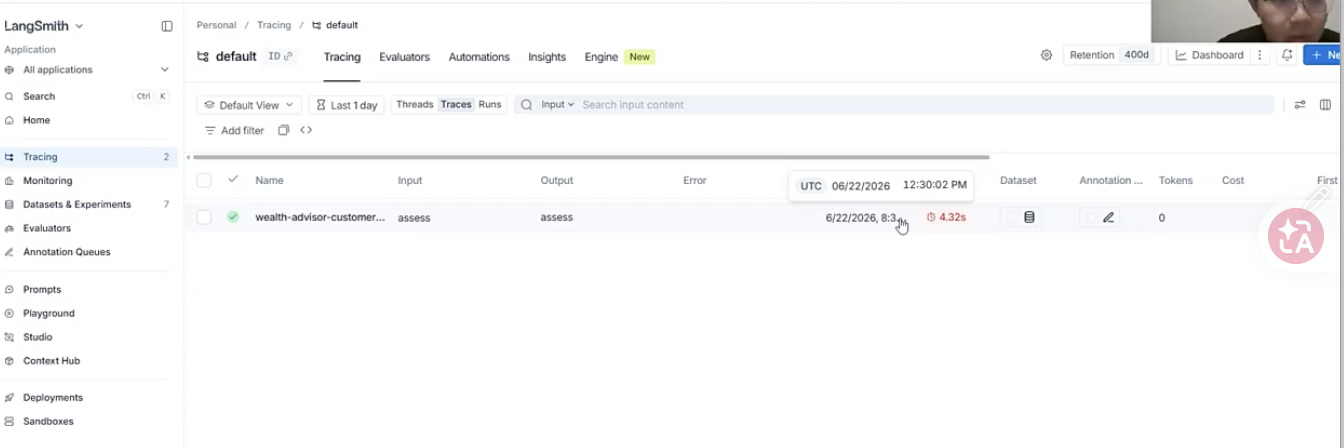
点击记录后
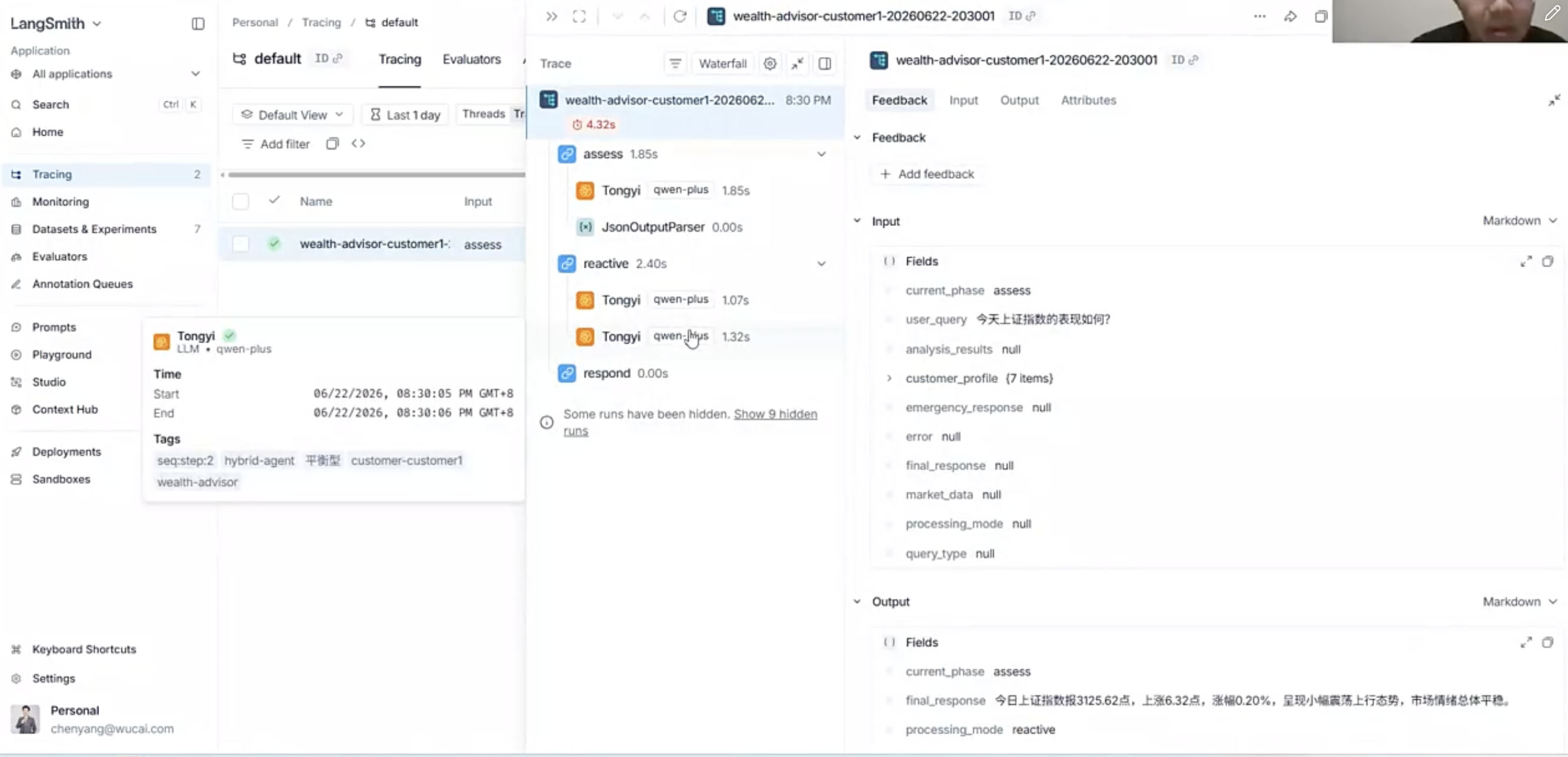
点击waterfall的到类似前端network的时序图
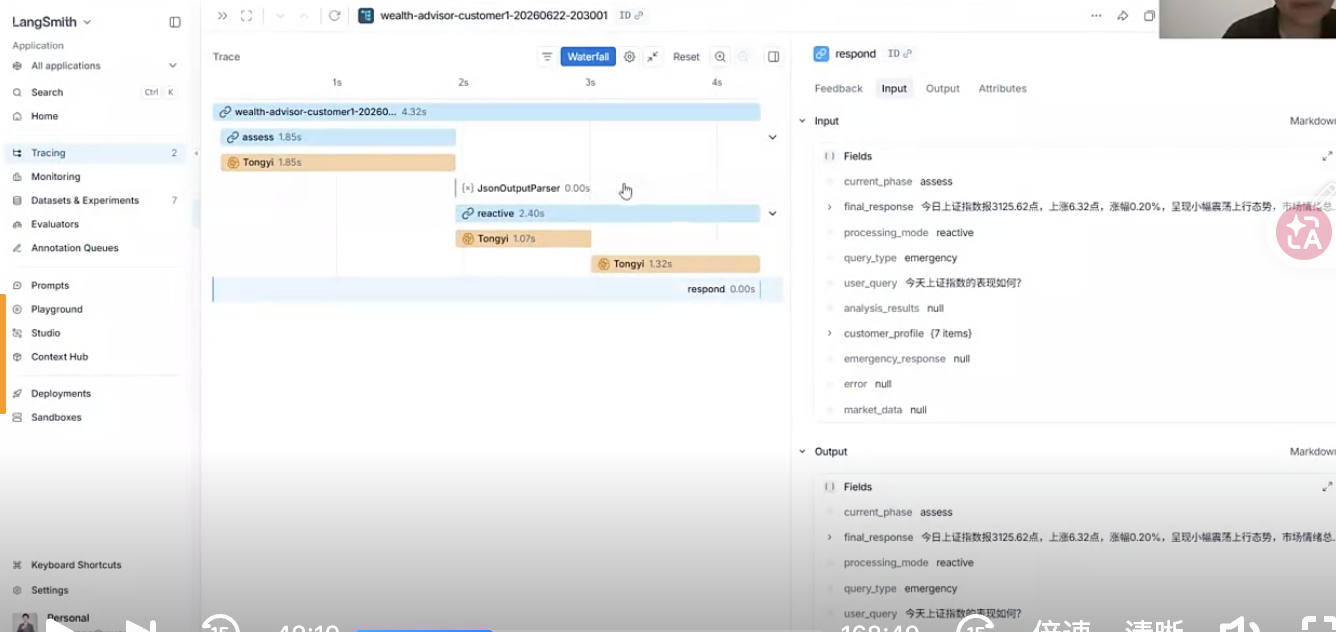
LangSmith可以创建数据集,然后添加样本。
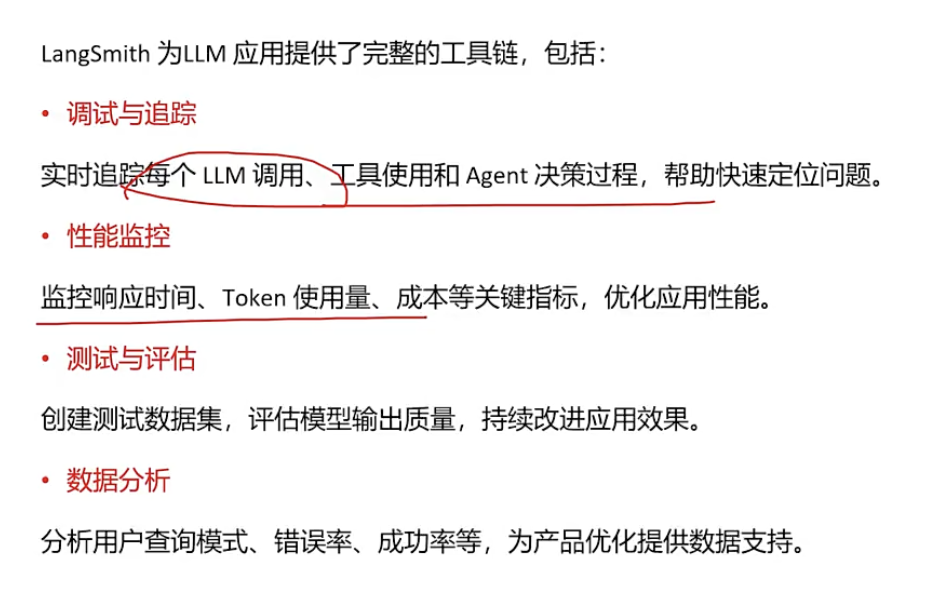
LangSmith可以对多个样本进行批量测试,代码如下

1
2
3
4
5
6
7
8
9
10
11
12
13
14
15
16
17
18
19
20
21
22
23
24
25
26
27
28
29
30
31
32
33
34
35
36
37
38
39
40
41
42
43
44
45
46
47
48
49
50
51
52
53
54
55
56
57
58
59
60
61
62
63
64
65
66
67
68
69
70
71
72
73
74
75
76
77
78
79
80
81
82
83
84
85
86
87
88
89
90
91
92
93
94
95
96
97
98
99
100
101
102
103
104
105
106
107
108
109
110
111
112
113
114
115
116
117
118
119
120
121
122
123
124
125
126
127
128
129
130
131
132
133
134
135
136
137
138
139
140
141
142
143
144
145
146
147
148
149
150
151
152
153
154
155
156
157
158
159
160
161
162
163
164
165
166
167
168
169
170
171
172
173
174
175
176
177
178
179
180
181
182
183
184
185
186
187
188
189
190
191
192
193
194
195
196
197
198
199
200
201
202
203
204
205
206
207
208
209
210
211
212
213
214
215
216
217
218
219
220
221
222
223
224
225
226
227
228
229
230
231
232
233
234
235
236
237
238
239
240
241
242
243
244
245
246
247
248
249
250
251
252
253
254
255
256
257
258
259
260
261
262
263
264
265
266
267
268
269
270
271
272
273
274
275
276
277
278
279
280
281
282
283
284
285
286
287
288
289
290
291
292
293
294
295
296
297
298
299
300
301
302
303
304
305
306
307
308
309
310
311
312
313
314
315
316
317
318
319
320
321
322
323
324
325
326
327
328
329
330
331
332
333
334
335
336
337
338
339
340
341
342
343
344
345
346
347
348
349
350
351
352
353
354
355
356
357
358
359
360
361
362
363
364
365
366
367
368
369
370
371
372
373
374
375
376
377
378
379
380
381
382
383
384
385
386
387
388
389
390
391
392
393
394
395
396
397
398
399
400
401
402
403
404
405
406
407
408
409
410
411
412
413
414
415
416
417
418
419
420
421
422
423
424
425
426
427
428
429
430
431
432
433
434
435
436
437
438
439
440
441
442
443
444
445
446
447
448
449
450
451
452
453
454
455
456
457
458
459
460
461
462
463
464
465
466
467
468
469
470
471
472
473
474
475
476
477
478
479
480
481
482
483
484
485
486
487
488
489
490
491
492
493
494
495
496
497
498
499
500
501
502
503
504
505
506
507
508
509
510
511
512
513
514
515
516
517
518
519
520
521
522
523
524
525
526
527
528
529
530
531
532
533
534
535
536
537
538
539
540
541
542
543
544
545
546
547
548
549
550
551
552
553
554
555
556
557
558
559
560
561
562
563
564
565
566
567
568
569
570
571
572
573
574
575
576
577
578
579
580
581
582
583
584
585
586
587
588
589
590
591
592
593
594
595
596
597
598
599
600
601
602
603
604
605
606
607
608
609
610
611
612
613
614
615
616
617
618
619
620
621
622
623
624
625
626
627
628
629
630
631
632
633
634
635
636
637
638
639
#!/usr/bin/env python
# -*- coding: utf-8 -*-

"""
LangSmith 测试与评估模块

本模块提供使用 LangSmith 进行 Agent 测试和评估的功能,包括:
1. 创建和管理测试数据集
2. 运行批量测试
3. 使用评估器评估输出质量
4. 比较不同版本的性能
5. 生成评估报告

使用方法:
1. 确保已设置 LangSmith 环境变量
2. 运行此脚本进行测试和评估
"""

import os
import json
from datetime import datetime
from typing import Dict, List, Any, Optional
from langsmith import Client, RunEvaluator
from langsmith.evaluation import evaluate
from langsmith.schemas import Example, Run

# 导入主智能体模块
# 导入主智能体模块(文件名以数字开头,需要使用 importlib)
# **为什么不用 import?**,模块名不能数字开头。
import importlib.util
import sys
#这种写法在 Agent 框架中很常见,原因有两个:

#1. **动态加载插件或工作流**:例如根据配置文件决定加载哪个 Agent,而不是在代码中写死 `import`。
#2. **解决文件名不符合 Python 模块命名规范的问题**:像 `1-hybrid_wealth_advisor_langgraph_langsmith.py` 这种以数字开头、包含特殊字符的文件,无法直接使用 `import` 导入,只能通过 `importlib` 按文件路径动态加载。


#从文件中导入文件中的函数模块
#**加载计划**,**根据一个 Python 文件,创建模块的加载说明**
spec = importlib.util.spec_from_file_location(
"hybrid_wealth_advisor_langgraph_langsmith",
"1-hybrid_wealth_advisor_langgraph_langsmith.py"
)
#创建了一个空模块ModuleType。Python文件还没执行!
hybrid_module = importlib.util.module_from_spec(spec)
#Python已经加载的所有模块
sys.modules["hybrid_wealth_advisor_langgraph_langsmith"] = hybrid_module
#运行该python文件
spec.loader.exec_module(hybrid_module)

from hybrid_wealth_advisor_langgraph_langsmith import (
run_wealth_advisor,
SAMPLE_CUSTOMER_PROFILES
)

# LangSmith 客户端初始化
LANGSMITH_API_KEY = os.getenv("LANGSMITH_API_KEY")
LANGSMITH_ENABLED = os.getenv("LANGCHAIN_TRACING_V2", "").lower() == "true"

if not LANGSMITH_ENABLED or not LANGSMITH_API_KEY:
print("警告: LangSmith 未启用,无法进行测试和评估")
print("请设置环境变量:")
print(" - LANGSMITH_API_KEY: 您的 API 密钥")
print(" - LANGCHAIN_TRACING_V2: true")
client = None
else:
client = Client(api_key=LANGSMITH_API_KEY)
print(f"[LangSmith] 客户端已初始化,可以开始测试和评估")

# ==================== 测试数据集定义 ====================

# 测试用例:反应式查询(简单查询)
REACTIVE_TEST_CASES = [
{
"inputs": {
"user_query": "今天上证指数的表现如何?",
"customer_id": "customer1"
},
"expected_outputs": {
"processing_mode": "reactive",
"should_contain": ["上证指数", "点位", "涨跌"]
}
},
{
"inputs": {
"user_query": "我的投资组合中科技股占比是多少?",
"customer_id": "customer1"
},
"expected_outputs": {
"processing_mode": "reactive",
"should_contain": ["科技", "占比", "投资组合"]
}
},
{
"inputs": {
"user_query": "请解释一下什么是ETF?",
"customer_id": "customer1"
},
"expected_outputs": {
"processing_mode": "reactive",
"should_contain": ["ETF", "基金", "交易"]
}
}
]

# 测试用例:深思熟虑查询(复杂分析)
DELIBERATIVE_TEST_CASES = [
{
"inputs": {
"user_query": "根据当前市场情况,我应该如何调整投资组合以应对可能的经济衰退?",
"customer_id": "customer1"
},
"expected_outputs": {
"processing_mode": "deliberative",
"should_contain": ["投资组合", "调整", "经济衰退", "建议"]
}
},
{
"inputs": {
"user_query": "考虑到我的退休目标,请评估我当前的投资策略并提供优化建议。",
"customer_id": "customer1"
},
"expected_outputs": {
"processing_mode": "deliberative",
"should_contain": ["退休", "投资策略", "评估", "建议"]
}
},
{
"inputs": {
"user_query": "我想为子女准备教育金,请帮我设计一个10年期的投资计划。",
"customer_id": "customer1"
},
"expected_outputs": {
"processing_mode": "deliberative",
"should_contain": ["教育金", "10年", "投资计划", "建议"]
}
}
]

# 测试用例:边界情况
EDGE_CASE_TEST_CASES = [
{
"inputs": {
"user_query": "", # 空查询
"customer_id": "customer1"
},
"expected_outputs": {
"should_handle_error": True
}
},
{
"inputs": {
"user_query": "这是一个非常长的查询" * 100, # 超长查询
"customer_id": "customer1"
},
"expected_outputs": {
"should_handle": True
}
}
]

# 合并所有测试用例
ALL_TEST_CASES = REACTIVE_TEST_CASES + DELIBERATIVE_TEST_CASES + EDGE_CASE_TEST_CASES

# ==================== 评估器定义 ====================

def _get_example_inputs(example):
"""安全获取 example 的 inputs,支持 Example 对象和字典"""
try:
# 尝试多种方式获取 inputs
if hasattr(example, 'inputs'):
inputs = example.inputs
if inputs is not None:
return inputs if isinstance(inputs, dict) else {}
if isinstance(example, dict):
if "inputs" in example:
return example["inputs"] if isinstance(example["inputs"], dict) else {}
# 如果 example 本身就是 inputs
if "user_query" in example:
return example
# 尝试直接访问属性
if hasattr(example, '__dict__'):
if 'inputs' in example.__dict__:
inputs = example.__dict__['inputs']
return inputs if isinstance(inputs, dict) else {}
except Exception as e:
pass
return {}

def _get_example_outputs(example):
"""安全获取 example 的 outputs,支持 Example 对象和字典"""
try:
# 尝试多种方式获取 outputs
if hasattr(example, 'outputs'):
outputs = example.outputs
if outputs is not None:
return outputs if isinstance(outputs, dict) else {}
if isinstance(example, dict):
if "outputs" in example:
return example["outputs"] if isinstance(example["outputs"], dict) else {}
# 尝试直接访问属性
if hasattr(example, '__dict__'):
if 'outputs' in example.__dict__:
outputs = example.__dict__['outputs']
return outputs if isinstance(outputs, dict) else {}
except Exception as e:
pass
return {}

class ProcessingModeEvaluator(RunEvaluator):
"""评估处理模式选择是否正确"""

def evaluate_run(self, run: Run, example: Example, **kwargs) -> Dict[str, Any]:
"""评估处理模式是否正确"""
try:
example_outputs = _get_example_outputs(example)
expected_mode = example_outputs.get("processing_mode")

if not expected_mode:
return {
"key": "processing_mode",
"score": None,
"comment": "未指定期望的处理模式"
}

actual_mode = run.outputs.get("processing_mode") if run.outputs else None

if actual_mode == expected_mode:
return {
"key": "processing_mode",
"score": 1.0,
"comment": f"处理模式正确: {actual_mode}"
}
else:
return {
"key": "processing_mode",
"score": 0.0,
"comment": f"处理模式不匹配: 期望 {expected_mode}, 实际 {actual_mode}"
}
except Exception as e:
return {
"key": "processing_mode",
"score": 0,
"comment": f"评估错误: {str(e)}"
}

class ResponseCompletenessEvaluator(RunEvaluator):
"""评估响应完整性"""

def evaluate_run(self, run: Run, example: Example, **kwargs) -> Dict[str, Any]:
"""评估响应是否完整"""
try:
if not run.outputs or "final_response" not in run.outputs:
return {
"key": "response_completeness",
"score": 0,
"comment": "无响应输出"
}

response = run.outputs.get("final_response", "")
example_outputs = _get_example_outputs(example)
expected_keywords = example_outputs.get("should_contain", [])

if not expected_keywords:
return {
"key": "response_completeness",
"score": None,
"comment": "未指定期望的关键词"
}

# 检查是否包含期望的关键词(硬匹配)可以改用大模型语义匹配
response_lower = response.lower()
found_keywords = [kw for kw in expected_keywords if kw.lower() in response_lower]
completeness = len(found_keywords) / len(expected_keywords) if expected_keywords else 0

return {
"key": "response_completeness",
"score": completeness,
"comment": f"找到 {len(found_keywords)}/{len(expected_keywords)} 个期望关键词"
}
except Exception as e:
return {
"key": "response_completeness",
"score": 0,
"comment": f"评估错误: {str(e)}"
}

# ==================== 测试运行函数 ====================

def create_test_dataset(dataset_name: str = "wealth-advisor-test-dataset") -> str:
"""创建测试数据集"""
if not client:
print("错误: LangSmith 客户端未初始化")
return None

try:
# 检查数据集是否已存在
try:
existing_dataset = client.read_dataset(dataset_name=dataset_name)
print(f"[LangSmith] 数据集已存在: {dataset_name}")
# 检查现有示例数量
existing_examples = list(client.list_examples(dataset_name=dataset_name))
print(f" 现有测试用例数量: {len(existing_examples)}")
if len(existing_examples) > 0:
return dataset_name
else:
print(f" 数据集为空,将添加测试用例...")
except Exception as e:
# 数据集不存在,创建新数据集
print(f"[LangSmith] 数据集不存在,正在创建...")
try:
dataset = client.create_dataset(
dataset_name=dataset_name,
description="投顾AI助手测试数据集,包含反应式、深思熟虑和边界情况测试用例"
)
print(f"[LangSmith] 数据集已创建: {dataset_name}")
except Exception as create_error:
error_msg = str(create_error)
if "already exists" in error_msg.lower() or "duplicate" in error_msg.lower():
print(f"[LangSmith] 数据集已存在: {dataset_name}")
else:
raise create_error

# 添加测试用例到数据集
print(f"[LangSmith] 正在添加测试用例...")
added_count = 0
for i, test_case in enumerate(ALL_TEST_CASES):
try:
client.create_example(
inputs=test_case["inputs"],
outputs=test_case.get("expected_outputs", {}),
dataset_name=dataset_name
)
added_count += 1
except Exception as e:
# 如果示例已存在,跳过
error_msg = str(e)
if "already exists" in error_msg.lower() or "duplicate" in error_msg.lower():
continue
else:
print(f" 警告: 添加测试用例 {i+1} 失败: {error_msg}")

# 验证数据集
existing_examples = list(client.list_examples(dataset_name=dataset_name))
print(f"[LangSmith] 测试数据集准备完成: {dataset_name}")
print(f" 总测试用例数量: {len(existing_examples)}")
if added_count > 0:
print(f" 本次新增: {added_count} 个测试用例")

return dataset_name
except Exception as e:
error_msg = str(e)
print(f"创建测试数据集失败: {error_msg}")
import traceback
traceback.print_exc()
return None

def run_evaluation(
dataset_name: str,
experiment_name: Optional[str] = None,
evaluators: Optional[List[RunEvaluator]] = None
) -> Dict[str, Any]:
"""运行评估"""
if not client:
print("错误: LangSmith 客户端未初始化")
return None

if not experiment_name:
experiment_name = f"wealth-advisor-eval-{datetime.now().strftime('%Y%m%d-%H%M%S')}"

# 默认评估器
if not evaluators:
evaluators = [
ProcessingModeEvaluator(),
ResponseCompletenessEvaluator()
]

# 定义测试函数
def test_function(example: Example) -> Dict[str, Any]:
"""测试函数,运行智能体并返回结果"""
try:
# 尝试多种方式获取 inputs
example_inputs = None

# 方式1: 直接访问 example.inputs
if hasattr(example, 'inputs'):
example_inputs = example.inputs

# 方式2: 如果是字典
if not example_inputs and isinstance(example, dict):
example_inputs = example.get("inputs")

# 方式3: 使用辅助函数
if not example_inputs:
example_inputs = _get_example_inputs(example)

# 确保 example_inputs 是字典
if not isinstance(example_inputs, dict):
# 如果 example_inputs 不是字典,尝试转换或使用空字典
if example_inputs is None:
example_inputs = {}
elif hasattr(example_inputs, '__dict__'):
example_inputs = example_inputs.__dict__
else:
example_inputs = {}

user_query = example_inputs.get("user_query") if example_inputs else ""
customer_id = example_inputs.get("customer_id", "customer1") if example_inputs else "customer1"

# 如果 user_query 为空或 None,返回错误
if not user_query or (isinstance(user_query, str) and not user_query.strip()):
return {
"error": "用户查询为空",
"final_response": "用户查询为空,无法处理",
"processing_mode": "unknown",
"query_type": "unknown"
}

result = run_wealth_advisor(
user_query=user_query,
customer_id=customer_id
)
return {
"final_response": result.get("final_response", ""),
"processing_mode": result.get("processing_mode", "unknown"),
"query_type": result.get("query_type", "unknown"),
"error": result.get("error")
}
except Exception as e:
return {
"error": str(e),
"final_response": f"执行错误: {str(e)}",
"processing_mode": "unknown",
"query_type": "unknown"
}

try:
print(f"[LangSmith] 开始评估...")
print(f" 实验名称: {experiment_name}")
print(f" 数据集: {dataset_name}")
print(f" 评估器数量: {len(evaluators)}")
print()

# 运行评估
results = evaluate(
test_function,
data=dataset_name,
evaluators=evaluators,
experiment_prefix=experiment_name,
max_concurrency=1 # 串行执行,避免API限流
)

print()
print(f"[LangSmith] 评估完成")
return results
except Exception as e:
print(f"运行评估失败: {str(e)}")
import traceback
traceback.print_exc()
return None

def run_single_test(user_query: str, customer_id: str = "customer1") -> Dict[str, Any]:
"""运行单个测试用例"""
print(f"\n=== 运行测试 ===")
print(f"查询: {user_query}")
print(f"客户: {customer_id}")

start_time = datetime.now()
result = run_wealth_advisor(user_query, customer_id)
end_time = datetime.now()

process_time = (end_time - start_time).total_seconds()

print(f"\n处理模式: {result.get('processing_mode', '未知')}")
print(f"查询类型: {result.get('query_type', '未知')}")
print(f"处理时间: {process_time:.2f}秒")

if result.get("error"):
print(f"错误: {result['error']}")

print(f"\n响应预览: {result.get('final_response', '')[:200]}...")

return {
"result": result,
"process_time": process_time,
"timestamp": datetime.now().isoformat()
}

def compare_experiments(experiment_names: List[str]) -> Dict[str, Any]:
"""比较不同实验的结果"""
if not client:
print("错误: LangSmith 客户端未初始化")
return None

try:
comparison_results = {}
for exp_name in experiment_names:
# 获取实验的评估结果
runs = list(client.list_runs(project_name=exp_name, limit=100))

# 计算平均分数
scores = {}
for run in runs:
if run.feedback_stats:
for feedback in run.feedback_stats:
key = feedback.get("key", "unknown")
score = feedback.get("score", 0)
if key not in scores:
scores[key] = []
scores[key].append(score)

# 计算平均值
avg_scores = {
key: sum(values) / len(values) if values else 0
for key, values in scores.items()
}

comparison_results[exp_name] = {
"total_runs": len(runs),
"average_scores": avg_scores
}

return comparison_results
except Exception as e:
print(f"比较实验失败: {str(e)}")
return None

# ==================== 主函数 ====================

if __name__ == "__main__":
print("=" * 60)
print("LangSmith 测试与评估工具")
print("=" * 60)
print()

if not LANGSMITH_ENABLED or not client:
print("❌ 错误: LangSmith 未启用,无法进行测试和评估")
print()
print("请设置环境变量:")
print(" - LANGSMITH_API_KEY: 您的 API 密钥")
print(" - LANGCHAIN_TRACING_V2: true")
exit(1)

# 固定的数据集名称
dataset_name = "wealth-advisor-test-dataset"

# 步骤 1: 创建或使用测试数据集
print("步骤 1: 准备测试数据集...")
print("-" * 60)
created_dataset = None
try:
created_dataset = create_test_dataset(dataset_name)
if created_dataset:
print(f"✓ 测试数据集准备完成: {dataset_name}")
else:
print(f"❌ 数据集准备失败")
print()
print("请检查:")
print(" 1. LangSmith API 密钥是否正确")
print(" 2. 网络连接是否正常")
print(" 3. 或者手动在 https://smith.langchain.com 创建数据集")
exit(1)
except Exception as e:
print(f"❌ 数据集准备失败: {str(e)}")
print()
print("请检查:")
print(" 1. LangSmith API 密钥是否正确")
print(" 2. 网络连接是否正常")
print(" 3. 或者手动在 https://smith.langchain.com 创建数据集")
exit(1)

# 验证数据集是否存在
try:
existing_examples = list(client.list_examples(dataset_name=dataset_name))
if len(existing_examples) == 0:
print(f"❌ 数据集为空,无法运行评估")
print("请确保数据集包含测试用例")
exit(1)
except Exception as e:
print(f"❌ 无法验证数据集: {str(e)}")
print("请确保数据集存在且可访问")
exit(1)

print()

# 步骤 2: 运行评估
print("步骤 2: 运行测试集评估...")
print("-" * 60)
experiment_name = f"wealth-advisor-eval-{datetime.now().strftime('%Y%m%d-%H%M%S')}"
print(f"实验名称: {experiment_name}")
print(f"数据集: {dataset_name}")

# 获取实际测试用例数量
try:
existing_examples = list(client.list_examples(dataset_name=dataset_name))
print(f"测试用例数量: {len(existing_examples)}")
except:
print(f"测试用例数量: {len(ALL_TEST_CASES)} (预期)")

print()
print("开始运行评估,这可能需要几分钟时间,请耐心等待...")
print()

try:
results = run_evaluation(dataset_name, experiment_name)

if results:
print()
print("=" * 60)
print("✓ 评估完成!")
print("=" * 60)
print()
print(f"实验名称: {experiment_name}")
print(f"数据集: {dataset_name}")
print()
print("查看详细结果:")
print(f" https://smith.langchain.com")
print()
print("在 LangSmith 界面中:")
print(" 1. 进入 'Experiments' 页面")
print(f" 2. 查找实验: {experiment_name}")
print(" 3. 查看详细的评估结果、分数和统计信息")
else:
print()
print("⚠ 评估完成,但未返回结果")
print("请检查 LangSmith 界面查看评估状态")
except Exception as e:
print()
print("=" * 60)
print(f"❌ 评估失败: {str(e)}")
print("=" * 60)
print()
print("请检查:")
print(" 1. LangSmith API 密钥是否正确")
print(" 2. 数据集是否存在")
print(" 3. 网络连接是否正常")
exit(1)


自动批量评测步骤

  • 定义测试数据集
    1
    2
    3
    4
    5
    6
    7
    8
    9
    10
    11
    12
    13
    14
    15
    16
    17
    18
    19
    20
    21
    22
    23
    24
    25
    26
    27
    28
    29
    30
    31
    32
    33
    34
    35
    36
    37
    38
    39
    40
    41
    42
    43
    44
    45
    46
    47
    48
    49
    50
    51
    52
    53
    54
    55
    56
    57
    58
    59
    60
    61
    62
    63
    64
    65
    66
    67
    # 测试用例:反应式查询(简单查询)
    REACTIVE_TEST_CASES = [
    {
    "inputs": {
    "user_query": "今天上证指数的表现如何?",
    "customer_id": "customer1"
    },
    "expected_outputs": {
    "processing_mode": "reactive",
    "should_contain": ["上证指数", "点位", "涨跌"]
    }
    },
    {
    "inputs": {
    "user_query": "我的投资组合中科技股占比是多少?",
    "customer_id": "customer1"
    },
    "expected_outputs": {
    "processing_mode": "reactive",
    "should_contain": ["科技", "占比", "投资组合"]
    }
    },
    {
    "inputs": {
    "user_query": "请解释一下什么是ETF?",
    "customer_id": "customer1"
    },
    "expected_outputs": {
    "processing_mode": "reactive",
    "should_contain": ["ETF", "基金", "交易"]
    }
    }
    ]

    # 测试用例:深思熟虑查询(复杂分析)
    DELIBERATIVE_TEST_CASES = [
    {
    "inputs": {
    "user_query": "根据当前市场情况,我应该如何调整投资组合以应对可能的经济衰退?",
    "customer_id": "customer1"
    },
    "expected_outputs": {
    "processing_mode": "deliberative",
    "should_contain": ["投资组合", "调整", "经济衰退", "建议"]
    }
    },
    {
    "inputs": {
    "user_query": "考虑到我的退休目标,请评估我当前的投资策略并提供优化建议。",
    "customer_id": "customer1"
    },
    "expected_outputs": {
    "processing_mode": "deliberative",
    "should_contain": ["退休", "投资策略", "评估", "建议"]
    }
    },
    {
    "inputs": {
    "user_query": "我想为子女准备教育金,请帮我设计一个10年期的投资计划。",
    "customer_id": "customer1"
    },
    "expected_outputs": {
    "processing_mode": "deliberative",
    "should_contain": ["教育金", "10年", "投资计划", "建议"]
    }
    }
    ]
  • 创建每个评估内容(处理模式、响应式agent、深思熟虑agent)的评估器类型,继承于RunEvaluator类
    • 类中定义def evaluate_run(self, run:Run, example: Example, **kwargs)函数
    • 在函数中设置人工标签和运行智能体的输出
  • prompt版本控制
    1
    2
    3
    4
    config = RunnableConfig(
    run_name = "coordination-prompt-v3",
    tags=["prompt-v3"]
    )
  • 优点:
    • 回归测试(对历史的测试再跑一遍)
    • 个性化evaluate

      提示词工程运维优化
      Prompt Ops是一种工程化方法,用于系统地管理、测试、优化和监控LLM应用中的提示(Prompt),确保提示的质量和一致性,实现持续改进。
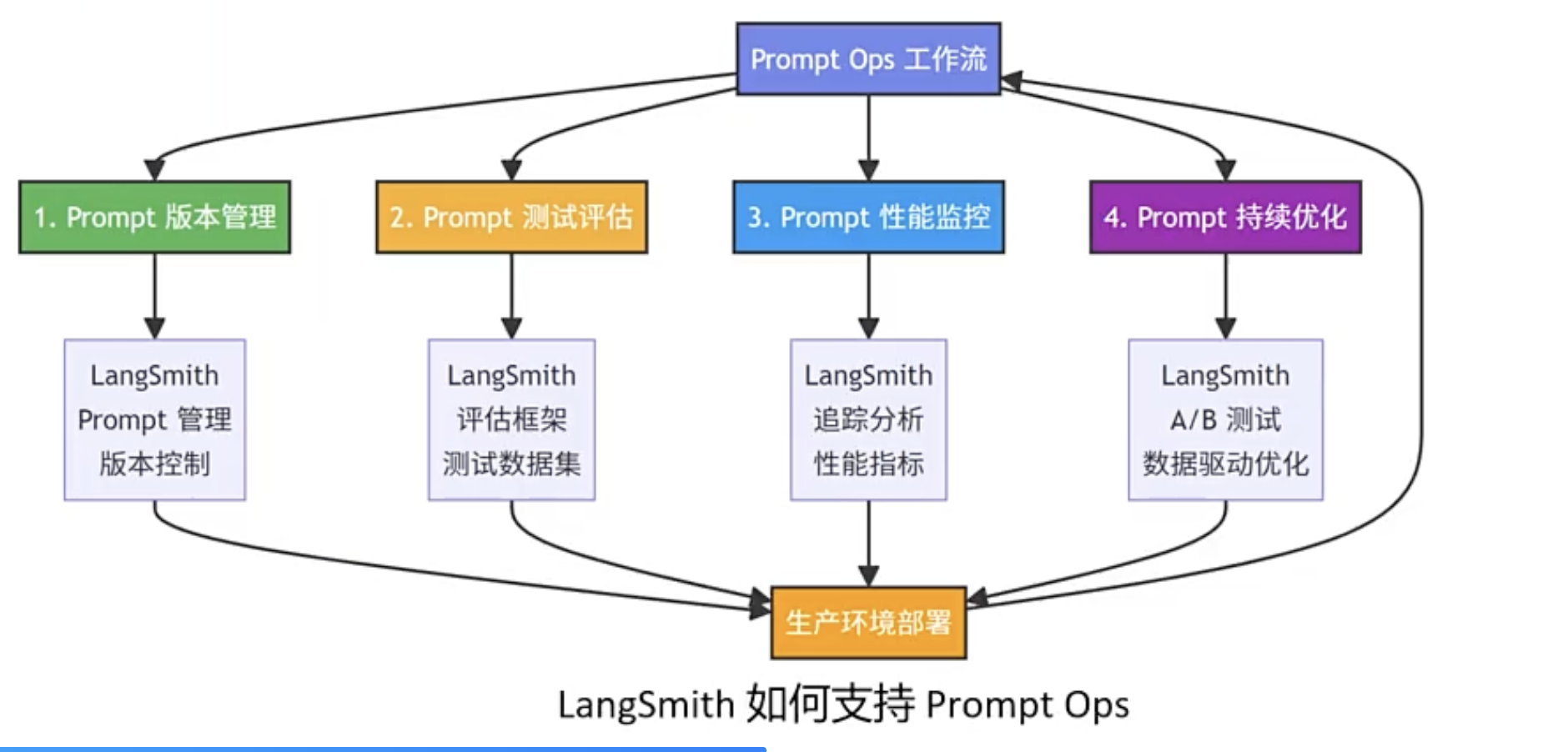
OpenEvals

之前LangSmith的评估器是自己建立的简单评估,现在使用基于LLM的评估器即OpenEvals

LangSmith可以通过openeval调用多种内置评估器
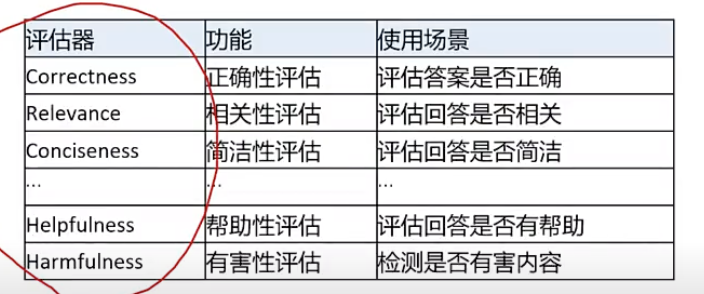
LangSmith是一个框架:有后段(后台)、前端(网页)
Openevals是一个评估器集合、评估相关的资源库
LangSmith与Openevals可以配合使用
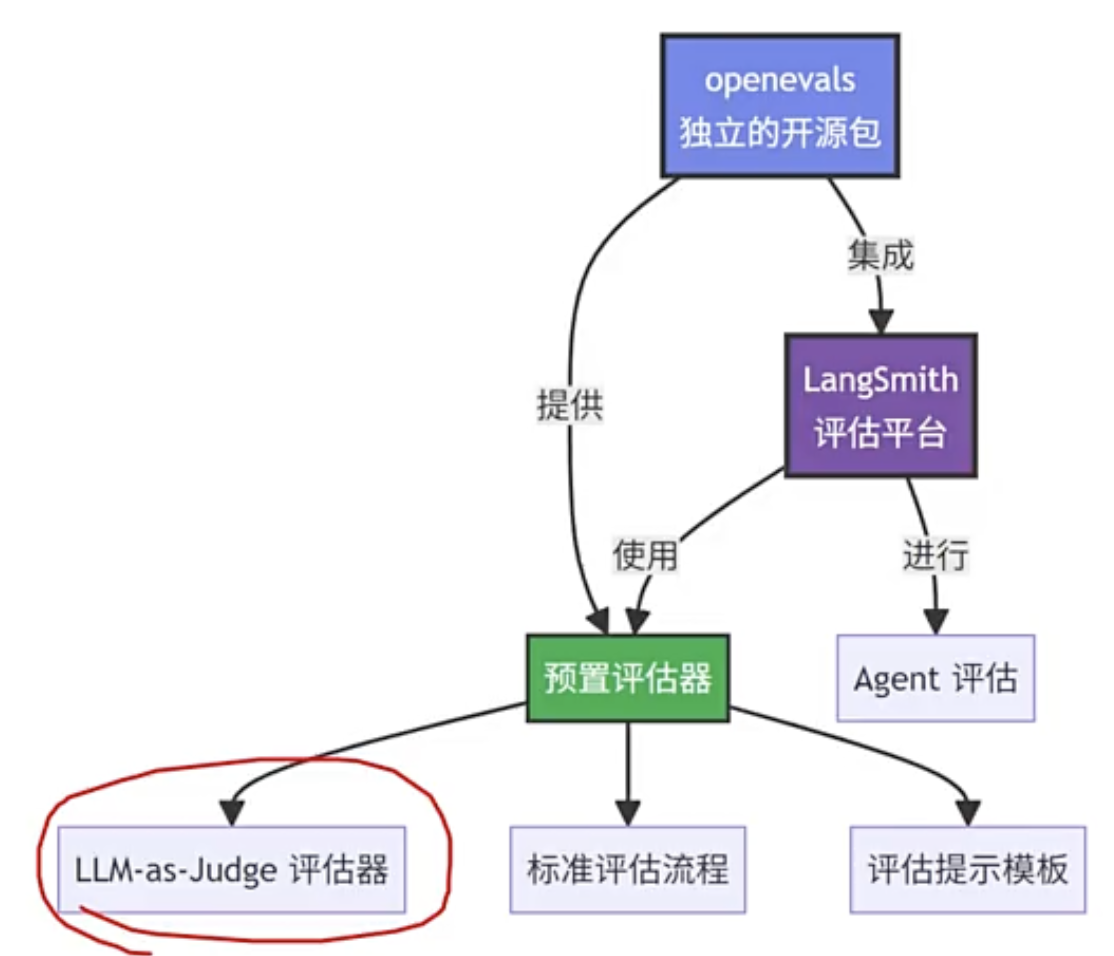
qianwen+openevals

1
2
3
4
5
6
7
8
9
10
11
12
13
14
15
16
17
18
19
20
21
22
23
24
25
26
27
28
29
30
31
32
33
34
35
36
37
38
39
40
41
42
43
44
45
46
47
48
49
50
51
52
53
54
55
56
57
58
59
60
61
62
63
64
65
66
67
68
69
70
71
72
73
74
75
76
77
78
79
80
81
82
83
84
85
86
87
88
89
90
91
92
93
94
95
96
97
98
99
100
101
102
103
104
105
106
107
108
109
110
111
112
113
114
115
116
117
118
119
120
121
122
123
124
125
126
127
128
129
130
131
132
133
134
135
136
137
138
139
140
141
142
143
144
145
146
147
148
149
150
151
152
153
154
155
156
157
158
159
160
161
162
163
164
165
166
167
168
169
170
171
172
173
174
175
176
177
178
179
180
181
#!/usr/bin/env python
# -*- coding: utf-8 -*-

"""
测试 OpenEvals 评估器示例

本文件用于测试评估器的使用,查看评估结果的格式和内容。
"""

import os
from langchain_community.chat_models import ChatTongyi
from openevals.prompts import CORRECTNESS_PROMPT
from openevals.llm import create_llm_as_judge

# ==================== 配置 ====================

DASHSCOPE_API_KEY = os.getenv("DASHSCOPE_API_KEY")
if not DASHSCOPE_API_KEY:
print("错误: 请设置 DASHSCOPE_API_KEY 环境变量")
print("Windows PowerShell: $env:DASHSCOPE_API_KEY='your-key'")
print("Linux/Mac: export DASHSCOPE_API_KEY='your-key'")
exit(1)

# ==================== 创建评估 LLM ====================

print("=" * 60)
print("创建评估 LLM...")
print("=" * 60)

eval_llm = ChatTongyi(
model_name="qwen-turbo",
dashscope_api_key=DASHSCOPE_API_KEY,
temperature=0
)

print("[OK] 评估 LLM 创建成功\n")

# ==================== 创建评估器 ====================

print("=" * 60)
print("创建正确性评估器...")
print("=" * 60)

evaluator = create_llm_as_judge(
prompt=CORRECTNESS_PROMPT,
feedback_key="correctness",
judge=eval_llm,
continuous=True,
use_reasoning=False,
)

print("[OK] 评估器创建成功\n")

# ==================== 测试评估 ====================

print("=" * 60)
print("开始评估测试...")
print("=" * 60)

# 测试用例1: 基本评估
print("\n【测试用例 1】")
print("-" * 60)
inputs_1 = "什么是机器学习?"
outputs_1 = "机器学习是人工智能的一个分支,通过算法让计算机从数据中学习。"
reference_outputs_1 = "机器学习是让计算机从数据中学习的技术。"

print(f"输入: {inputs_1}")
print(f"输出: {outputs_1}")
print(f"参考输出: {reference_outputs_1}")
print("\n正在评估...")

try:
result_1 = evaluator(
inputs=inputs_1,
outputs=outputs_1,
reference_outputs=reference_outputs_1,
)

print("\n[OK] 评估完成")
print(f"\n评估结果类型: {type(result_1)}")
print(f"评估结果内容:\n{result_1}")

# 尝试提取分数
if isinstance(result_1, dict):
print(f"\n结果字典键: {result_1.keys()}")
if "score" in result_1:
print(f"分数: {result_1['score']}")
if "key" in result_1:
print(f"评估键: {result_1['key']}")
if "comment" in result_1:
print(f"评论: {result_1['comment']}")
elif isinstance(result_1, (int, float)):
print(f"\n分数: {result_1}")
elif isinstance(result_1, tuple):
print(f"\n元组内容: {result_1}")
if len(result_1) >= 1:
print(f"分数: {result_1[0]}")
if len(result_1) >= 2:
print(f"理由: {result_1[1]}")

except Exception as e:
print(f"\n❌ 评估失败: {e}")
import traceback
traceback.print_exc()

# 测试用例2: 不同质量的输出
print("\n\n" + "=" * 60)
print("【测试用例 2】- 测试不同质量的输出")
print("=" * 60)

test_cases = [
{
"name": "高质量回答",
"inputs": "什么是Python?",
"outputs": "Python是一种高级编程语言,具有简洁的语法和强大的功能。",
"reference_outputs": "Python是一种高级编程语言。"
},
{
"name": "部分正确回答",
"inputs": "什么是Python?",
"outputs": "Python是一种编程语言。",
"reference_outputs": "Python是一种高级编程语言,具有简洁的语法和强大的功能。"
},
{
"name": "错误回答",
"inputs": "什么是Python?",
"outputs": "Python是一种数据库管理系统。",
"reference_outputs": "Python是一种高级编程语言。"
},
]

for i, test_case in enumerate(test_cases, 1):
print(f"\n--- 测试 {i}: {test_case['name']} ---")
print(f"输入: {test_case['inputs']}")
print(f"输出: {test_case['outputs']}")
print(f"参考输出: {test_case['reference_outputs']}")

try:
result = evaluator(
inputs=test_case['inputs'],
outputs=test_case['outputs'],
reference_outputs=test_case['reference_outputs'],
)

# 提取分数
score = None
if isinstance(result, dict):
score = result.get("score")
elif isinstance(result, (int, float)):
score = result
elif isinstance(result, tuple) and len(result) > 0:
score = result[0]

if score is not None:
print(f"[OK] 评估分数: {score:.3f}")
else:
print(f"[WARN] 无法提取分数,结果: {result}")

except Exception as e:
print(f"[ERROR] 评估失败: {e}")

# ==================== 总结 ====================

print("\n\n" + "=" * 60)
print("测试完成")
print("=" * 60)
print("\n说明:")
print("1. 评估结果格式: 字典 {'key': 'correctness', 'score': 0.8, 'comment': None, 'metadata': None}")
print("2. 分数范围: 0.0 到 1.0")
print("3. 分数含义: 分数越高表示输出越正确")
print(" - 0.8-1.0: 高质量回答")
print(" - 0.5-0.8: 部分正确回答")
print(" - 0.0-0.5: 低质量或错误回答")
print("4. 如果 use_reasoning=True,结果可能是 (分数, 理由) 元组")
print("5. 如果 use_reasoning=False,结果通常是包含分数的字典")
print("\n实际运行结果示例:")
print(" - 高质量回答: score = 0.800")
print(" - 部分正确回答: score = 0.600")
print(" - 错误回答: score = 0.000")


LangSmith+OpenEvals

1
2
3
4
5
6
7
8
9
10
11
12
13
14
15
16
17
18
19
20
21
22
23
24
25
26
27
28
29
30
31
32
33
34
35
36
37
38
39
40
41
42
43
44
45
46
47
48
49
50
51
52
53
54
55
56
57
58
59
60
61
62
63
64
65
66
67
68
69
70
71
72
73
74
75
76
77
78
79
80
81
82
83
84
85
86
87
88
89
90
91
92
93
94
95
96
97
98
99
100
101
102
103
104
105
106
107
108
109
110
111
112
113
114
115
116
117
118
119
120
121
122
123
124
125
126
127
128
129
130
131
132
133
134
135
136
137
138
139
140
141
142
143
144
145
146
147
148
149
150
151
152
153
154
155
156
157
158
159
160
161
162
163
164
165
166
167
168
169
170
171
172
173
174
175
176
177
178
179
180
181
182
183
184
185
186
187
188
189
190
191
192
193
194
195
196
197
198
199
200
201
202
203
204
205
206
207
208
209
210
211
212
213
214
215
216
217
218
219
220
221
222
223
224
225
226
227
228
229
230
231
232
233
234
235
236
237
238
239
240
241
242
243
244
245
246
247
248
249
250
251
252
253
254
255
256
257
258
259
260
261
262
263
264
265
266
267
268
269
270
271
272
273
274
275
276
277
278
279
280
281
282
283
284
285
286
287
288
289
290
291
292
293
294
295
296
297
298
299
300
301
302
303
304
305
306
307
308
309
310
311
312
313
314
315
316
317
318
319
320
321
322
323
324
325
326
327
328
329
330
331
332
333
334
335
336
337
338
339
340
341
342
343
344
345
346
347
348
349
350
351
352
353
354
355
356
357
358
359
360
361
362
363
364
365
366
367
368
369
370
371
372
373
374
375
376
377
378
379
380
381
382
383
384
385
386
387
388
389
390
391
392
393
394
395
396
397
398
399
400
401
402
403
404
405
406
407
408
409
410
411
412
413
414
415
416
417
418
419
420
421
422
423
424
#!/usr/bin/env python
# -*- coding: utf-8 -*-

"""
OpenEvals 评估器使用 - 投顾助手评估示例
使用 openevals 创建多种评估器,对投顾助手进行全面评估
"""

import os
from langsmith import Client
from langsmith.evaluation import evaluate
from langchain_community.chat_models import ChatTongyi
from openevals.llm import create_llm_as_judge
from openevals.prompts import (
ANSWER_RELEVANCE_PROMPT,
CONCISENESS_PROMPT,
RAG_HELPFULNESS_PROMPT,
HALLUCINATION_PROMPT,
TOXICITY_PROMPT,
)

# ==================== 投顾助手评估(使用 OpenEvals)====================

def evaluate_wealth_advisor():
"""使用 OpenEvals 评估投顾助手"""
print("=" * 60)
print("投顾助手评估(使用 OpenEvals)")
print("=" * 60)

# 检查环境变量
if not os.getenv("DASHSCOPE_API_KEY"):
print("\n[ERROR] 错误: 请设置 DASHSCOPE_API_KEY 环境变量")
return

if not os.getenv("LANGSMITH_API_KEY"):
print("\n[WARN] 未配置 LANGSMITH_API_KEY,跳过 LangSmith 集成")
print("如需使用 LangSmith,请设置环境变量:")
print(" Windows PowerShell: $env:LANGSMITH_API_KEY='your-key'")
print(" Linux/Mac: export LANGSMITH_API_KEY='your-key'")
return

# 尝试导入投顾助手模块
try:
import importlib.util
import sys

spec = importlib.util.spec_from_file_location(
"hybrid_wealth_advisor_langgraph_langsmith",
"1-hybrid_wealth_advisor_langgraph_langsmith.py"
)
if spec is None or spec.loader is None:
raise ImportError("无法加载投顾助手模块")

hybrid_module = importlib.util.module_from_spec(spec)
sys.modules["hybrid_wealth_advisor_langgraph_langsmith"] = hybrid_module
spec.loader.exec_module(hybrid_module)

from hybrid_wealth_advisor_langgraph_langsmith import run_wealth_advisor
except Exception as e:
print(f"\n[WARN] 无法导入投顾助手模块: {e}")
print(" 请确保 1-hybrid_wealth_advisor_langgraph_langsmith.py 文件存在")
return

# 1. 定义要评估的函数
def predict(inputs: dict) -> dict:
"""投顾助手预测函数,用于 LangSmith 评估"""
try:
user_query = inputs.get("user_query", "")
customer_id = inputs.get("customer_id", "customer1")

if not user_query:
return {
"output": "用户查询为空,无法处理",
"final_response": "用户查询为空,无法处理"
}

result = run_wealth_advisor(user_query=user_query, customer_id=customer_id)

# 返回格式化的输出
# 为了支持评估器,将 processing_mode 信息包含在输出中
final_response = result.get("final_response", "")
processing_mode = result.get("processing_mode", "unknown")

# 将 processing_mode 信息添加到输出文本中(用于评估器提取)
output_text = f"[处理模式: {processing_mode}]\n\n{final_response}"

return {
"output": output_text,
"final_response": final_response,
"processing_mode": processing_mode,
"query_type": result.get("query_type", "unknown")
}
except Exception as e:
return {
"output": f"执行错误: {str(e)}",
"final_response": f"执行错误: {str(e)}",
"error": str(e)
}

# 2. 创建评估 LLM
eval_llm = ChatTongyi(
model_name="qwen-turbo",
dashscope_api_key=os.getenv("DASHSCOPE_API_KEY"),
temperature=0
)

# 3. 创建投顾助手专用的自定义评估器(参考 2-langsmith_testing_evaluation.py)

# 处理模式评估 Prompt(对应 ProcessingModeEvaluator)
PROCESSING_MODE_PROMPT = """你是一位评估员,评估投顾助手选择的处理模式是否正确。

<说明>
投顾助手有两种处理模式:
- reactive(反应式):用于简单查询,需要快速响应
- deliberative(深思熟虑):用于复杂分析,需要深入思考

<用户查询>
{inputs}
</用户查询>

<实际输出>
输出的开头包含 "[处理模式: xxx]" 格式的信息,请从中提取实际选择的处理模式(应该是 "reactive" 或 "deliberative")。
{outputs}
</实际输出>

<期望的处理模式>
参考输出中可能包含字典格式,如 {{"processing_mode": "reactive", "should_contain": [...]}},请提取其中的 "processing_mode" 字段值。
如果参考输出是字符串格式,请直接使用该字符串。
{reference_outputs}
</期望的处理模式>

请评估实际选择的处理模式是否与期望的处理模式一致。
如果一致,给出 1.0 分;如果不一致,给出 0.0 分。"""

# 响应完整性评估 Prompt(对应 ResponseCompletenessEvaluator)
RESPONSE_COMPLETENESS_PROMPT = """你是一位评估员,评估投顾助手的回答是否完整,是否包含了期望的关键信息。

<用户查询>
{inputs}
</用户查询>

<投顾助手的回答>
注意:回答开头可能包含 "[处理模式: xxx]" 格式的信息,请忽略这部分,只关注实际的回答内容。
{outputs}
</投顾助手的回答>

<期望包含的关键词>
参考输出中可能包含字典格式,如 {{"processing_mode": "reactive", "should_contain": ["关键词1", "关键词2"]}},请提取其中的 "should_contain" 字段值(这是一个关键词列表)。
如果参考输出是字符串格式,请尝试解析为关键词列表。
{reference_outputs}
</期望包含的关键词>

请评估回答是否包含了期望的关键信息。
根据包含的关键词比例给出 0-1 之间的分数:
- 如果包含了所有期望的关键词,给出 1.0 分
- 如果包含了部分关键词,给出相应的比例分数(例如包含 2/3 的关键词,给出 0.67 分)
- 如果没有包含任何关键词,给出 0.0 分"""

# 创建评估器列表(包含预定义和自定义评估器)
evaluators = [
# 预定义评估器
create_llm_as_judge(
prompt=ANSWER_RELEVANCE_PROMPT,
feedback_key="relevance",
judge=eval_llm,
continuous=True,
use_reasoning=False,
),
create_llm_as_judge(
prompt=CONCISENESS_PROMPT,
feedback_key="conciseness",
judge=eval_llm,
continuous=True,
use_reasoning=False,
),
create_llm_as_judge(
prompt=RAG_HELPFULNESS_PROMPT,
feedback_key="helpfulness",
judge=eval_llm,
continuous=True,
use_reasoning=False,
),
create_llm_as_judge(
prompt=HALLUCINATION_PROMPT,
feedback_key="hallucination",
judge=eval_llm,
continuous=True,
use_reasoning=False,
),
create_llm_as_judge(
prompt=TOXICITY_PROMPT,
feedback_key="toxicity",
judge=eval_llm,
continuous=True,
use_reasoning=False,
),
# 自定义评估器(参考 2-langsmith_testing_evaluation.py)
create_llm_as_judge(
prompt=PROCESSING_MODE_PROMPT,
feedback_key="processing_mode",
judge=eval_llm,
continuous=True,
use_reasoning=False,
),
create_llm_as_judge(
prompt=RESPONSE_COMPLETENESS_PROMPT,
feedback_key="response_completeness",
judge=eval_llm,
continuous=True,
use_reasoning=False,
),
]

print(f"\n创建了 {len(evaluators)} 个评估器:")
print(" 预定义评估器:")
print(" - relevance (相关性)")
print(" - conciseness (简洁性)")
print(" - helpfulness (帮助性)")
print(" - hallucination (幻觉检测)")
print(" - toxicity (毒性检测)")
print(" 自定义评估器(参考 2-langsmith_testing_evaluation.py):")
print(" - processing_mode (处理模式)")
print(" - response_completeness (响应完整性)")

# 4. LangSmith 集成
print("\n[步骤1] 创建 LangSmith 客户端")
client = Client(api_key=os.getenv("LANGSMITH_API_KEY"))
dataset_name = "wealth-advisor-openevals-dataset"

# 定义测试用例(参考 2-langsmith_testing_evaluation.py)
test_cases = [
{
"inputs": {
"user_query": "今天上证指数的表现如何?",
"customer_id": "customer1"
},
"outputs": {
"processing_mode": "reactive",
"should_contain": ["上证指数", "点位", "涨跌"]
}
},
{
"inputs": {
"user_query": "我的投资组合中科技股占比是多少?",
"customer_id": "customer1"
},
"outputs": {
"processing_mode": "reactive",
"should_contain": ["科技", "占比", "投资组合"]
}
},
{
"inputs": {
"user_query": "请解释一下什么是ETF?",
"customer_id": "customer1"
},
"outputs": {
"processing_mode": "reactive",
"should_contain": ["ETF", "基金", "交易"]
}
},
{
"inputs": {
"user_query": "根据当前市场情况,我应该如何调整投资组合以应对可能的经济衰退?",
"customer_id": "customer1"
},
"outputs": {
"processing_mode": "deliberative",
"should_contain": ["投资组合", "调整", "经济衰退", "建议"]
}
},
{
"inputs": {
"user_query": "考虑到我的退休目标,请评估我当前的投资策略并提供优化建议。",
"customer_id": "customer1"
},
"outputs": {
"processing_mode": "deliberative",
"should_contain": ["退休", "投资策略", "评估", "建议"]
}
},
{
"inputs": {
"user_query": "我想为子女准备教育金,请帮我设计一个10年期的投资计划。",
"customer_id": "customer1"
},
"outputs": {
"processing_mode": "deliberative",
"should_contain": ["教育金", "10年", "投资计划", "建议"]
}
}
]

print(f"[步骤2] 创建数据集: {dataset_name}")
try:
# 删除已存在的数据集(如果存在)
try:
client.delete_dataset(dataset_name=dataset_name)
except:
pass

# 创建新数据集
client.create_dataset(
dataset_name=dataset_name,
description="投顾助手 OpenEvals 评估数据集"
)

# 添加测试用例
for test_case in test_cases:
client.create_example(
inputs=test_case["inputs"],
outputs=test_case.get("outputs", {}),
dataset_name=dataset_name
)

print(f"[OK] 数据集创建成功,包含 {len(test_cases)} 个测试用例")
except Exception as e:
print(f"[ERROR] 数据集创建失败: {e}")
import traceback
traceback.print_exc()
return

print(f"[步骤3] 使用 evaluate() 函数运行评估")
print(f" 评估器数量: {len(evaluators)}")
print(f" 数据集: {dataset_name}")
print(f" 测试用例数: {len(test_cases)}")
print(f" 预计评估次数: {len(evaluators) * len(test_cases)}")

try:
results = evaluate(
predict,
data=dataset_name,
evaluators=evaluators,
client=client,
experiment_prefix="wealth-advisor-openevals",
max_concurrency=1 # 串行执行,避免 API 限流
)

print(f"[步骤4] 评估完成,查看结果:")
print(f" https://smith.langchain.com")
print(f"\n[OK] 投顾助手评估成功")

# 尝试获取结果(可能因为网络问题失败)
try:
results_list = list(results)
print(f"[OK] 成功评估 {len(results_list)} 个测试样本")

# 统计评估分数
if results_list:
print("\n评估结果摘要:")
scores_summary = {}
for result in results_list:
if "feedback_stats" in result:
for feedback in result["feedback_stats"]:
key = feedback.get("key", "unknown")
score = feedback.get("score", 0)
if key not in scores_summary:
scores_summary[key] = []
scores_summary[key].append(score)

# 按类别分组显示
predefined_keys = ["relevance", "conciseness", "helpfulness", "hallucination", "toxicity"]
custom_keys = ["processing_mode", "response_completeness"]

print("\n 预定义评估器结果:")
for key in predefined_keys:
if key in scores_summary:
scores = scores_summary[key]
avg_score = sum(scores) / len(scores) if scores else 0
print(f" {key:20s}: 平均分数 {avg_score:.3f} ({len(scores)} 个样本)")

print("\n 自定义评估器结果:")
for key in custom_keys:
if key in scores_summary:
scores = scores_summary[key]
avg_score = sum(scores) / len(scores) if scores else 0
print(f" {key:20s}: 平均分数 {avg_score:.3f} ({len(scores)} 个样本)")
except Exception as e:
print(f"[WARN] 无法获取详细结果: {e}")
print(" 但评估可能已经完成,请访问 LangSmith 网站查看")

except Exception as e:
print(f"[ERROR] 评估失败: {e}")
import traceback
traceback.print_exc()


# ==================== 主函数 ====================

def main():
"""运行投顾助手评估"""
print("=" * 60)
print("OpenEvals 评估器使用 - 投顾助手评估")
print("=" * 60)

try:
evaluate_wealth_advisor()
except Exception as e:
print(f"\n[ERROR] 运行评估时出错: {e}")
import traceback
traceback.print_exc()

print("\n" + "=" * 60)
print("评估完成")
print("=" * 60)
print("\n注意:")
print(" - 需要配置 DASHSCOPE_API_KEY 和 LANGSMITH_API_KEY 环境变量")
print(" - 需要 1-hybrid_wealth_advisor_langgraph_langsmith.py 文件存在")
print(" - 评估结果可以在 LangSmith 网站上查看: https://smith.langchain.com")
print("\n评估器说明:")
print(" 预定义评估器:")
print(" - relevance: 回答与问题的相关性")
print(" - conciseness: 回答的简洁性")
print(" - helpfulness: 回答的帮助性")
print(" - hallucination: 幻觉检测(分数越高表示幻觉越少)")
print(" - toxicity: 毒性检测(分数越高表示越有害)")
print(" 自定义评估器:")
print(" - processing_mode: 处理模式选择是否正确")
print(" - response_completeness: 响应是否包含期望的关键信息")


if __name__ == "__main__":
main()

评估器使用步骤:

  • 定义要评估的函数,返回结构化待评估的字段

    1
    2
    3
    4
    5
    6
    7
    8
    9
    10
    11
    12
    13
    14
    15
    16
    17
    18
    19
    20
    21
    22
    23
    24
    25
    26
    27
    28
    29
    30
    31
    32
    33
    34
    def predict(inputs: dict) -> dict:
    """投顾助手预测函数,用于 LangSmith 评估"""
    try:
    user_query = inputs.get("user_query", "")
    customer_id = inputs.get("customer_id", "customer1")

    if not user_query:
    return {
    "output": "用户查询为空,无法处理",
    "final_response": "用户查询为空,无法处理"
    }

    result = run_wealth_advisor(user_query=user_query, customer_id=customer_id)

    # 返回格式化的输出
    # 为了支持评估器,将 processing_mode 信息包含在输出中
    final_response = result.get("final_response", "")
    processing_mode = result.get("processing_mode", "unknown")

    # 将 processing_mode 信息添加到输出文本中(用于评估器提取)
    output_text = f"[处理模式: {processing_mode}]\n\n{final_response}"

    return {
    "output": output_text,
    "final_response": final_response,
    "processing_mode": processing_mode,
    "query_type": result.get("query_type", "unknown")
    }
    except Exception as e:
    return {
    "output": f"执行错误: {str(e)}",
    "final_response": f"执行错误: {str(e)}",
    "error": str(e)
    }
  • 创建评估 LLM

    1
    2
    3
    4
    5
    eval_llm = ChatTongyi(
    model_name="qwen-turbo",
    dashscope_api_key=os.getenv("DASHSCOPE_API_KEY"),
    temperature=0
    )
  • 创建评估器列表(包含预定义和自定义评估器)

    1
    2
    3
    4
    5
    6
    7
    8
    9
    10
    11
    12
    13
    14
    15
    16
    17
    18
    19
    20
    21
    22
    23
    24
    25
    26
    27
    28
    29
    30
    31
    32
    33
    34
    35
    36
    37
    38
    39
    40
    41
    42
    43
    44
    45
    46
    47
    48
    49
    50
    51
    52
    53
    evaluators = [
    # 预定义评估器
    create_llm_as_judge(
    prompt=ANSWER_RELEVANCE_PROMPT,
    feedback_key="relevance",
    judge=eval_llm,
    continuous=True,
    use_reasoning=False,
    ),
    create_llm_as_judge(
    prompt=CONCISENESS_PROMPT,
    feedback_key="conciseness",
    judge=eval_llm,
    continuous=True,
    use_reasoning=False,
    ),
    create_llm_as_judge(
    prompt=RAG_HELPFULNESS_PROMPT,
    feedback_key="helpfulness",
    judge=eval_llm,
    continuous=True,
    use_reasoning=False,
    ),
    create_llm_as_judge(
    prompt=HALLUCINATION_PROMPT,
    feedback_key="hallucination",
    judge=eval_llm,
    continuous=True,
    use_reasoning=False,
    ),
    create_llm_as_judge(
    prompt=TOXICITY_PROMPT,
    feedback_key="toxicity",
    judge=eval_llm,
    continuous=True,
    use_reasoning=False,
    ),
    # 自定义评估器(参考 2-langsmith_testing_evaluation.py)
    create_llm_as_judge(
    prompt=PROCESSING_MODE_PROMPT,
    feedback_key="processing_mode",
    judge=eval_llm,
    continuous=True,
    use_reasoning=False,
    ),
    create_llm_as_judge(
    prompt=RESPONSE_COMPLETENESS_PROMPT,
    feedback_key="response_completeness",
    judge=eval_llm,
    continuous=True,
    use_reasoning=False,
    ),
    ]
  • LangSmith 集成

    1
    2
    3
    4
    5
    6
    7
    8
    results = evaluate(
    predict,
    data=dataset_name,
    evaluators=evaluators,
    client=client,
    experiment_prefix="wealth-advisor-openevals",
    max_concurrency=1 # 串行执行,避免 API 限流
    )

LangFuse

1
2
3
4
5
6
7
8
9
10
11
12
13
14
15
16
17
18
19
20
21
22
23
24
25
26
27
28
29
30
31
32
33
34
35
36
37
38
39
40
41
42
43
44
45
46
47
48
49
50
51
52
53
54
55
56
57
58
59
60
61
62
63
64
65
66
67
68
69
70
71
72
73
74
75
76
77
78
79
80
81
82
83
84
85
86
87
88
89
90
91
92
93
94
95
96
97
98
99
100
101
102
103
104
105
106
107
108
109
110
111
112
113
114
115
116
117
118
119
120
121
122
123
124
125
126
127
128
129
130
131
132
133
134
135
136
137
138
139
140
141
142
143
144
145
146
147
148
149
150
151
152
153
154
155
156
157
158
159
160
161
162
163
164
165
166
167
168
169
170
171
172
173
174
175
176
177
178
179
180
181
182
183
184
185
186
187
188
189
190
191
192
193
194
195
196
197
198
199
200
201
202
203
204
205
206
207
208
209
210
211
212
213
214
215
216
217
218
219
220
221
222
223
224
225
226
227
228
229
230
231
232
233
234
235
236
237
238
239
240
241
242
243
244
245
246
247
248
249
250
251
252
253
254
255
256
257
258
259
260
261
262
263
264
265
266
267
268
269
270
271
272
273
274
275
276
277
278
279
280
281
282
283
284
285
286
287
288
289
290
291
292
293
294
295
296
297
298
299
300
301
302
303
304
305
306
307
308
309
310
311
312
313
314
315
316
317
318
319
320
321
322
323
324
325
326
327
328
329
330
331
332
333
334
335
336
337
338
339
340
341
342
343
344
345
346
347
348
349
350
351
352
353
354
355
356
357
358
359
360
361
362
363
364
365
366
367
368
369
370
371
372
373
374
375
376
377
378
379
380
381
382
383
384
385
386
387
388
389
390
391
392
393
394
395
396
397
398
399
400
401
402
403
404
405
406
407
408
409
410
411
412
413
414
415
416
417
418
419
420
421
422
423
424
425
426
427
428
429
430
431
432
433
434
435
436
437
438
439
440
441
442
443
444
445
446
447
448
449
450
451
452
453
454
455
456
457
458
459
460
461
462
463
464
465
466
467
468
469
470
471
472
473
474
475
476
477
478
479
480
481
482
483
484
485
486
487
488
489
490
491
492
493
494
495
496
497
498
499
500
501
502
503
504
505
506
507
508
509
510
511
512
513
514
515
516
517
518
519
520
521
522
523
524
525
526
527
528
529
530
531
532
533
534
535
536
537
538
539
540
541
542
543
544
545
546
547
548
549
550
551
552
553
554
555
556
557
558
559
560
561
562
563
564
565
566
567
568
569
570
571
572
573
574
575
576
577
578
579
580
581
582
583
584
585
586
587
588
589
590
591
592
593
594
595
596
597
598
599
600
601
602
603
604
605
606
607
608
609
610
611
612
613
614
615
616
617
618
619
#!/usr/bin/env python
# -*- coding: utf-8 -*-

"""
混合智能体(Hybrid Agent)- 财富管理投顾AI助手(集成 LangFuse 监测)

基于 qwen-agent 实现的混合型智能体,结合反应式架构的即时响应能力和深思熟虑架构的长期规划能力,
通过智能协调动态切换处理模式,提供智能化财富管理咨询服务。

集成 LangFuse 用于 LLM 调用监测、追踪和调试。

LangFuse 配置:
1. 安装:pip install langfuse
2. 设置环境变量:
- LANGFUSE_PUBLIC_KEY: LangFuse 公钥
- LANGFUSE_SECRET_KEY: LangFuse 私钥
- LANGFUSE_BASE_URL: LangFuse 服务地址(可选,默认 https://cloud.langfuse.com)

三层架构:
1. 底层(反应式):即时响应客户查询,提供快速反馈
2. 中层(协调):评估任务类型和优先级,动态选择处理模式
3. 顶层(深思熟虑):进行复杂的投资分析和长期财务规划
"""

import os
import json
import logging
import time
from datetime import datetime
from typing import Dict, List, Any, Optional
import dashscope
from qwen_agent.agents import Assistant
from qwen_agent.gui import WebUI
from qwen_agent.tools.base import BaseTool, register_tool

# ====== LangFuse 导入和初始化 ======

# 尝试导入 LangFuse(可选,用于LLM调用监测)
try:
from langfuse import Langfuse, observe, get_client
HAS_LANGFUSE = True
except ImportError:
HAS_LANGFUSE = False
observe = None
get_client = None
print(" [提示] LangFuse 未安装,LLM调用监测功能将不可用")
print(" 安装命令: pip install langfuse")

# 初始化 LangFuse(如果可用)
langfuse_client = None
if HAS_LANGFUSE:
# 抑制 OpenTelemetry 导出错误日志(避免网络超时等错误干扰主流程)
otel_logger = logging.getLogger("opentelemetry")
otel_logger.setLevel(logging.CRITICAL) # 只显示严重错误

langfuse_secret_key = os.getenv("LANGFUSE_SECRET_KEY")
langfuse_public_key = os.getenv("LANGFUSE_PUBLIC_KEY")
langfuse_base_url = os.getenv("LANGFUSE_BASE_URL", "https://cloud.langfuse.com")

if langfuse_secret_key and langfuse_public_key:
try:
# 移除密钥中的引号(如果用户不小心加了引号)
langfuse_secret_key = langfuse_secret_key.strip('"\'')
langfuse_public_key = langfuse_public_key.strip('"\'')

langfuse_client = Langfuse(
secret_key=langfuse_secret_key,
public_key=langfuse_public_key,
host=langfuse_base_url,
flush_at=1, # 每次事件后立即发送(默认是批量发送)
flush_interval=1 # 每秒检查一次(默认是10秒)
)
print(f" [提示] LangFuse 监测已启用 (Host: {langfuse_base_url})")
print(f" [提示] LangFuse 导出错误将被静默处理,不影响主流程")
except Exception as e:
print(f" [警告] LangFuse 初始化失败: {e}")
langfuse_client = None
else:
print(" [提示] LangFuse 密钥未配置,跳过监测")
print(" 要启用监测,请设置环境变量:")
print(" - LANGFUSE_PUBLIC_KEY")
print(" - LANGFUSE_SECRET_KEY")

# 设置API密钥
DASHSCOPE_API_KEY = os.getenv("DASHSCOPE_API_KEY")
dashscope.api_key = DASHSCOPE_API_KEY
dashscope.timeout = 30

# 示例客户画像数据
SAMPLE_CUSTOMER_PROFILES = {
"customer1": {
"customer_id": "C10012345",
"risk_tolerance": "平衡型",
"investment_horizon": "中期",
"financial_goals": ["退休规划", "子女教育金"],
"investment_preferences": ["ESG投资", "科技行业"],
"portfolio_value": 1500000.0,
"current_allocations": {
"股票": 0.40,
"债券": 0.30,
"现金": 0.10,
"另类投资": 0.20
}
},
"customer2": {
"customer_id": "C10067890",
"risk_tolerance": "进取型",
"investment_horizon": "长期",
"financial_goals": ["财富增长", "资产配置多元化"],
"investment_preferences": ["新兴市场", "高成长行业"],
"portfolio_value": 3000000.0,
"current_allocations": {
"股票": 0.65,
"债券": 0.15,
"现金": 0.05,
"另类投资": 0.15
}
}
}

# ====== 工具定义 ======

@register_tool('query_shanghai_index')
class QueryShanghaiIndexTool(BaseTool):
"""
上证指数实时查询工具(模拟版),返回固定的行情数据
"""
description = '查询上证指数的最新行情数据,包括当前点位、涨跌和涨跌幅'
parameters = []

def call(self, params: str, **kwargs) -> str:
"""执行上证指数查询"""
# 解析参数(即使没有参数也需要处理)
try:
if params:
import json
args = json.loads(params)
except:
pass

# 直接返回模拟数据,避免外部API不可用导致报错
name = "上证指数"
price = "3125.62"
change = "6.32"
pct = "0.20"
result = f"{name} 当前点位: {price},涨跌: {change},涨跌幅: {pct}%"
print('工具调用结果:', result)
return result

# ====== 系统提示词 ======

def get_system_prompt(customer_profile: Dict[str, Any]) -> str:
"""根据客户画像生成系统提示词"""
customer_info = json.dumps(customer_profile, ensure_ascii=False, indent=2)

system_prompt = f"""你是一个专业的财富管理投顾AI助手,具备混合智能处理能力。

## 客户信息
{customer_info}

## 你的能力

你具备两种处理模式,会根据查询类型自动选择:

### 1. 反应式处理模式(Reactive Mode)
适用于需要快速响应的查询,如:
- 市场状况查询(如"今天上证指数如何?")
- 账户信息查询(如"我的投资组合中科技股占比是多少?")
- 产品信息查询(如"请解释一下什么是ETF?")
- 简单的数据查询

处理方式:
- 直接回答用户问题
- 如需市场数据,使用 query_shanghai_index 工具查询
- 提供简洁、准确的回答
- 可提供相关的关键数据点和建议操作

### 2. 深思熟虑处理模式(Deliberative Mode)
适用于需要深度分析的查询,如:
- 投资组合优化建议
- 长期理财规划
- 风险评估和应对策略
- 资产配置调整建议
- 市场趋势分析和投资策略

处理方式:
- 首先分析当前市场状况
- 评估客户的投资组合
- 考虑客户的风险承受能力、投资期限和财务目标
- 提供全面的投资分析,包括:
* 市场评估
* 投资组合分析
* 个性化投资建议
* 风险评估
* 预期结果和回报预测
- 提供专业、详细、个性化的建议

## 工作流程

1. **评估阶段**:分析用户查询,判断查询类型
- 如果是紧急/简单查询 → 使用反应式处理
- 如果是分析性查询 → 使用深思熟虑处理

2. **处理阶段**:
- 反应式:快速响应,必要时调用工具
- 深思熟虑:进行深度分析,提供全面建议

3. **响应阶段**:根据处理结果,生成专业、友好的回答

## 回答要求

- 语言友好易懂,避免过多专业术语
- 提供具体、可操作的建议
- 考虑客户的个性化需求
- 对于分析性查询,提供:
* 总体投资策略
* 具体行动步骤
* 资产配置建议
* 风险管理策略
* 时间框架
* 预期收益
* 后续跟进计划

## 工具使用

- query_shanghai_index: 查询上证指数行情,当用户询问市场指数时使用

请根据用户查询,智能选择处理模式,提供专业的财富管理咨询服务。"""

return system_prompt

# ====== LangFuse 追踪包装类 ======

class TracedAssistant(Assistant):
"""带 LangFuse 追踪的 Assistant 包装类"""

def __init__(self, *args, customer_id: str = "customer1",
customer_profile: Dict[str, Any] = None, **kwargs):
super().__init__(*args, **kwargs)
self.customer_id = customer_id
self.customer_profile = customer_profile or {}

def run(self, messages, **kwargs):
"""重写 run 方法,添加 LangFuse 追踪"""
print("[DEBUG] TracedAssistant.run() 被调用")
print(f"[DEBUG] langfuse_client={langfuse_client}, observe={observe}")

if langfuse_client and observe:
try:
# 提取用户查询用于记录
user_query = ""
if messages:
if isinstance(messages, list) and len(messages) > 0:
last_msg = messages[-1]
if isinstance(last_msg, dict):
user_query = last_msg.get('content', '')
elif isinstance(last_msg, str):
user_query = last_msg
elif isinstance(messages, str):
user_query = messages

print(f"[DEBUG] 提取的用户查询: {user_query[:100] if user_query else '空'}")

# 使用 observe 装饰器追踪(LangFuse 3.x)
@observe(name="gui_query", as_type="generation")
def _traced_run():
print("[DEBUG] _traced_run() 函数开始执行")

# 设置 input 和 metadata
input_set = False
if get_client:
try:
langfuse = get_client()
print(f"[DEBUG] get_client() 返回: {langfuse}")
if langfuse:
input_value = user_query if user_query else str(messages)[:500]
print(f"[DEBUG] 准备设置 input: {input_value[:100]}")
langfuse.update_current_span(
input=input_value,
model="qwen-turbo-latest",
metadata={
"customer_id": self.customer_id,
"risk_tolerance": self.customer_profile.get("risk_tolerance", "unknown"),
"investment_horizon": self.customer_profile.get("investment_horizon", "unknown"),
"portfolio_value": self.customer_profile.get("portfolio_value", 0),
"query_length": len(user_query) if user_query else 0,
"mode": "gui"
}
)
input_set = True
print("[DEBUG] input 和 metadata 设置成功")
except Exception as e:
print(f"[DEBUG] 设置 input/metadata 时出错: {e}")
import traceback
traceback.print_exc()

# 调用原始的 run 方法(直接调用父类方法,避免 super() 在装饰器中的问题)
print("[DEBUG] 准备调用 Assistant.run()")
result_generator = Assistant.run(self, messages, **kwargs)
print("[DEBUG] Assistant.run() 返回生成器")

# 收集所有响应
all_responses = []
try:
print("[DEBUG] 开始收集响应...")
for idx, response in enumerate(result_generator):
print(f"[DEBUG] 收到响应 #{idx+1}: {type(response)}, 长度: {len(str(response))}")
all_responses.append(response)
print(f"[DEBUG] 响应收集完成,共 {len(all_responses)} 个响应")
except Exception as e:
print(f"[DEBUG] 收集响应时出错: {e}")
import traceback
traceback.print_exc()
# 如果出错,记录错误到 LangFuse
if get_client:
try:
langfuse = get_client()
if langfuse:
langfuse.update_current_span(
output=None,
level="ERROR",
status_message=str(e)
)
langfuse.flush()
print(f"[DEBUG] 错误已记录到 LangFuse: {e}")
except Exception as e2:
print(f"[DEBUG] 记录错误到 LangFuse 时失败: {e2}")
raise

# 提取最终响应内容
final_output = ""
print(f"[DEBUG] 开始提取最终响应,all_responses 长度: {len(all_responses)}")
if all_responses:
last_response = all_responses[-1]
print(f"[DEBUG] 最后一个响应类型: {type(last_response)}")
print(f"[DEBUG] 最后一个响应内容预览: {str(last_response)[:200]}")

if isinstance(last_response, list):
for msg_idx, msg in enumerate(last_response):
print(f"[DEBUG] 消息 #{msg_idx}: {type(msg)}, role={msg.get('role') if isinstance(msg, dict) else 'N/A'}")
if isinstance(msg, dict) and msg.get('role') == 'assistant':
content = msg.get('content', '')
print(f"[DEBUG] 助手消息内容类型: {type(content)}")
if isinstance(content, str):
final_output += content
elif isinstance(content, list):
for item in content:
if isinstance(item, dict) and item.get('text'):
final_output += item['text']
elif isinstance(item, str):
final_output += item
elif isinstance(last_response, str):
final_output = last_response

print(f"[DEBUG] 提取的最终输出长度: {len(final_output)}")
print(f"[DEBUG] 最终输出预览: {final_output[:200] if final_output else '空'}")

# 设置 output
output_set = False
if get_client:
try:
langfuse = get_client()
if langfuse:
output_value = final_output if final_output else "响应已生成"
print(f"[DEBUG] 准备设置 output: {output_value[:100]}")
langfuse.update_current_span(
output=output_value,
metadata={
"response_length": len(final_output),
"response_count": len(all_responses)
}
)
output_set = True
print("[DEBUG] output 设置成功")
langfuse.flush()
print("[DEBUG] LangFuse flush() 完成")
except Exception as e:
print(f"[DEBUG] 设置 output 时出错: {e}")
import traceback
traceback.print_exc()

print(f"[DEBUG] _traced_run() 完成,input_set={input_set}, output_set={output_set}")
# 返回所有响应(作为列表返回,observe 装饰器会自动处理)
return all_responses

# 调用追踪函数并返回生成器
print("[DEBUG] 准备调用 _traced_run()")
all_responses = _traced_run()
print(f"[DEBUG] _traced_run() 返回,响应数量: {len(all_responses) if isinstance(all_responses, list) else 'N/A'}")

# 返回生成器(重新生成)
for response in all_responses:
yield response

except Exception as e:
print(f"[DEBUG] LangFuse 追踪外层异常: {e}")
import traceback
traceback.print_exc()
print(f" [警告] LangFuse 追踪失败: {e},继续执行")
return super().run(messages, **kwargs)
else:
print("[DEBUG] LangFuse 未启用,使用原始 run 方法")
return super().run(messages, **kwargs)

# ====== 初始化智能体 ======

def init_wealth_advisor_agent(customer_profile: Dict[str, Any],
customer_id: str = "customer1",
enable_tracing: bool = True) -> Assistant:
"""初始化财富顾问智能体"""
llm_cfg = {
'model': 'qwen-turbo-latest',
'timeout': 30,
'retry_count': 3,
}

try:
# 如果启用追踪且 LangFuse 可用,使用包装类
if enable_tracing and langfuse_client and observe:
agent = TracedAssistant(
llm=llm_cfg,
name='财富管理投顾AI助手',
description='混合智能体财富管理咨询服务',
system_message=get_system_prompt(customer_profile),
function_list=['query_shanghai_index'],
customer_id=customer_id,
customer_profile=customer_profile
)
else:
agent = Assistant(
llm=llm_cfg,
name='财富管理投顾AI助手',
description='混合智能体财富管理咨询服务',
system_message=get_system_prompt(customer_profile),
function_list=['query_shanghai_index'],
)
print("财富顾问智能体初始化成功!")
return agent
except Exception as e:
print(f"智能体初始化失败: {str(e)}")
raise

# ====== 运行智能体(带 LangFuse 追踪) ======

def _run_agent_internal(agent: Assistant, messages: List[Dict[str, Any]],
customer_id: str, customer_profile: Dict[str, Any]) -> Dict[str, Any]:
"""运行智能体的内部实现"""
start_time = time.time()

# 运行智能体并收集响应
response_messages = []
for response in agent.run(messages):
response_messages = response # 每次迭代都会更新为最新的响应消息列表

# 提取最终响应
final_response = ""
for msg in response_messages:
if msg.get('role') == 'assistant':
content = msg.get('content', '')
if isinstance(content, str):
final_response += content
elif isinstance(content, list):
for item in content:
if isinstance(item, dict):
if item.get('text'):
final_response += item['text']
elif item.get('content'):
final_response += item['content']
elif isinstance(item, str):
final_response += item

elapsed_time = time.time() - start_time

return {
"user_query": messages[0].get('content', '') if messages else '',
"customer_profile": customer_profile,
"final_response": final_response if final_response else "未能生成响应",
"response_messages": response_messages,
"elapsed_time": elapsed_time
}

def run_wealth_advisor(user_query: str, customer_id: str = "customer1") -> Dict[str, Any]:
"""运行财富顾问智能体并返回结果(带 LangFuse 追踪)"""

# 获取客户画像
customer_profile = SAMPLE_CUSTOMER_PROFILES.get(customer_id, SAMPLE_CUSTOMER_PROFILES["customer1"])

# 初始化智能体(GUI 模式启用追踪)
agent = init_wealth_advisor_agent(customer_profile, customer_id=customer_id, enable_tracing=True)

# 准备消息
messages = [{'role': 'user', 'content': user_query}]

# LangFuse 追踪
if langfuse_client and observe:
try:
@observe(name="wealth_advisor_query")
def _traced_run():
# 更新 metadata
if get_client:
try:
langfuse = get_client()
if langfuse:
langfuse.update_current_span(
metadata={
"model": "qwen-turbo-latest",
"customer_id": customer_id,
"risk_tolerance": customer_profile.get("risk_tolerance", "unknown"),
"investment_horizon": customer_profile.get("investment_horizon", "unknown"),
"portfolio_value": customer_profile.get("portfolio_value", 0),
"query_length": len(user_query),
"query_preview": user_query[:100] # 只记录前100个字符
}
)
except Exception:
pass # metadata 设置失败不影响主流程

return _run_agent_internal(agent, messages, customer_id, customer_profile)

result = _traced_run()

# 更新输出 metadata
if get_client:
try:
langfuse = get_client()
if langfuse:
langfuse.update_current_span(
metadata={
"response_length": len(result.get("final_response", "")),
"elapsed_time": result.get("elapsed_time", 0),
"has_error": bool(result.get("error"))
}
)
except Exception:
pass

return result

except Exception as e:
print(f" [警告] LangFuse 追踪失败: {e},继续执行")
return _run_agent_internal(agent, messages, customer_id, customer_profile)
else:
return _run_agent_internal(agent, messages, customer_id, customer_profile)

# ====== GUI 模式 ======

def app_gui(customer_id: str = "customer1"):
"""图形界面模式,提供 Web 图形界面"""
try:
print("正在启动 Web 界面...")

# 获取客户画像
customer_profile = SAMPLE_CUSTOMER_PROFILES.get(customer_id, SAMPLE_CUSTOMER_PROFILES["customer1"])

# 初始化智能体(GUI 模式启用追踪)
agent = init_wealth_advisor_agent(customer_profile, customer_id=customer_id, enable_tracing=True)

# 配置聊天界面,列举典型财富管理查询问题
chatbot_config = {
'prompt.suggestions': [
'今天上证指数的表现如何?',
'我的投资组合中科技股占比是多少?',
'根据当前市场情况,我应该如何调整投资组合以应对可能的经济衰退?',
'考虑到我的退休目标,请评估我当前的投资策略并提供优化建议。',
'我想为子女准备教育金,请帮我设计一个10年期的投资计划。',
]
}

print(f"客户类型: {customer_profile['risk_tolerance']} 投资者")
print("Web 界面准备就绪,正在启动服务...")

# 启动 Web 界面
WebUI(
agent,
chatbot_config=chatbot_config
).run()
except Exception as e:
print(f"启动 Web 界面失败: {str(e)}")
print("请检查网络连接和 API Key 配置")
finally:
# 确保 LangFuse 事件落盘
_flush_langfuse()

def _flush_langfuse():
"""确保 LangFuse 事件落盘"""
try:
if HAS_LANGFUSE and get_client:
langfuse = get_client()
if langfuse:
langfuse.flush()
except Exception:
pass

# ====== 主函数 ======

if __name__ == "__main__":
print("=== 混合智能体 - 财富管理投顾AI助手 ===\n")
print("使用模型:Qwen-Turbo-Latest")
print("框架:qwen-agent")
if langfuse_client:
print("监测:LangFuse 已启用\n")
else:
print("监测:LangFuse 未启用\n")
print("-"*50 + "\n")

# 选择客户
customer_id = "customer1" # 默认客户
customer_choice = input("选择客户 (1: 平衡型投资者, 2: 进取型投资者,默认1): ").strip()
if customer_choice == "2":
customer_id = "customer2"

try:
# 启动 Web 图形界面模式
app_gui(customer_id)
finally:
# 确保 LangFuse 事件落盘
_flush_langfuse()


非LangChain家族的agent工具,例如QwenAgent
LangFuse <—> LangSmith
DeepEval <—> OpenEvals

Agent自主规划与工具开发

Harness Engine

Q:什么是Harness
A: 控制模型输出,随着业务复杂度、模型内部复杂度要高,外部管理模型的架构(记录信息、管理执行资源)复杂度也越高,这个外部管理的架构就是Harness。
Q:Harness的架构有哪些
A:agent loop中有意图识别、选择规划、执行具体行动,在循环过程中能否通过外部工具管理起来,管理每次的执行结果作为每个管理节点,管理选择规划与具体执行过程中的资源(限制)
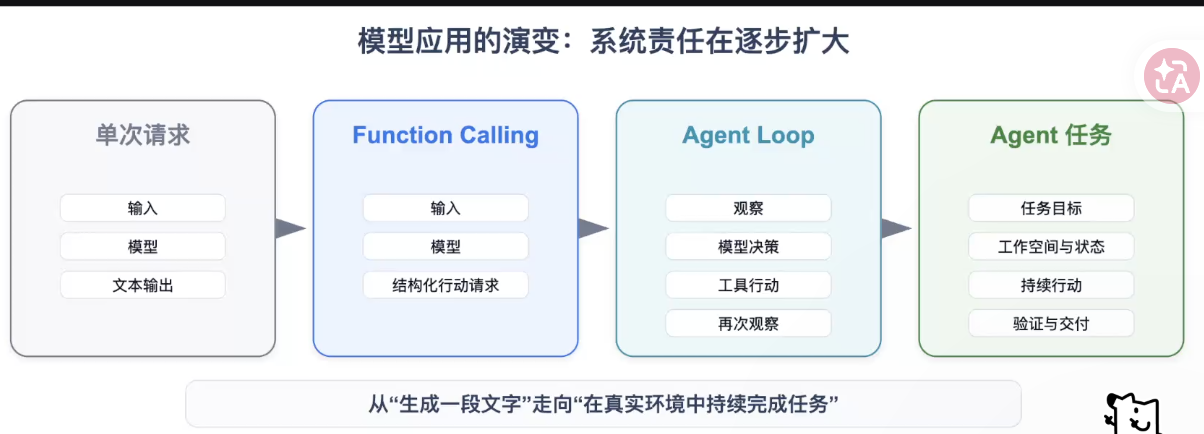

CoT=Chain of Thought:前置输入token块影响后置token的输出,Step by Step, 不要跳过中间的token块而输出后置输出token
agent 任务中的工作空间用来管理过程中的信息、状态。
下一步会发展到:长任务(问题:思考过程依赖前置内容所以容易产生误差,误差会被放大)、自演进(问题:)
Anthropic改进方法:
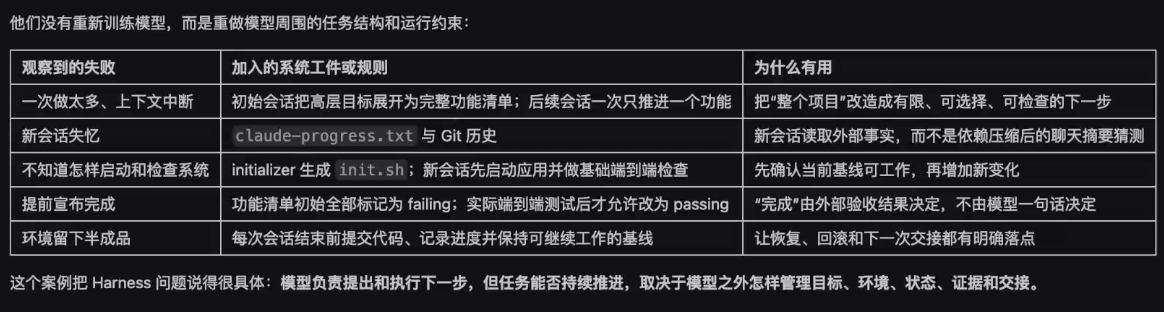

Harness Engineering的5种分析单位,严格说用户外层控制为Harness工程,
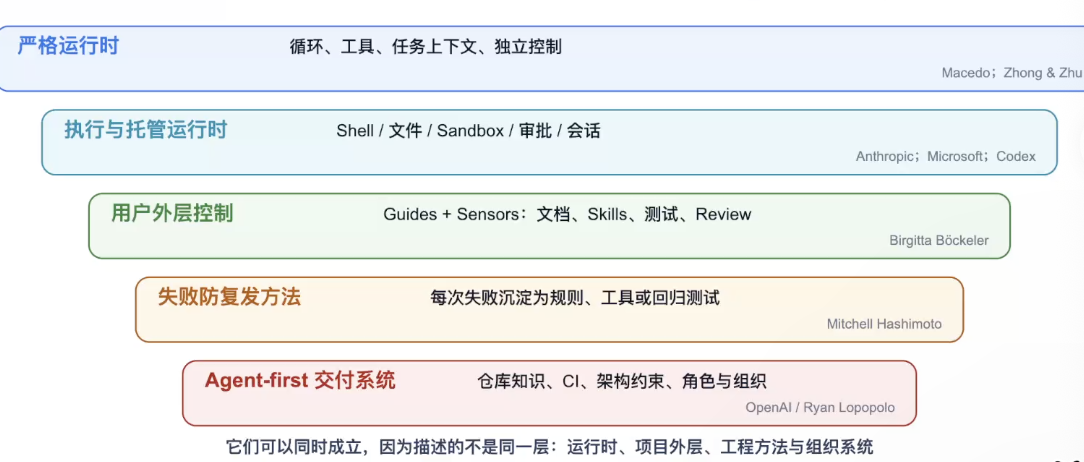

蓝色:系统层
绿色:
红色:组织架构层
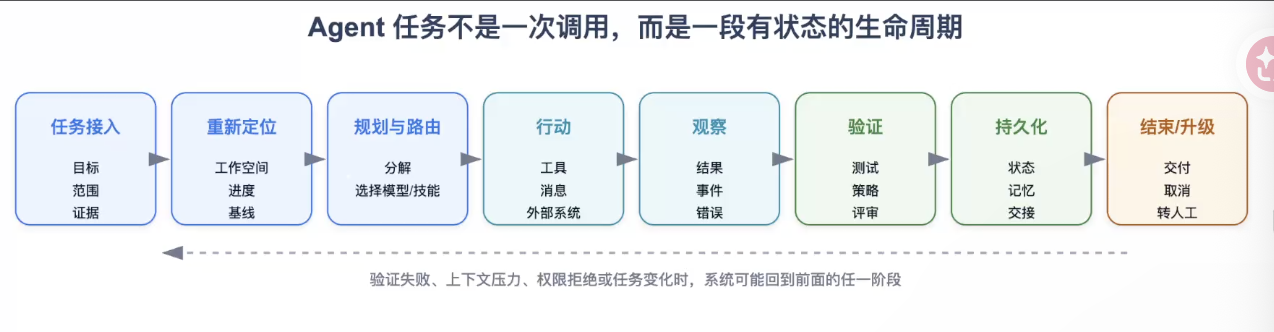
skills使用的策略是渐进式披露到模型中(不是一次全部输入到模型中,而是多次)。
skills在自己的agent中实现需要达到L3级别,L4和L5是企业落地,ci是持续集成。

系统层开发等级:
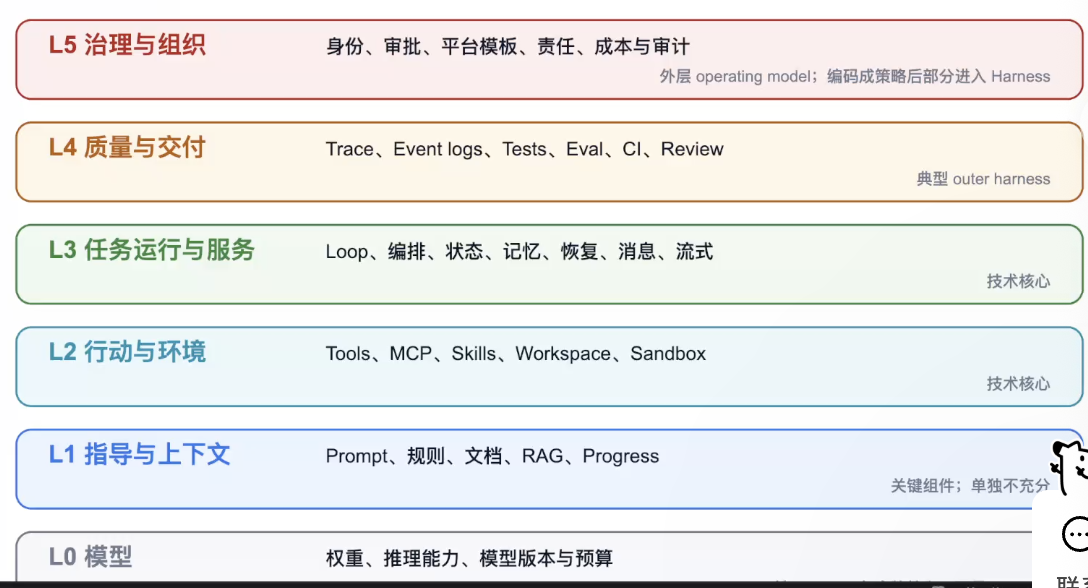
Harness不是prompt也不是Agent Loop
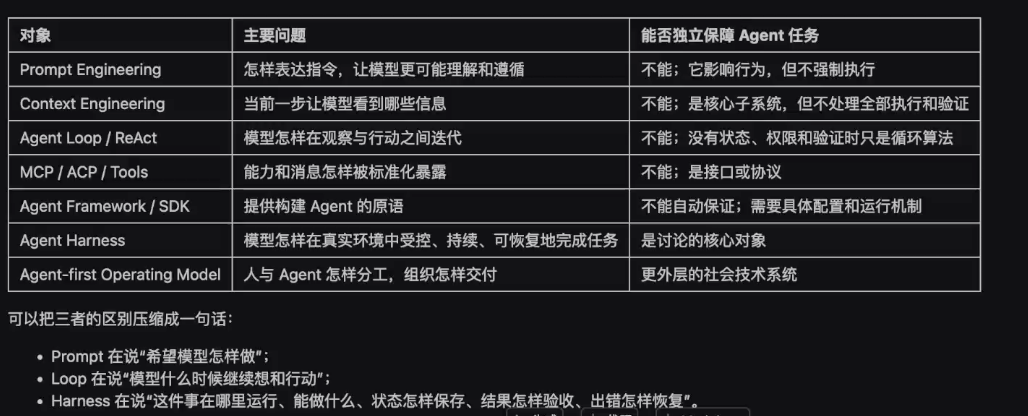
搭建类似Hermes Agent的自进化长期记忆

  • 模型本身没有记忆
  • 模型能够多轮对话,依赖我们给它提供上下文,最简单的方式是把所有的会话记录都传给它。
  • 模型可接受的上下文长度有限(历史会话+当前输入+最新输出)
    记忆系统四个动作 对比 RAG
  • RAG
    • 对话素材录入 (预处理)
      • 切块
      • 切块索引
      • 向量化
    • 向量知识库 (预处理)
    • 用户提问 (实时发生)
      • 问题转写
      • 向量化
      • 在知识库做向量匹配
      • 输出匹配的对话

        记忆系统
  • 写入
  • 修正
  • 遗忘
  • 召回

单用户|单项目|全局整个Agent
^
|
稳定规则层 (system prompt)
^
|
任务经验层(Todo list, plan) -------》 工作记忆
^
|
原事件层
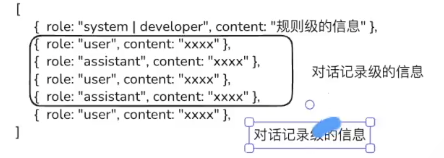

记忆压缩:

  • 对话结构化
    压缩的原理就是让LLM把对话拆分成若干结构字段的结构化输出,提纲挈领
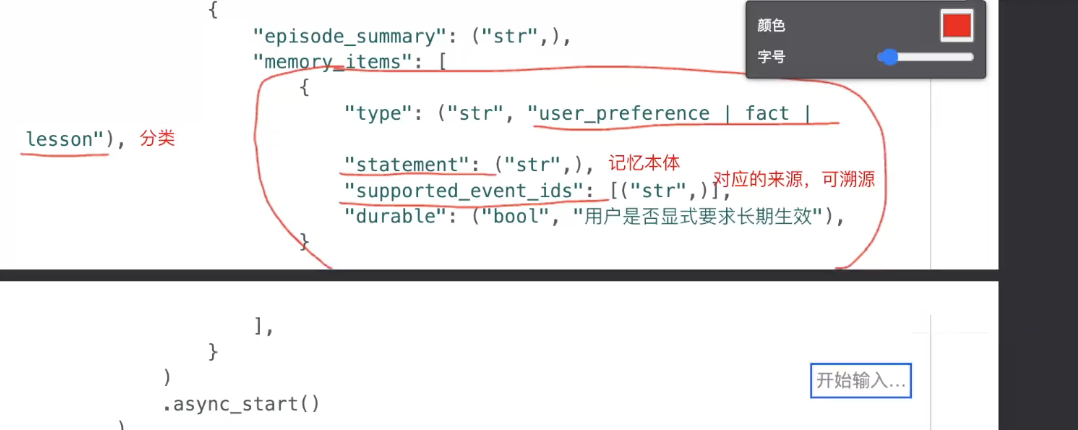
  • 分批次处理
  • 合并同类对话
    召回
    (03),(04),(05),(06),(07)是本次课的目录中的代码序号
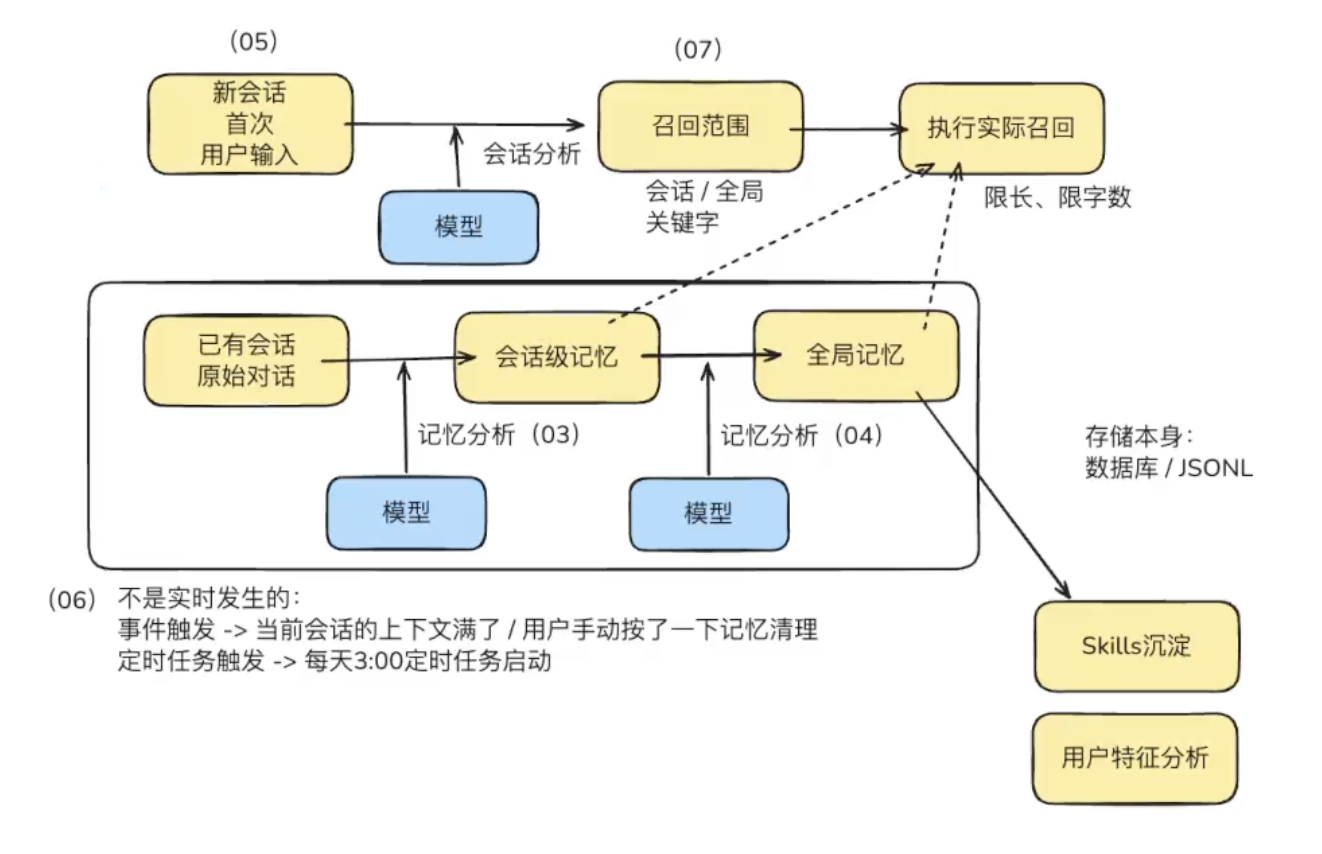

    存储方式:文件.jsonl/数据库
    已有对话处理流程不是实时发生:
  • 事件触发:当前会话的上下文满了/用户手动按了一下极易清理
  • 定时任务触发:每天3:00

实现Hermes中的多Agent协作、主Agent调度

目的:复杂任务下需要多个Agent协同工作完成。
难点:主Agent怎样调度子Agent,同时避免上下文污染。
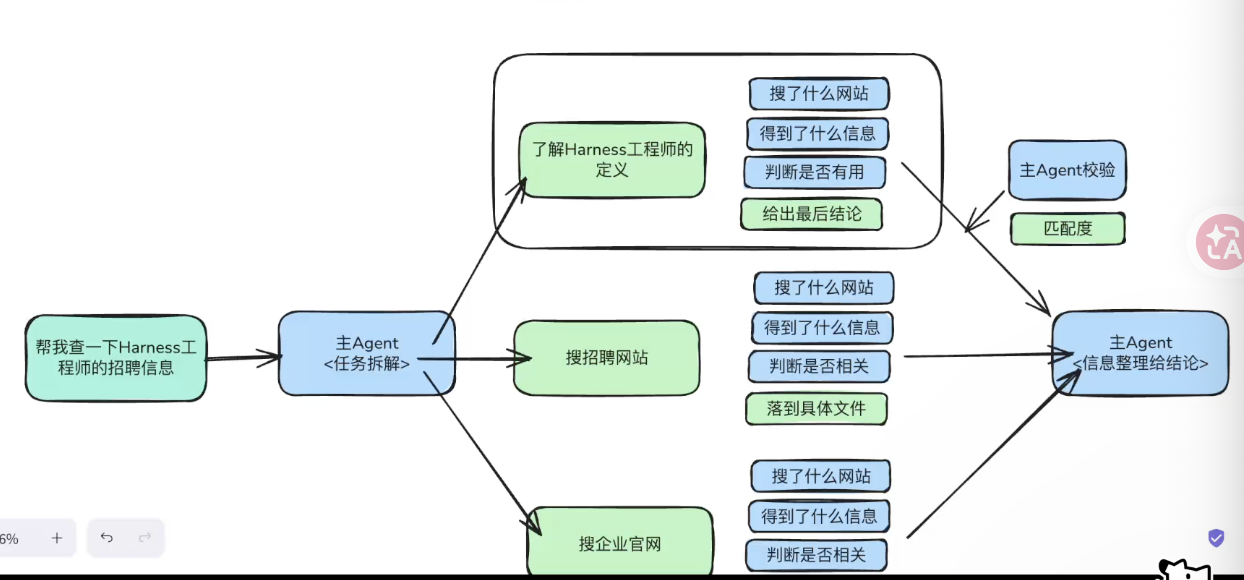

对主Agent来说各子任务的结论信息是有用的。即关心给子Agent的输入和返回的输出。
对子Agent来说各中间状态的过程信息是必要的,需要维护各个状态的信息,因为Agent不具备记忆性。
让主Agent处理的信息更少,让各子任务相互隔离。

一个Agent的基本结构:
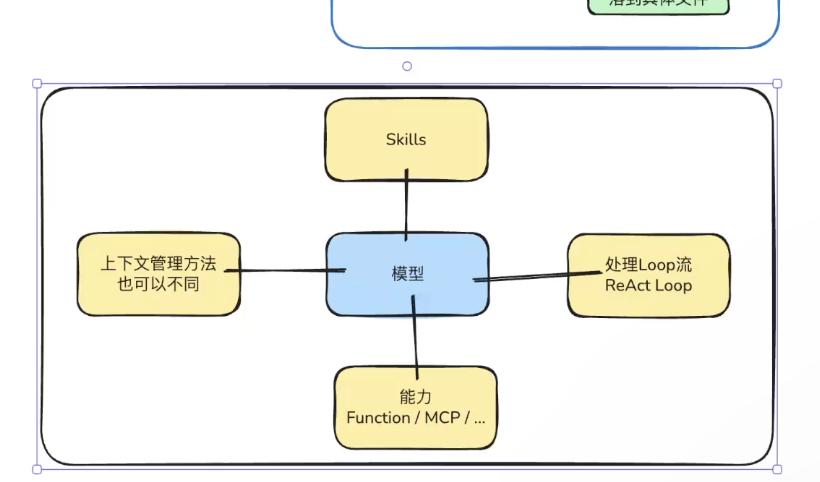
每个子Agent能力各有千秋:

  • Deep Research
  • Search

复杂任务时面临的问题:

解决的设计方式:

DAG: LangGraph的特点动态行动图(有向无环图)
主Agent关心:

  • 任务的拆解
  • 任务的分发(分发给哪个子Agent是根据子Agent的描述信息决定)
  • 任务的回收评价
  • 最终结论输出
    子Agent关心:
  • 任务的承接
  • 任务的执行
  • 任务的结果汇总
  • 任务的结果返回

ACP和A2A

ACP: Agent Client Protocol

ACP: 把本地Agent接成标准会话,主Agent分发时如何将任务传递给子Agent。
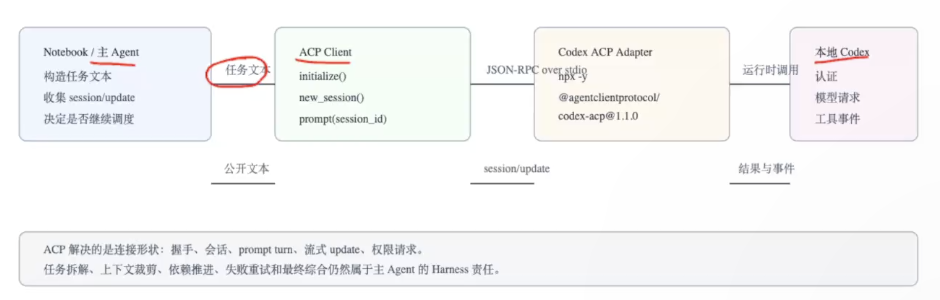
ACP Client:

  • 归一:使用方(主Agent)如何发出指令、回收结果
    ACP Adapter:
  • 归一:子Agent适配器来完成Client端收信息,把结果返回给Client。
  • 将发布端和适配端相互解开。

左侧负责对接,右侧负责业务


A2A

重量级ACP

企业级AI部署 从硬件选型到框架选择

Embedding模型

Embedding模型本质是LLM+池化层,大模型简化板。

LLM推理中的数据搬运

内存墙,将token运到显存中的过程限制计算速度,SRAM(静态随机存取存储器)HBM(高带宽内存)

  • 数据复用
  • 并行归约与协作计算
  • 结果聚合与缓存

AI服务核心:高并发原理与性能监控调优

高并发内存瓶颈

KV Cache提升效率,将上一轮计算使用的KV放入缓存,下一轮计算直接使用上一轮KV,以及计算本轮KV。

  • 瓶颈1:内部碎片(请求空间多了),外部碎片(请求内存不连续的区域)
  • 瓶颈2:动态长度导致
  • 瓶颈3:Copy-on-Decoding开销,例如beam search(每次搜索多个而不是一个)
    pageAttention:
    内存分成许多block,用block表管理和维护。每个block可存16个token。block表记录了block块的索引。
  • 按需分配:用多少token分配多少个block。
  • 写时复制:各样本公用一些块,同时每个样本有自己私有的块。
  • 动态重排:不需要连续空间,有离散空间也可以用。

vLLM架构详解

推测解码

传统解码:一个一个token输出
推测解码:小模型(Draft model)一次输出多个token,大模型(Target model)给生成的token打分,大于阈值接收否则修改,大模型对拒绝的token生成候选token然后思索后给出最终token。打分过程快,思索过程慢。

MEDUSA推理框架

像美杜莎多头一样,每次预测多个token。
贪心算法只顾当前节点得分最高,不管整个路径中的得分最高。
Beam search保留多个路径,找路径中得分最高的路径。
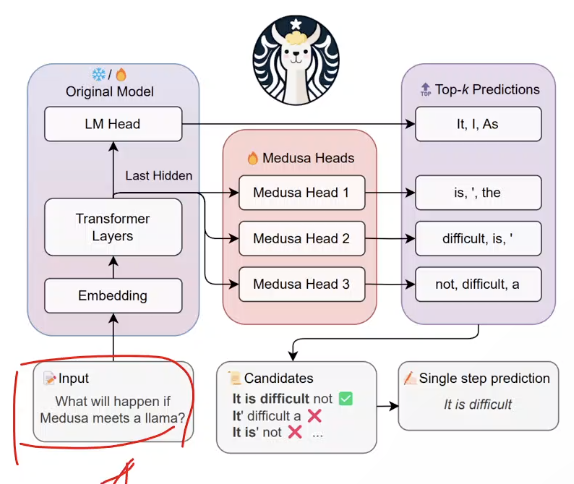
Typical acceptance: 概率接收,超参temperature。

不再需要Draft Model (小模型),不用大模型打分。

EAGLE推理框架

增加了特征提取层,提取token特征向量比直接用token ID有更好的预测。包含草稿阶段和大模型验证阶段。token vector + token ID共同预测。
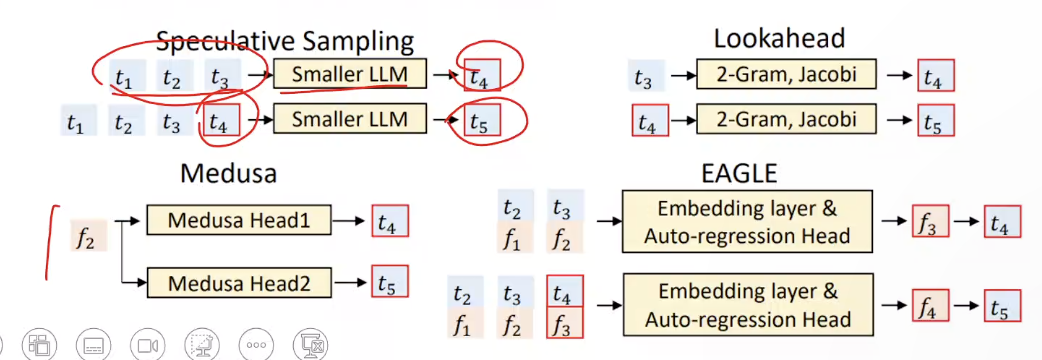
增大大模型接收的概率提升推理速度。

vLLM性能监控与调优

关键指标
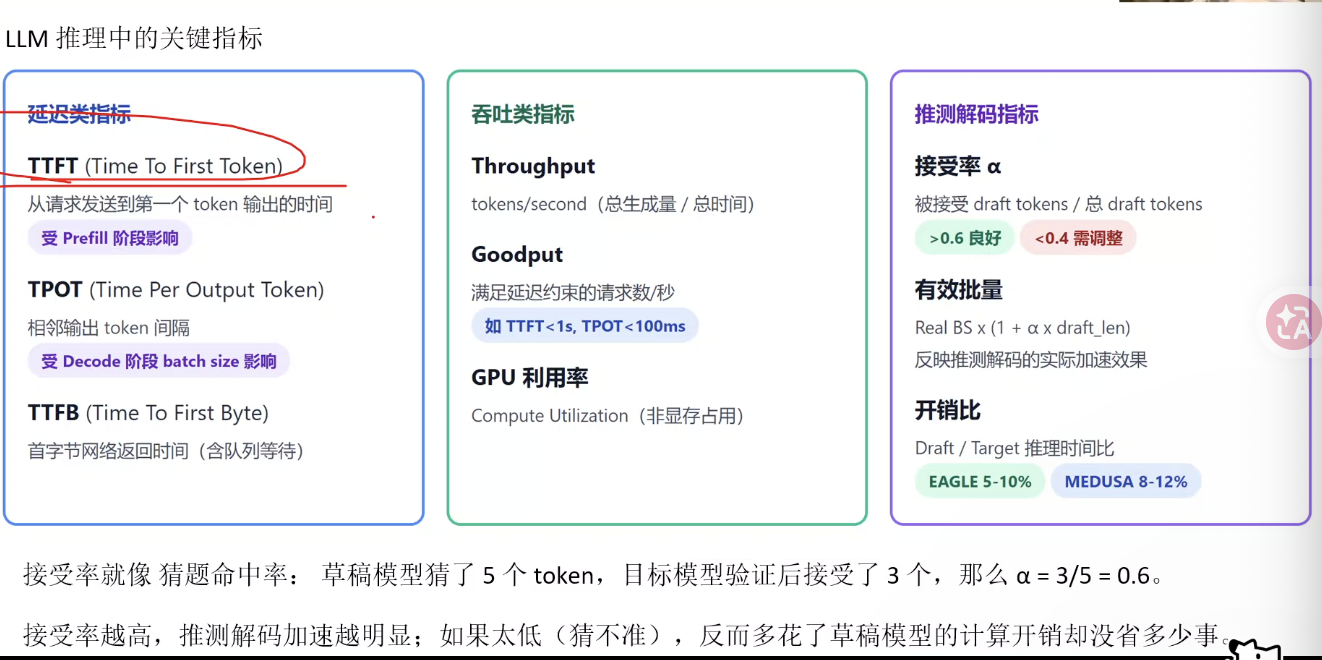
SGLang 深度优化:Radix 缓存与复杂任务的极致吞吐

SGLang和vLLM

vLLM: 解决模型如何跑得快

  • PageAttention(解决KV碎片)
  • Continuous Batching(解决GPU空闲)
  • 推测解码(加速Decode)

SGLang:处理业务逻辑

PD架构分离 – Prefill/Decode解耦

Prefill:模型处理用户输入(Prompt)阶段

  • 做什么:读入Prompt的问题/提示,计算token的KV Cache。
  • 计算特点:计算密集型–大量矩阵乘法,GPU算力是瓶颈
  • 关键指标:TTFT(Time to First Token)
  • 资源需求:高算力、高并行度
    Decode:模型生成答案(逐个吐字)阶段
  • 做什么:基于生成的内容,逐个预测下一个token(自回归生成–之前的历史token生成当前一个token)
  • 计算特点:内存带宽密集型:每一步只计算一个token,瓶颈在读取KV Cache,GPU计算单元大量空闲。
  • 关键指标:TPOT(Time Per Output Token)
  • 资源需求:大显存,高内存带宽

SGLang大模型底层语言,一种为LLM设计的结构化生成语言,用于简化和加速复杂语言模型程序的编程和执行。
前端:语言,基于python的大语言模型(包含对话信息)编程
后端:运行时

vLLM像是一个组件,启动大模型提供API服务,API调用
SGLang颗粒度更细,深入到语法层面

SGLang系统中的RadixAttention

一种用于高效重用LLM推理过程中的KV Cache的方法。

  • 基数树(Radix Tree):分节点(前缀)、分类存储KV值
  • LRU(最近最少使用)逐出策略:优先逐出最久未使用的缓存条目。
  • 缓存感知调度:合理调度编排提升缓存命中率,优先处理前缀匹配更长的请求。

    约束解码(Compressed FSM有限状态机)

短剧视频换脸
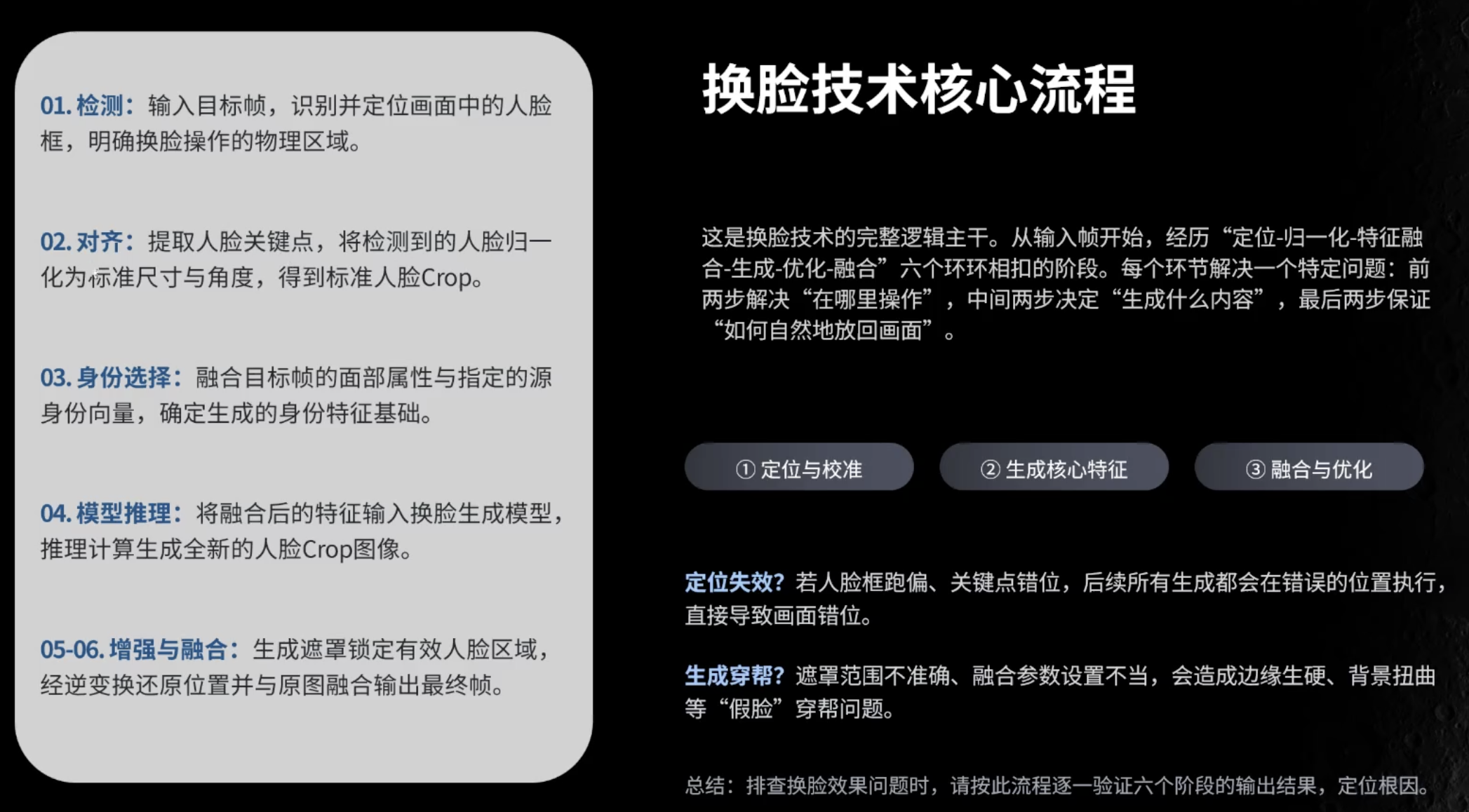
facefusion

LangChain:多任务应用开发

LangChain组件:

  • model:大模型
  • prompt:管理提示词
  • memory:保存上下文
  • index:结构化文档
  • chains:编排
  • agents:代理-观察-思考-行动